
Ask ten people how to scale a course website and nine of them will start talking about servers. Load balancers. Database sharding. Whether you’re on AWS or Google Cloud.
Here’s the thing: if you’re a course creator on a hosted platform, the server is almost never what gives. In the great majority of cases the things that actually bend as you grow are the ceilings written into your own subscription, the percentage your payment provider takes on every sale, the support questions arriving faster than you can answer them, and a course catalogue that stopped making sense to a stranger somewhere around course number twelve. None of those is a technical problem. All of them are fixable, and all of them are cheaper to fix early.
So this is the guide that actually matches the job. We’ll go through what breaks at each stage of growth, what to do about it, and what to ask your platform before you find out the hard way. And because some of you do run your own stack, the infrastructure layer is still here in full — just put where it belongs, which is after the things that will bite you first.
What “scaling a course website” actually means
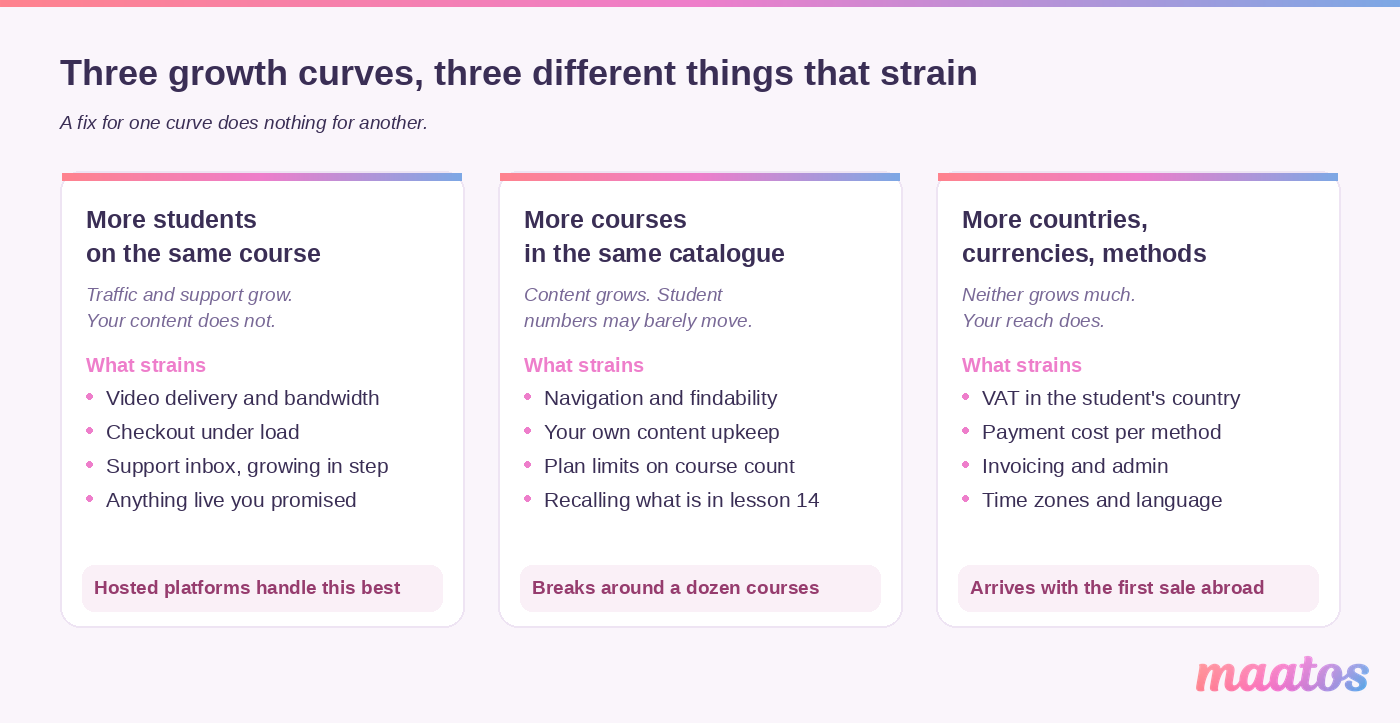
Scaling is not one curve. It’s three, they arrive in a different order for everybody, and each one strains something completely different. Being clear about which one you’re on saves you from fixing the wrong thing.
More students on the same course. Your traffic and your support inbox grow; your content doesn’t. This is the curve everyone pictures, and it’s the one hosted platforms handle best. What strains: video delivery, checkout, support load, and any live element you’ve promised.
More courses in the same catalogue. Your content grows; your student numbers might barely move. What strains: navigation and findability, your own content maintenance, plan limits on the number of courses, and your ability to remember what’s in lesson 14 of the course you recorded two years ago.
More countries, currencies and payment methods. Neither content nor students grow dramatically — your reach does. What strains: VAT, payment costs, invoicing, time zones for anything live, and language.
Most creators hit these in the order above, but not always. A consultant who sells one €2,000 programme to twenty companies is on curve three long before curve one. Keep the distinction in your head as you read, because a fix for one curve does nothing for another — and I’ll flag which curve each section belongs to.
The ceilings nobody puts in the brochure
Every course platform has limits that only appear once you grow, and they are almost never on the marketing page. This is the single most useful thing to sort out before anything else, because a ceiling doesn’t degrade gracefully — you’re fine, and then one day you’re not.
There are four ceilings worth knowing about on any platform, including ours:
How many courses can you publish? Course caps are the most common ceiling and the easiest to trip. On Maatos the plans allow up to 3 courses on Basic, up to 15 on Premium, and unlimited on Complete. Note what that does to the cost per course: a full Basic plan works out at €16.33 per course per month, while a full Premium plan is €6.60. If you’re planning to split one big course into a ladder of smaller ones, the bigger plan is often cheaper per unit of what you sell.
How much content can a single course hold? Maatos applies a fair-use policy rather than a hard wall: around 200 lessons per course, including 200 or more videos, is considered reasonable. Past that there’s no gate that slams shut, but a higher plan is the honest recommendation so the site stays quick. Video storage itself is unlimited on every plan, and there is no cap on student numbers.
How many active users before the conversation changes? This is the number almost nobody publishes. Ours is in the pricing FAQ: above 5,000 active monthly users, Maatos gets in touch to discuss the available options. That’s not a threat, it’s a capacity conversation — but knowing the figure means you can see it coming a quarter out instead of getting an email about it.
What’s gated behind a higher tier? Not a capacity limit, but it behaves like one. Subscriptions, payment in instalments, the integration for live and in-person courses, the booking calendar and pop-ups start at Premium. The affiliate system, sales funnels, optimised checkout pages, order bumps, A/B testing, upsells and custom thank-you pages are Complete only. If your scaling plan is “add a subscription tier”, the plan you’re on decides whether that’s a Tuesday afternoon or a migration.
Ask any platform you’re considering all four questions in writing. If you can’t get a straight number for active users or storage, that’s your answer about what happens when you grow. Ours are above, and if your situation doesn’t fit any of them neatly, just ask us — an awkward answer given early is worth more than a tidy one given late.
Your platform fee shrinks as you grow. Your payment fees don’t.
(Curves one and three.) This is the arithmetic nobody in this corner of the internet wants to publish, and it’s the most valuable paragraph in this article.
A fixed monthly platform fee gets proportionally cheaper every month you grow. Maatos Complete at €199 is roughly 10% of revenue if you’re selling €2,000 a month, 2% at €10,000, and 1% at €20,000. The fee didn’t move; you did. That’s how a flat fee is supposed to behave, and it’s the main argument for one.
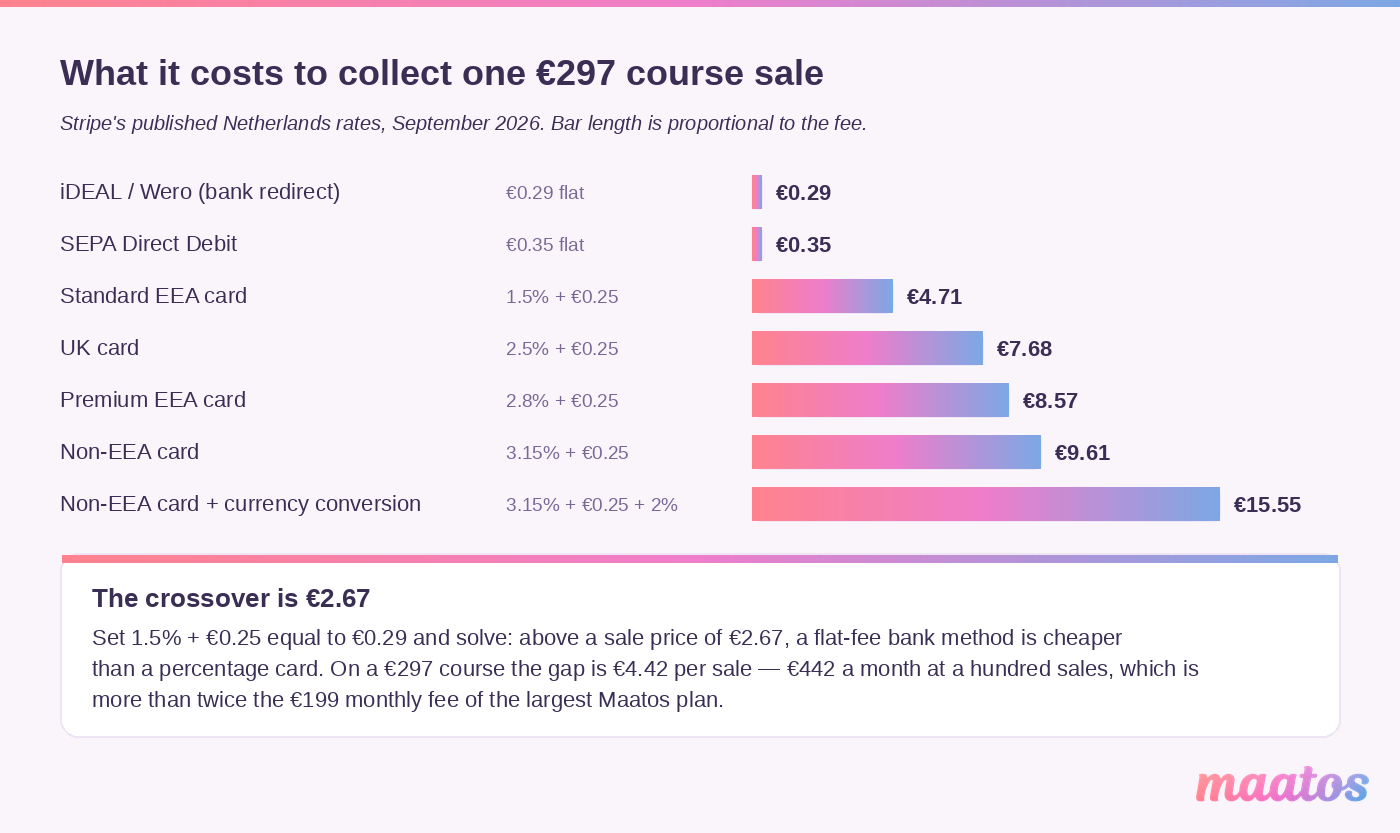
Your payment provider’s cut does the exact opposite. It’s a percentage, so it scales precisely in step with you, forever. And the spread between payment methods is much wider than people realise. Taking Stripe’s own published Netherlands pricing as the example, here’s what it costs to collect one €297 course sale:
| How the student pays | The fee | On a €297 sale |
|---|---|---|
| iDEAL / Wero (bank redirect) | €0.29 flat | €0.29 |
| SEPA Direct Debit | €0.35 flat | €0.35 |
| Standard EEA card | 1.5% + €0.25 | €4.71 |
| Premium EEA card | 2.8% + €0.25 | €8.57 |
| UK card | 2.5% + €0.25 | €7.68 |
| Non-EEA card | 3.15% + €0.25 | €9.61 |
| Non-EEA card needing currency conversion | 3.15% + €0.25 + 2% | €15.55 |
The same sale, for the same course, costs anywhere between 29 cents and €15.55 depending purely on which button the buyer clicks. That’s a 54-fold spread, and it’s invisible on your revenue line because the money arrives net.
Two things follow from that table.
First, flat-fee methods beat percentage cards above about €2.67. Set 1.5% + €0.25 equal to €0.29 and solve: the crossover is €2.67. Every course you sell above the price of a coffee is cheaper to collect by bank redirect than by card. On that €297 course the gap is €4.42 a sale — at a hundred sales a month, €442, which is more than twice what the Complete plan costs. If most of your students are in a country with a dominant bank method (iDEAL in the Netherlands, Bancontact in Belgium at €0.35 flat, Blik in Poland, Swish in Sweden), switching them on is the highest-return twenty minutes available to you. Maatos connects to both Stripe and Mollie and you get paid directly, so this is your decision to make, not ours.
Second, recurring revenue is where percentages really hurt. A €49 monthly subscription collected by standard card costs €0.99 a month; by SEPA Direct Debit, €0.35. Over a year, per student, that’s €11.82 against €4.20. Multiply by a few hundred members and the choice of debit method is a line item.
One honest caveat so this doesn’t read as a trick: bank redirects and direct debits don’t work everywhere, can be slower to settle, and some students simply prefer cards. Offer both; just don’t be surprised by what cards cost. And since the fee is a percentage, your pricing model decides how much of it you feel — a single €297 payment carries one fixed charge, while the same €297 split into six instalments carries six. If you want the deeper version of this argument, we wrote about keeping your platform costs off a commission model and about setting Stripe up without the usual pitfalls.
Do you actually need to think about infrastructure?
(Curve one.) Mostly, no — and knowing why is worth more than knowing what sharding is.
If someone else hosts your course site, the entire layer below is being done on your behalf, and you get none of the levers. On Maatos, hosting is included in every plan and larger media files sit on a separate secured video server built to resist downloading. Your infrastructure decision, in that case, is which plan and which provider — not which database topology. If you’re still weighing that up, start with hosting basics for course websites and the open-source versus SaaS comparison.
If you do run your own stack — self-hosted WordPress, a custom build, an open-source LMS on your own server — then this is your job, and here is what it involves. It’s also worth being realistic about the skills building a course website actually takes before you commit to owning this layer.
Why scalable infrastructure matters at all
Three pressures make a course site outgrow a fixed server. Traffic spikes: a launch, a webinar or a bit of press puts a month of visitors on your site in an afternoon. Content growth: every video, quiz and PDF you add asks more of storage, bandwidth and the database. Expectations: learners abandon a slow page, and they’re much less forgiving inside a course they’ve paid for than on a blog.
Cloud hosting and dynamic resource allocation
Elastic hosting from Amazon Web Services, Google Cloud Platform or Microsoft Azure means you pay for what you use, capacity grows and shrinks with real demand, and distributed data centres reduce the risk of one outage taking you offline. The practical benefit is that a launch spike doesn’t require you to be awake. The practical cost is that you now own a cloud bill that varies, and cloud bills surprise people. If that’s not a job you want, our done-for-you service and other services exist precisely so it isn’t your job.
Load balancing
A load balancer spreads incoming requests across several servers so no single machine drowns. You get better responsiveness because requests don’t queue behind one another, better uptime because traffic reroutes automatically when a server fails, and easier maintenance because you can update one machine while the others serve. Without one, a single busy evening can take the whole site down.
Content delivery networks
A CDN caches your static files — images, video, stylesheets, scripts — on servers physically closer to each learner. Pages load faster regardless of where someone is, your origin server carries less traffic, and you get some resilience against both spikes and denial-of-service attempts. Once your students are spread across continents this stops being optional: physics is not negotiable, and a video served from Frankfurt to Sydney will always be slower than one served from Sydney.
Database sharding and replication
Databases, not web servers, are usually the first real bottleneck on a busy course site. Two techniques address it. Sharding splits the database horizontally into pieces, each holding a subset of users or courses, so no single instance answers every query. Replication keeps synchronised copies and sends read-heavy work — fetching lesson content, checking progress — to the replicas, leaving the primary free for writes. Both also improve fault tolerance, because losing one instance stops being the same as losing everything.
If you read those two paragraphs and thought I never want to think about this again, that reaction is legitimate and it is the actual argument for a managed platform. The infrastructure work doesn’t disappear; it just stops being yours.
Is your site actually fast, and how would you know?
(Curve one.) Performance is the one technical thing you should keep an eye on whoever hosts your site, because it’s measurable from the outside and it affects both learners and search.
Google’s Core Web Vitals give you the thresholds to aim at, measured at the 75th percentile of real page loads, split between mobile and desktop: Largest Contentful Paint within 2.5 seconds, Interaction to Next Paint of 200 milliseconds or less, and Cumulative Layout Shift of 0.1 or under. The 75th percentile matters more than it sounds — it means a quarter of your visitors can be having a worse time than your average suggests, which is exactly the group that leaves.
Beyond those three, the numbers worth watching as you grow are page load time, server response time, error rates (404s and 500s both mean something is broken for somebody), how many people are on the site at once, how long your slowest database queries take, and how much of your CPU, memory and bandwidth you’re actually using.
For tools, Google Lighthouse and PageSpeed Insights cost nothing and cover the front end. If you self-host, application performance monitoring — New Relic, Datadog, AppDynamics and the like — gives you the backend picture, server logs show error spikes and unusual traffic, and synthetic monitoring walks through a signup or a lesson on a schedule so you hear about a break before a student does. Set alerts on the thresholds that matter rather than watching dashboards; the point is to be told, not to look.
When the data points somewhere, the fixes are fairly predictable: scale cloud resources with demand instead of guessing, index the fields your slow queries filter on, archive old data, cache at every level you can (browser, CDN, server-side), and put the CDN in front of your heaviest assets. One course-specific note: video is almost always the heaviest thing on the page, so before you optimise anything clever, check that you’re not loading a 4K hero video on a phone. Recording sensibly in the first place helps more than any caching layer — see video and audio quality for courses and the case for shorter lessons over long videos.
Can you still manage your content once there’s a lot of it?
(Curve two.) The thing that breaks here is not your editor. It’s your own memory.
At three courses you know where everything is. At twenty you don’t, and the cost shows up as lessons that contradict each other, a price mentioned in a video you can’t find, and a link to a tool that shut down last year. The fix is boring and it works: name things consistently, keep one document that lists every course and what’s in it, and audit on a schedule instead of when a student complains. We’ve written up a maintenance rhythm for course websites that’s worth stealing.
What your content management needs to do as the catalogue grows:
Let you update things fast. Expanding catalogues need constant small edits — a new module, a corrected slide, an outdated screenshot. A system that makes each edit a small project quietly stops you making them.
Hold up under load. More courses means more data and more simultaneous interaction. Editing shouldn’t get slower as you succeed.
Cope with more than one person. Sooner or later someone helps you — an editor, a co-instructor, a VA. Concurrent editing without people overwriting each other stops being a nice-to-have.
It also has to handle every content type you actually teach with: video lectures that need proper hosting and embedding, PDFs and documents for supplementary reading, interactive quizzes and assignments, and audio, slides or infographics for the people who learn differently. On Maatos all of those live in the same editor, and a drag-and-drop builder means adding and rearranging them doesn’t involve code — which matters less on day one than it does the fifteenth time you restructure a module. The same drag-and-drop approach covers the website itself, not just the course.
Does your catalogue still make sense to a stranger?
(Curve two.) Around a dozen courses, something specific happens: the page that lists them stops being a list and becomes a wall. Your returning students are fine — they know what they bought. A newcomer bounces.
Navigation. Group courses by something a stranger recognises — topic, level, or the outcome they want — rather than by the order you happened to make them. Keep breadcrumbs so people know where they are, keep your menu in the same place on every page, and collapse long sections rather than showing everything at once. Our piece on why course website navigation matters goes deeper, and the pages every course website needs covers the skeleton.
Search. Once browsing takes more than a few seconds, search becomes the fastest route to a sale. Useful search means filters that match how people choose (length, format, level, topic), autocomplete that nudges vague queries toward real ones, sensible ranking, and an index that updates when you publish. Here’s the honest bit: Maatos gives you categories, a drag-and-drop site builder and Yoast for search visibility, but it does not ship a faceted course-catalogue search engine. At the scale most creators operate, clear categories and a good overview page genuinely outperform a search box nobody uses — but if you’re heading for fifty courses, ask us about it early rather than assuming.
Mobile. More of your learners are on a phone than you think, and the gap widens as your audience broadens. That means touch targets sized for thumbs, video that doesn’t burn a data plan, layouts that drop the decoration on small screens, and pages light enough to load on a train. We have two pieces on this: mobile-friendly course websites and mobile-friendly design.
Testing, not guessing. A/B test layouts when you have the traffic to make it meaningful, use heatmaps to see where people stall, run session recordings when a funnel leaks, and ask. Actually asking is the cheapest of the four — these 22 questions for getting usable feedback will tell you more in a week than a month of dashboards.
Security and data as more people trust you with theirs
(Curve one.) Growth changes your security position in a way that’s easy to miss: the value of breaking in goes up. Two hundred students’ names, emails and payment history is a target in a way that twenty isn’t.
Protecting the data itself. Store personal data encrypted, keep internal access to the people who genuinely need it, and keep software and plugins patched — unpatched known vulnerabilities remain the most common way small sites get compromised, not clever new attacks.
Authentication. Username and password alone stopped being enough a long time ago, mostly because of credential stuffing: attackers reuse passwords leaked elsewhere. Offer multi-factor authentication, require complexity without demanding monthly rotation that pushes people to sticky notes, and watch for the obvious patterns — a burst of failed logins, one account signing in from three countries in an hour.
Encryption in transit and at rest. TLS on everything, so nothing travels in the clear. Encrypted databases and backups, so a lost disk isn’t a disclosure. Current algorithms rather than whatever was fine in 2012.
There’s a split in responsibility here that’s worth being explicit about, because “the platform handles security” is how people end up surprised. Maatos is GDPR compliant on its side, with data processing agreements you accept when your site is created and data stored on European servers. What stays yours: who you give access to, what you do with your students’ data, and whether you actually have a copy of your own materials. More detail in security essentials for course websites and on building trust on a course website.
Every integration is a thing that can break
(Curves one and three.) Integrations are how a small platform does big things, and how a stable site becomes fragile. Both are true, and the trade is usually worth making — with a list.
Things worth connecting as you grow: live sessions through Zoom, Microsoft Teams or Google Meet, for cohorts and Q&As; discussion through a dedicated forum tool such as Discourse if you outgrow what’s built in; assessment apps that report progress back to your site rather than living in a silo; and video hosting on Vimeo or YouTube when you want their player and bandwidth while keeping control of access. On the money side, Maatos connects to Stripe and Mollie, so students can pay by card, Apple Pay, Google Pay and the local methods that dominate their own country — which, as the fee table above shows, is a revenue decision and not just a convenience one. Maatos also syncs with Klaviyo, Mailchimp and ActiveCampaign so your student list stays current without exports, and with Google Analytics and Search Console for traffic data. One constraint to know: custom plugins are only possible on a Custom environment combined with the Complete plan.
The discipline that keeps this from turning into a mess: write down every integration, what it does, who owns the account, and what breaks if it disappears. Review it twice a year. Tools get acquired, APIs change, free tiers close. An integration you forgot you had is the one that fails during a launch. On email specifically, keeping deliverability intact while you integrate is worth reading before you connect anything to your list.
Offering more formats without multiplying your workload
(Curves one and two.) A bigger audience is a more varied audience, and formats are how you serve variety. The catch is that formats have wildly different scaling behaviour, which is the part that gets skipped.
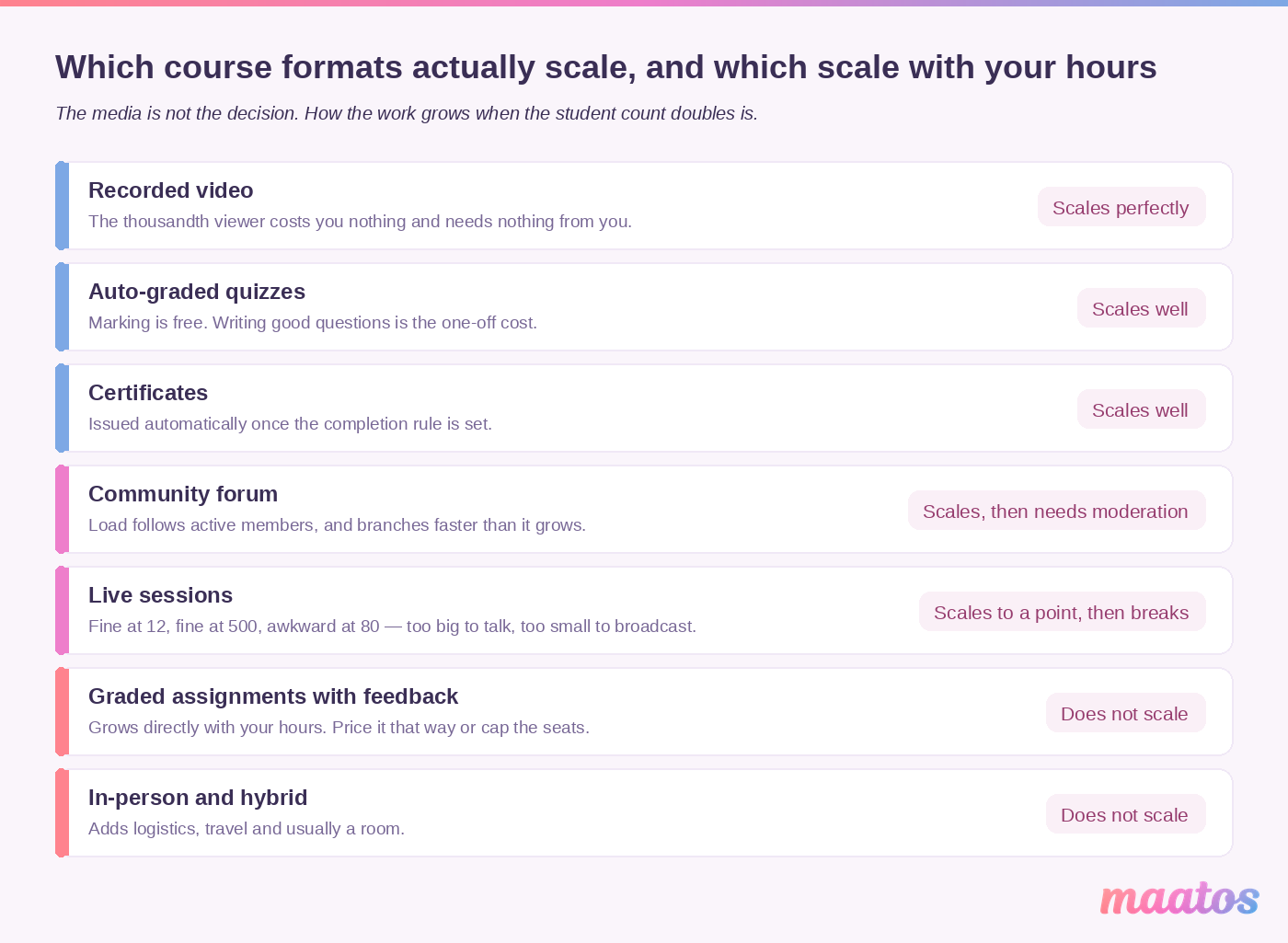
Recorded video scales almost perfectly: the thousandth viewer costs you nothing extra and needs nothing from you. Quizzes and assessments scale well when they’re auto-graded, and become a job the moment they aren’t. Assignments with real feedback do not scale at all — they scale with your hours, which is fine if you price them accordingly and disastrous if you don’t. Live sessions scale to a point and then break: the same webinar works for 12 people and for 500, but not for 80, where it’s too big for conversation and too small to be a broadcast. Hybrid and in-person adds logistics, and often a room.
On Maatos, quizzes, certificates and multimedia lessons are available on every plan; the integration for live and in-person courses and the appointment calendar start at Premium. Mixing online with offline is a genuinely good move for some topics, and we’ve written about selling offline workshops from your course website.
The real format decision at scale isn’t which media to use — it’s drip, cohort or self-paced. Cohorts produce better completion and better testimonials and cap your growth at the number of cohorts you can personally run. Self-paced scales indefinitely and needs you to design the motivation in, because nobody is waiting for you on Thursday. Most creators who scale successfully end up running a self-paced core with a small premium cohort on top, which is the same shape as a product ladder.
Community: brilliant, and not free
(Curve one.) Community turns a content library into a place people come back to. Motivation goes up through simple social accountability, knowledge sticks better when people explain it to each other, students build networks that outlast the course, and they practise the soft skills — communication, teamwork, giving critique — that no video teaches.
The tools that do this work are a discussion space where questions and answers accumulate, peer feedback on each other’s work, and the occasional group project for topics where collaboration is the point. On Maatos, the built-in forum is the piece that ships: participants ask questions, discuss and learn from each other in your own environment. Structured peer review and group-project workflows aren’t Maatos features — if your teaching depends on them you’ll want a dedicated tool alongside, and that’s a straight answer rather than a hedge.
Here’s the cost nobody mentions. Moderation load grows with the number of active members, not registered ones, and it grows faster than linearly because conversations branch. A forum with fifty active members is a pleasure. The same forum at five hundred, unmoderated, becomes unanswered questions in public — which is worse for your reputation than having no forum at all. Before you scale a community: decide who moderates, decide your response-time promise and make it modest enough to keep, and seed the norms early because the culture of the first fifty members is the culture you get. Community or no community walks through the decision honestly, including the case for not having one.
Using your data instead of collecting it
(Curves one and two.) Analytics at scale is worth exactly as much as the decisions you make with it, which is usually less than the dashboard implies.
Watch progress to catch people before they drift. Completed modules, quiz scores, submissions — plus the early warnings, which are missed deadlines and repeated low scores. On Maatos this lives in student management: one overview of all participants where you can track progress, see where students get stuck, and answer them directly. Worth being precise, because the original version of this article wasn’t: that’s a progress and student overview, not an analytics product. For proper traffic and funnel numbers you connect Google Analytics and Search Console, which Maatos supports.
Watch engagement to fix the content. Completion rates tell you something happened; engagement tells you where. Find the drop-off points in individual videos, see which sections people re-read or abandon, and check whether your forum is a conversation or a graveyard. Then change the thing: shorten the dense module, split the 40-minute lecture, add the worked example people keep asking for.
Close the loop or don’t bother. Set a measurable goal (“lift the module-three completion rate by ten points”), make one change, measure it, keep or revert. Two of our pieces go deeper: the analytics you actually need for a course website and an analytics dashboard for course creators, plus the engagement metrics that matter for choosing what to watch. And keep asking humans — no amount of data analysis surfaces what 22 well-chosen questions will.
Support: the one that scales linearly unless you intervene
(Curve one.) Do the arithmetic once and you’ll never ignore this again. If one in twenty students emails you and each email costs ten minutes of your attention, then 100 students is under an hour a month and 2,000 students is sixteen hours — two working days, every month, on questions. The ratio didn’t change. That’s the whole problem.
There are only three real moves, and they work in this order.
Remove the cause. Every repeated question is a design defect somewhere: a confusing checkout, a lesson that assumes a step you never explained, an email that doesn’t say what to do next. Fixing the cause removes the ticket permanently, which nothing else does. Reducing support tickets with better UX is the highest-leverage reading in this whole article, along with checkout optimisation quick wins and a proper onboarding email sequence, which prevents a surprising share of week-one questions.
Answer it once, publicly. Drafting all that material is a genuine slog, and it’s one of the few jobs AI is straightforwardly good at — the same approach behind our ChatGPT prompts for building a course works here: paste in a dozen real student emails and ask for the grouped questions behind them, then write the answers yourself. A well-organised FAQ and a set of self-help resources let people solve their own problem at 11pm. Group questions by the way people experience them — getting in, paying, access, technical — update it whenever you ship something or see a new pattern three times, and include short videos where showing beats telling.
Then automate the remainder. Chatbots and canned replies handle the genuinely repetitive stuff instantly, around the clock, across time zones, and escalate what they can’t. Two conditions: the escalation path has to be real, and the bot must never pretend to be you. An automated reply that feels like a wall is worse than a slow human one. Keep the human path for anything that needs judgement, route complex cases quickly, and let what the bot sees tell you what to fix upstream — that’s the loop closing back to move one.
Make sure people can reach you the way they already communicate — web chat, email, and the same experience on a phone as on a laptop — and keep every channel in one place so nothing falls between them. On Maatos, support is included with every plan, and if you want hands-on help with your course, strategy or marketing beyond that, extra assistance runs at €60 an hour excluding VAT.
Crossing a border is a scaling event
(Curve three.) The first sale to a student in another country is a growth milestone and a compliance one, and the second half tends to arrive as a surprise.
Selling a self-paced, automated course to a private individual in another EU country generally makes you liable for VAT at their country’s rate, not yours — and the rates vary by more than ten points across the Union, which quietly changes what you keep from an identical sale. Teacher-led live sessions follow different rules again. We’ve put the whole picture, country by country, in VAT and online courses in the European Union, and there are dedicated pages for the UK and for individual member states. On the platform side, Maatos calculates VAT automatically and sends invoices to your customers without extra work from you — but as the pricing FAQ says plainly, you are the seller, so knowing what you must charge remains yours. Don’t discover this in an audit.
Two related things arrive with the same border crossing: payment methods (see the fee table — a Dutch student paying by iDEAL and an American paying by card are not equivalent transactions) and language. Maatos can run your courses in multiple languages with an English interface, and a fully bilingual website is possible with a one-time fee that moves you to the Complete plan.
The resource that doesn’t scale is you
(All three curves.) Everything above assumes the bottleneck is technical. Usually it isn’t. Usually it’s that the same person records the videos, answers the emails, writes the newsletter, fixes the landing page and does the VAT return — and that person now has twice the students and the same number of Tuesdays.
The honest question isn’t “how do I do more?” but “what stops being mine?” Ranked by how much time they give back per hour invested:
- Anything repeated word for word. Onboarding emails, access instructions, invoices. Automate these first; they pay back immediately and permanently.
- Anything with a deadline you didn’t choose. Payment reminders, certificate issuing, cohort start emails.
- Anything you’re bad at and don’t enjoy. For most creators that’s design and setup. Our done-for-you service exists for exactly this, and our services page lists the smaller jobs with honest hour estimates — a lead magnet in about an hour, a landing page in one to three, a custom checkout page in two to four.
- Nothing else. Don’t delegate teaching, and don’t delegate reading your own student feedback. Those two are the business.
You can see what this looks like when it’s working on our projects page — real client sites, most built with a hand from us at the start and run by their owners since. That’s the shape of a course website that scaled: the owner still teaches, and no longer maintains.
Frequently asked questions
How many students can a course website handle?
On a managed platform, more than you’re likely to have — student numbers are rarely the limit. On Maatos there’s no cap on students, though above 5,000 active monthly users we’ll get in touch to discuss capacity. If you self-host, the honest answer is “as many as your slowest database query allows”, which is why the hosting choice matters more than the student count.
What breaks first when a course website grows?
Almost always your support load and your catalogue’s navigation, not your servers. Support scales in direct proportion to student numbers unless you remove the causes of tickets, and a course list stops working for newcomers somewhere around a dozen courses.
Do I need to worry about servers, load balancing and CDNs?
Only if you host the site yourself. On a managed platform those are handled for you and you can’t change them anyway — your equivalent decisions are which plan you’re on and which provider you trust. If you self-host, all three become your responsibility, along with the monitoring that tells you when one has failed.
How much does it cost to scale a course website?
The platform fee is the part that gets cheaper relative to revenue as you grow, because it’s fixed. The part that grows with you is your payment provider’s percentage — between €0.29 and €15.55 on a single €297 sale, depending entirely on how the student pays. Optimising payment methods is usually the largest saving available to a growing creator.
Is a flat monthly fee cheaper than a revenue share?
Above a fairly low revenue threshold, yes, and the gap widens every month you grow — that’s the arithmetic of a fixed number divided by a rising one. Below that threshold a revenue share can be cheaper, which is exactly why platforms that charge one talk about how it “grows with you”.
How many courses should I publish before upgrading my plan?
Watch the cost per course rather than the headline price. A full Basic plan at three courses is €16.33 per course per month; a full Premium plan at fifteen is €6.60. If your growth plan involves splitting one big course into several smaller ones, upgrading is often cheaper per unit than staying put.
Should I move to self-paced courses to scale?
Self-paced scales indefinitely and cohorts don’t — but cohorts produce better completion rates and better testimonials, which is what brings the next students. Most creators who scale well run a self-paced core with a small, higher-priced cohort or coaching tier on top.
How do I keep support manageable as student numbers grow?
In this order: remove the causes of repeated questions, answer the rest once in public where people can find them, then automate what’s left. Adding support capacity without doing the first two just means paying more for the same tickets.
What happens to my courses if I leave my platform?
Ask this before you need the answer — being able to leave is the only real insurance a growing creator has. On Maatos, cancelling ends access and your environment goes into quarantine before it’s removed, which means your materials are eventually deleted, so keep your own copies of videos and source files somewhere separate. That’s true of most platforms; the difference is whether they tell you. If you’re weighing a move, taking your course to your own platform covers what to export and in what order, and the long-term benefits of owning your course website covers why the question matters at all.
When does selling abroad become complicated?
At the first sale to a consumer in another country. For automated courses sold to private individuals in the EU, VAT generally follows the student’s country rather than yours, and rates differ by more than ten percentage points across the Union. The platform can calculate and invoice it; deciding what you owe stays with you, because you’re the seller.
Where to start
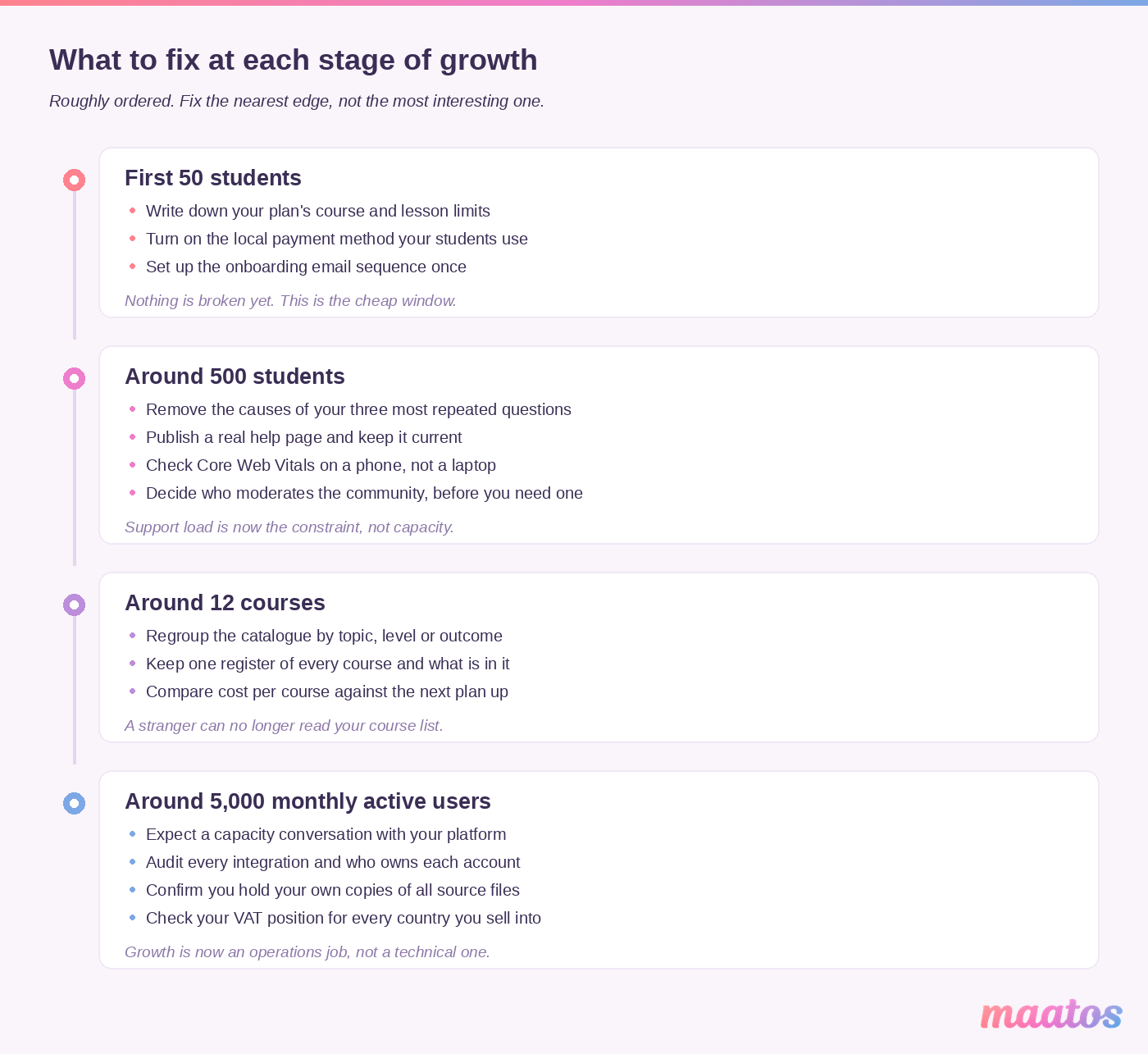
If you read all of that and want one thing to do this week, it’s this: find out your own ceilings. Write down how many courses your plan allows, what your fair-use limits are, how many active users trigger a conversation, and what percentage of your last hundred sales went to your payment provider. Four numbers. Most creators don’t know any of them, and all four are knowable in an afternoon.
Then fix whichever one is closest. Scaling a course website turns out to be much less about capacity than about knowing where the edges are before you reach them.
If you’d rather grow on a platform where the hosting, VAT calculation, invoicing and video delivery are already someone else’s job, you can try Maatos free for 30 days — no credit card, and you can build as much as you like before you have a single student. Have a look at what’s included and at the plans and their limits while you’re there, and if you’d like us to set the whole thing up in your own style, that’s what the done-for-you service is for. More in Build Course Website if you want to keep reading.