You build the course. You film it, edit it, write the sales page, answer the questions, and finally make the sale. Then the payout lands and it’s smaller than you expected — because somewhere between the buyer’s card and your bank account, a platform quietly took its cut.
That cut is a platform fee, and if you sell through a marketplace or a big all-in-one tool, you’re paying it on every single sale. The good news: most of it is avoidable. Once you understand where the fees hide and how a “no-commission” setup actually works, you can keep almost everything you earn — and own the customer relationship instead of renting it. This guide walks you through the real 2026 numbers, the honest trade-offs, and how to build a setup that pays you first.
What exactly is a platform fee?
A platform fee is money a third party takes for standing between you and your buyer. It shows up in three main shapes, and most creators are paying more than one at the same time.
The first is a marketplace commission — the percentage a store like Udemy, Etsy or Amazon skims off each sale in exchange for hosting your product and, in theory, sending you buyers. The second is a subscription or platform fee on the all-in-one course tools (think Teachable, Kajabi, Podia): a monthly bill, sometimes *plus* a transaction fee on top. The third is the payment-processing fee — the unavoidable slice a card network and processor like Stripe or Mollie charge to move the money. That last one is the cost of accepting cards at all; the first two are the ones a no-commission setup is designed to shrink or remove.
Here’s the part that catches people out: for a course creator, these fees stack. You can pay a marketplace commission, *and* a monthly platform fee, *and* a per-sale transaction fee, *and* processing — four layers deep on the same €50 sale. Selling something digital, with almost no marginal cost per copy, and still watching a third of the price disappear feels wrong because it is inefficient. You did the expensive part once; the platform charges you forever.
And there’s a quieter cost that never appears on an invoice. When you sell on someone else’s marketplace, they own the buyer. You often don’t get the customer’s email, you can’t easily follow up, and if the platform changes its rules, its algorithm or its revenue split — as several have, more than once — your income changes with it and you have no say. You’re building on rented land.
What the big course platforms actually take in 2026
Before you can decide what to stop paying, it helps to see the real numbers side by side. Rates change often, so these are current as of July 2026 — always check the provider’s own pricing page before you commit, because this is exactly the kind of figure that shifts.
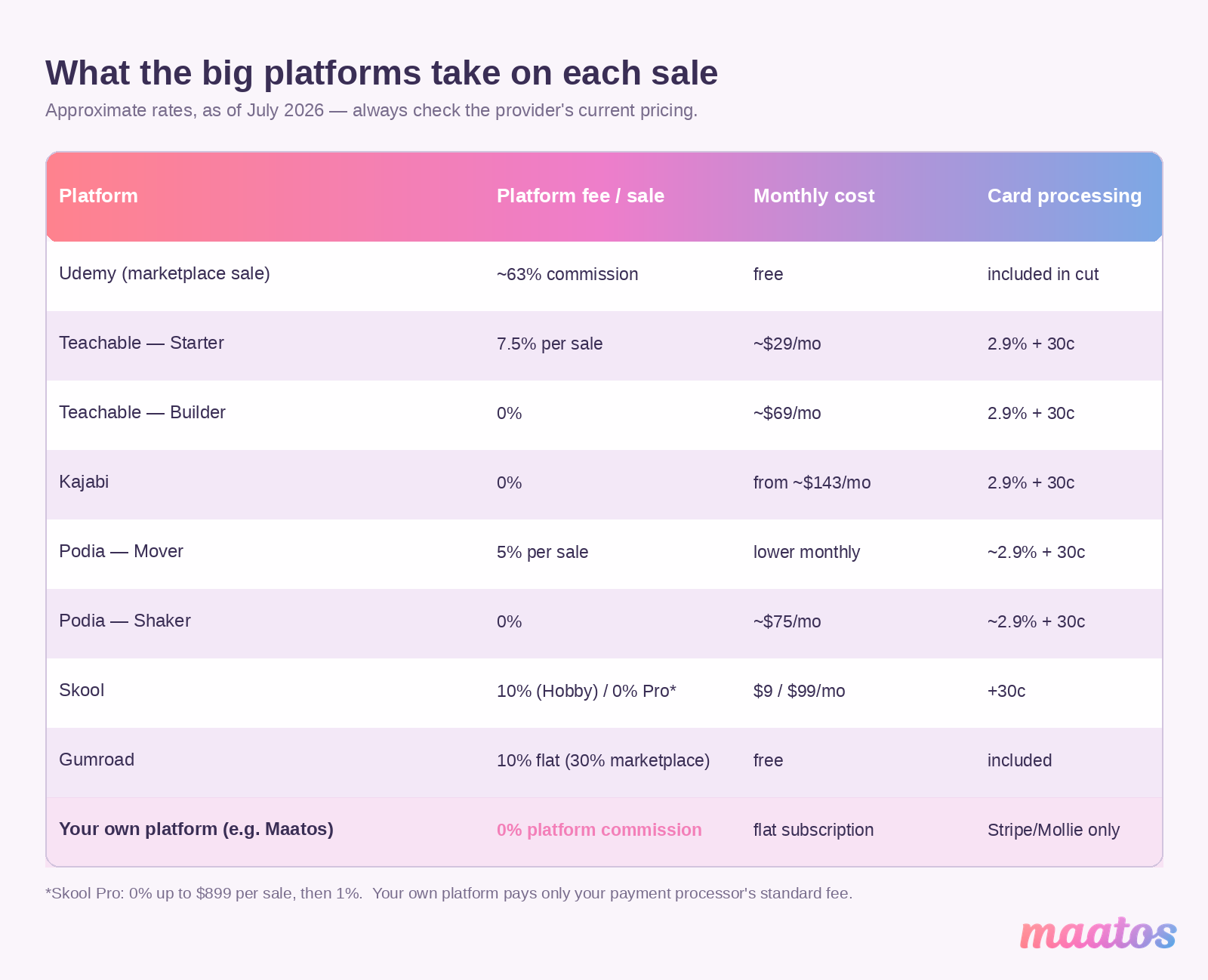
Udemy is the starkest. On an organic marketplace sale — a student who finds your course through Udemy itself — the instructor keeps 37%, and Udemy keeps the other 63%. You only keep 97% when the buyer uses *your own* coupon or referral link, which means you did the marketing Udemy is charging you for. For its business/subscription pool, Udemy’s instructor share has been trimmed again, down toward 15% from January 2026. Great for discovery; brutal on margin.
Teachable runs a hybrid. The Starter plan is about $29/month (billed annually) but adds a 7.5% transaction fee on every sale. Step up to Builder at roughly $69/month and the platform transaction fee drops to 0% — you’re trading a monthly fee for the per-sale cut. On top of either, Teachable:pay (powered by Stripe) charges the usual 2.9% + 30¢ in the US and 3.9% + 30¢ internationally.
Kajabi removes the transaction fee entirely if you use Kajabi Payments, but there’s no cheap way in: the entry plan is around $143/month billed annually, with card processing of 2.9% + 30¢. You pay for the absence of a commission with a high fixed cost — fine at volume, heavy when you’re starting.
Podia mirrors that logic on a smaller scale: the Mover plan carries a 5% transaction fee, while Shaker (about $75/month annually) drops it to 0%. Skool charges 10% + 30¢ on its Hobby tier and 0% on Pro (around $99/month) up to $899 per sale, then a 1% platform fee above that. Gumroad keeps it blunt: a flat 10% on sales through your own links, rising to 30% on anything it sells for you through its marketplace.
The pattern is the same everywhere. You either pay a percentage of every sale, or a hefty monthly fee to make that percentage go away — and usually a bit of both. A no-commission setup breaks the pattern by removing the middleman’s cut and leaving you with only the one fee you genuinely can’t avoid: your payment processor’s standard rate. For most European sellers that’s Stripe at roughly 1.5% + €0.25 or Mollie from around 1.8% + €0.25 on cards (and cheaper still on methods like iDEAL, from about €0.29).
So what does that actually cost you?
The percentages sound small until you put a real number on them. Here’s the same modest course business — €2,000 a month in sales — run through a few of the options above.
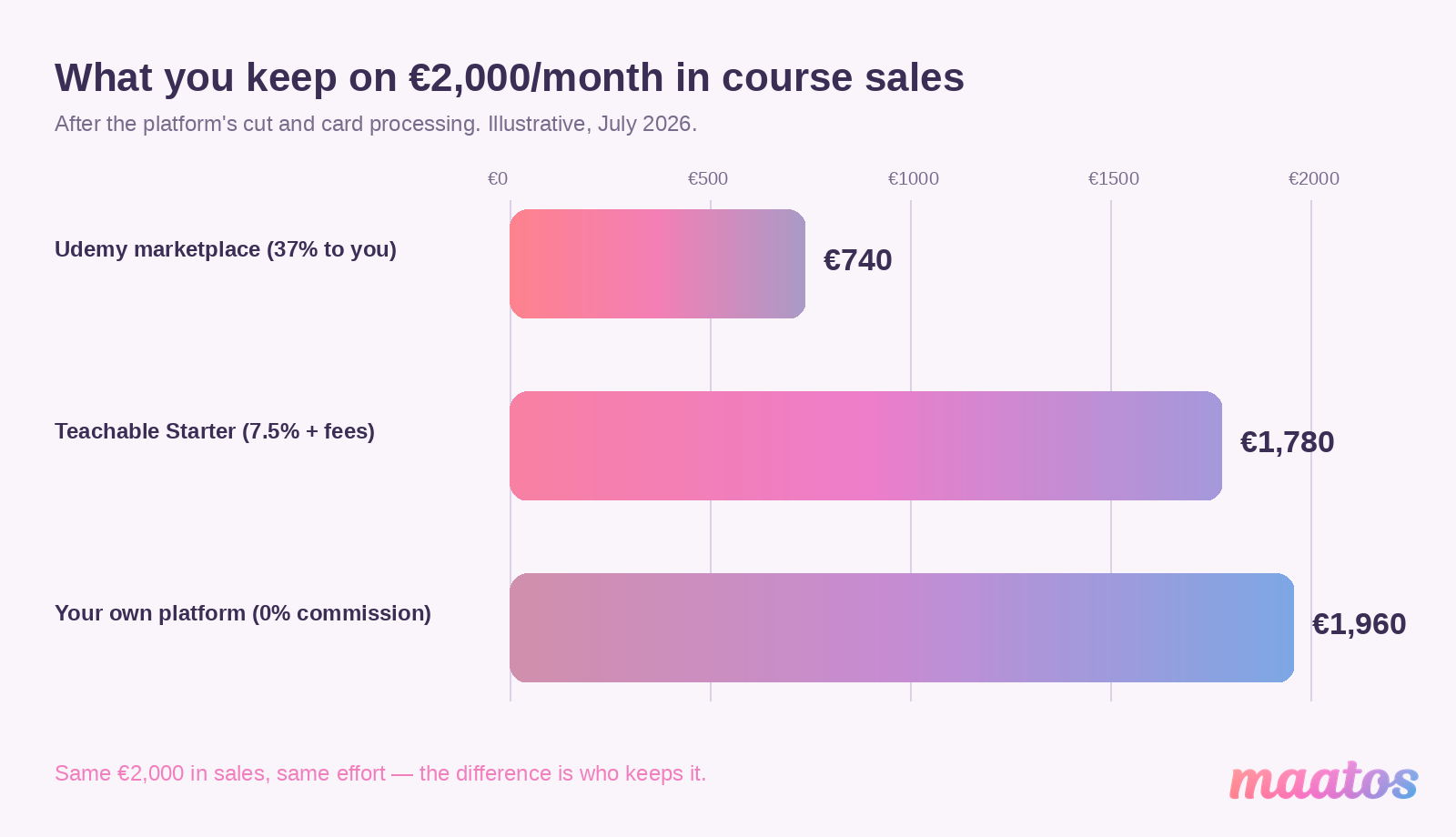
Sell that €2,000 through Udemy’s marketplace at a 37% instructor share and you take home roughly €740. The platform keeps about €1,260 of money you generated. On Teachable Starter (7.5% + processing) you’d keep around €1,780 but you’ve also paid the monthly fee. On a 0% platform-fee setup — your own site connected to Stripe or Mollie — you keep about €1,960 after processing, and the only other line item is a predictable monthly subscription for the platform itself, not a slice of every sale.
Over a year, the gap between “37% of your sales” and “you keep almost everything” is the difference between €8,880 and €23,000-plus in your pocket on the exact same effort. That’s not a rounding error. That’s a second income, or the budget to actually market the thing.
The maths gets more lopsided the more you sell, because a commission grows with your success while a flat monthly fee doesn’t. The better your course does, the more a percentage-based platform costs you — which is a strange thing to be punished for.
What people really mean by a “no-commission stack”
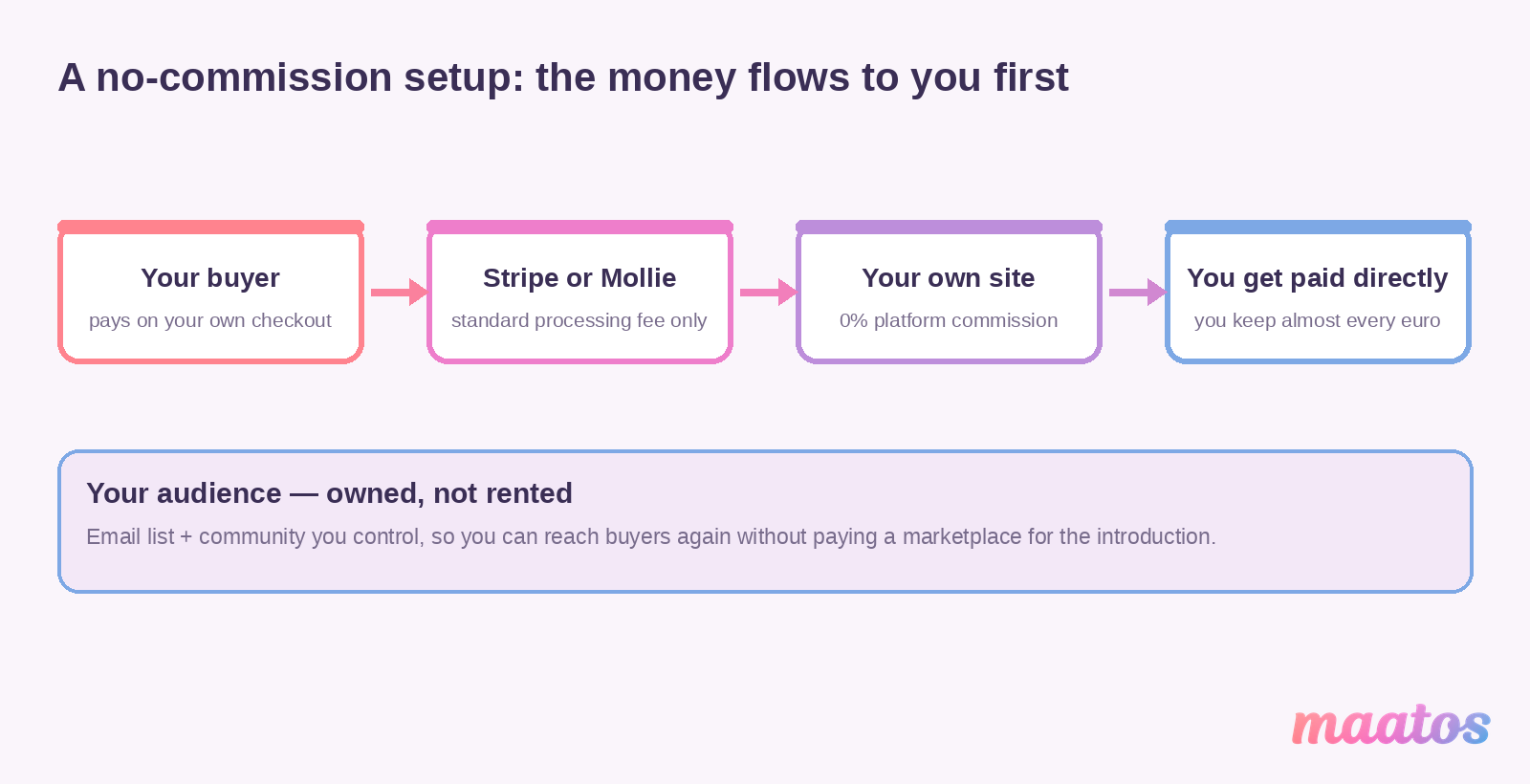
A “no-commission stack” sounds technical, but it’s just a plain idea: instead of renting your whole business from one marketplace that takes a cut, you assemble a small set of tools you control, none of which charge commission on your sales. Nobody sits between you and your buyer taking a percentage.
Strip away the jargon and it comes down to owning the two things marketplaces rent you: your storefront (where people buy) and your audience (who you can reach again). Get those two in your own hands, plug in a payment processor that only charges its standard rate, and the commission simply disappears. There’s no magic and — despite what a lot of breathless writing on this topic implies — no cryptocurrency required. It’s ordinary tools, arranged so the money flows to you first.
What you gain from that arrangement is concrete, not motivational-poster fluff:
- You keep the commission that used to leave on every sale — the single biggest line-item saving here.
- You own the customer relationship. Their email, their purchase history, the ability to follow up and sell them your next thing — all yours, not locked inside someone else’s dashboard.
- Your costs become predictable. A fixed monthly platform cost plus processing is something you can budget around, unlike a commission that quietly scales up as you grow.
- You’re insulated from other people’s rule changes. No overnight revenue-split cut, no algorithm change deciding whether your course gets seen.
None of this means “never use a marketplace” — we’ll get to when they still earn their keep. It means being deliberate about which fees you accept and why.
The pieces of a no-commission setup
You don’t need many parts, and they fit together more simply than the buzzwords suggest. Here’s what each one does and how to choose it.
A payment setup that pays you directly
This is the foundation. The goal is to accept cards and local payment methods while paying only your processor’s standard fee — no extra commission on top. Stripe and Mollie are the two most course-creators reach for: both drop the money straight into your own account, both integrate with just about any storefront, and neither takes a cut beyond their published rate. Mollie is especially handy in Europe because it supports the methods your buyers actually use — iDEAL, Bancontact, SEPA — often more cheaply than a card.
A word of honest warning, because you’ll see it suggested elsewhere: don’t try to dodge fees by taking “friends and family” transfers through PayPal, Venmo or Cash App. Those channels are built for splitting a dinner bill, not running a business — they offer no buyer protection, no proper invoicing, and using them for commercial sales breaks the providers’ terms and can get your account frozen. Saving 2% isn’t worth losing your income and your customers’ trust. Use a real processor; the standard rate is the price of doing this properly.
What you’re looking for in a payment setup is simple: a low, transparent per-transaction fee, money that lands in your account directly (not held by a middleman), and a checkout that’s smooth enough not to lose the sale at the last step.
A storefront you actually own
This is where you decide how much to run yourself. There are two honest routes, and neither is “right” for everyone.
The self-hosted route gives you total control. WooCommerce — the open-source plugin for WordPress — is the popular choice: endlessly customisable, thousands of extensions, and it works with any low-fee processor you like. Alternatives such as Shopware, PrestaShop and Magento offer similar independence with different strengths, from small-shop friendliness to full enterprise power. The trade-off is real: you own the hosting, the updates and the security, and you’ll either learn some technical basics or pay someone who has them. WooCommerce is moderate to learn; Magento is genuinely developer territory. You keep 100% of revenue after processing, but you’re also the IT department.
The commission-free SaaS route hands the technical burden to someone else while still charging no cut of your sales. This is the sweet spot for most course creators who’d rather teach than patch a server: you get a ready-made platform — course builder, payments, student management — for a flat, predictable subscription, with 0% platform commission on what you sell. You give up a little of the infinite tinkerability of self-hosting in exchange for launching this week instead of next quarter. (This is the lane Maatos sits in, more on that shortly.)
The decision really comes down to how you want to spend your time. If building and maintaining the machinery is genuinely enjoyable and you have the skills, self-hosting rewards you with total control. If your expertise is your subject and your hours are better spent teaching and marketing, a commission-free SaaS gets you the same “keep your money” outcome without the maintenance.
A direct line to your audience
Owning your storefront only pays off if you can actually reach the people who buy from you — otherwise you’re back to depending on someone else’s traffic. Two owned channels do most of the work here.
Email is still the most reliable. Collect addresses through a signup form on your own site or a lead magnet, then stay in touch with genuinely useful updates rather than constant pitches. Unlike a social feed that decides who sees you, email lands directly with people who already raised their hand — if you want ideas for making those emails worth opening, our piece on email marketing ideas is a good starting point.
A community — a forum on your own site, a members’ area, or a private group — turns one-off buyers into people who stick around, help each other, and come back for your next course. And the more directly you’re connected to your audience, the easier it is to *ask them what they want*: the best product improvements come from listening to the people already using what you make. These 22 questions to get feedback from your users are a simple way to start that conversation.
The point of both channels is the same: a relationship you own, not an audience you rent from a platform that can change the rules — or the price — whenever it likes.
Tools that connect without locking you in
The last piece is less a component than a principle: pick tools that talk to each other through open, standard connections rather than trapping your data. In practice that means your storefront, your email tool and your analytics can be swapped or upgraded without starting over, and you’re never held hostage by a single vendor’s ecosystem. You don’t need to think about this much on day one — just avoid any tool that makes it hard to get *your own* customer list back out. Ownership is the whole point; don’t trade it away for a shiny feature.
Where Maatos fits
Maatos is the commission-free SaaS route, built specifically for people selling courses rather than generic products. The core promise is the one this whole article is about: Maatos takes 0% commission on your sales. You connect your own Stripe or Mollie account, get paid directly, and the only per-sale cost you carry is your processor’s standard fee — no cut for us on top.
Around that sits everything you’d otherwise have to bolt together yourself. You get your own branded course website — your colours, your logo, your domain — with a drag-and-drop builder, so it looks like *your* business, not a marketplace listing. You can deliver lessons in video, audio, text and downloads, add quizzes and certificates, and run a built-in forum for your students. Because selling across Europe means tax, Maatos calculates VAT automatically and sends your customers invoices without you touching a spreadsheet — the kind of admin that quietly eats evenings. And it’s not only courses: there’s a full webshop if you want to sell digital or physical products alongside your lessons.
Pricing is a flat subscription rather than a slice of your revenue, which is the whole point — it starts at €49/month (excl. VAT) on Basic, with Premium at €99 and Complete at €199 (which adds a built-in affiliate system and sales funnels). Every plan comes with a 30-day free trial, no credit card required, so you can build your course and see the thing working before you pay anything. You can dig into what’s included on the features page and compare the tiers on pricing; if you’re weighing how to price your own course while you’re at it, course pricing models that convert pairs well with this.
If you’ve been comparing named platforms, it’s worth reading our honest Maatos vs Teachable comparison and the broader open-source vs SaaS course platforms breakdown — both go deeper on where a commission-free platform helps and where it doesn’t.
Is owning your platform actually worth it? The honest trade-offs
It would be easy to end here with “own everything, marketplaces are evil.” That’s not true, and pretending otherwise would cost you. So here’s the straight version.
A marketplace like Udemy is, at heart, a discovery engine. Its 63% cut is the price of access to millions of browsing learners you’d struggle to reach alone. If you’re brand new, have no audience, and want to validate that people will pay for your topic at all, putting one course on a marketplace can be a reasonable *first* move — you’re buying an audience you don’t yet have. The mistake is staying there once you’ve proven demand, because at that point you’re paying a finder’s fee on people who already know you.
Owning your platform shines the moment you have — or can build — even a small audience of your own. If you have an email list, a social following, a newsletter, a podcast, or a way to send buyers to a link you control, there’s little reason to hand a marketplace 30–63% for traffic you’re generating yourself. The break-even is less about revenue size and more about *where your buyers come from*: the more they come from you, the more a commission is pure waste.
The real trade-off with going independent isn’t money — the money maths is decisively in your favour — it’s effort and responsibility. On a marketplace, discovery and a lot of the tech are handled for you. On your own platform (SaaS or self-hosted), you’re responsible for bringing the traffic and, if you self-host, for the upkeep. A commission-free SaaS like Maatos removes most of the technical burden but not the marketing one: you still have to reach people. That’s the honest cost of keeping your money — and for most creators past the very first sale, it’s a cost well worth paying. Choosing a platform badly is one of the platform mistakes that quietly kills course sales, so it’s worth getting right early.
What changes when you stop paying the middleman
Put the pieces together and the shift is bigger than a line on a spreadsheet, though the spreadsheet is where it starts.
Financially, you keep a larger share of every sale, and your costs become predictable — a fixed monthly platform fee plus processing, instead of a commission that grows with your success. For a creator working on tight margins, that difference is often what makes the business sustainable rather than a nice-but-marginal side project.
Beyond the money, you get creative freedom — you decide how to package, bundle, price and present your work, without a marketplace’s rules flattening you into the same template as everyone else. You get ownership of your audience and their data, which means better follow-up, smarter next products, and no dependence on a third party’s data policies. And you get resilience: when you’re not built on rented land, a sudden fee hike, policy change or account suspension somewhere else can’t wipe out your income overnight. You’ve built something that’s actually yours.
That last point is why “own your platform” is more than a cost-cutting tactic. Revenue you keep is the headline, but the durability — a business that doesn’t rest on anyone else’s goodwill — is what compounds over the years.
How to build your own no-commission setup
You don’t have to do this all at once, and you certainly don’t have to do it perfectly. Here’s a sensible order.
Start with how you get paid. Set up a Stripe or Mollie account — whichever supports the payment methods your buyers use — so money lands in your account with only the standard processing fee. In Europe, Mollie’s local methods (iDEAL, Bancontact, SEPA) are often worth having; elsewhere, Stripe’s card handling is hard to beat. Weigh the per-transaction fee against any monthly cost and pick the one that fits your volume.
Then choose where you’ll sell. If you want full control and don’t mind the upkeep, a self-hosted setup like WooCommerce gives you 100% ownership. If you’d rather skip the maintenance and launch quickly, a commission-free SaaS like Maatos gives you a course builder, payments, VAT handling and student management for a flat fee with 0% commission — a turnkey version of the same “keep your money” outcome. Favour the option that matches your appetite for technical work, not the one with the most features you’ll never use.
Build your direct channels next. Start collecting emails from day one, even before your course is finished — a simple signup form and a reason to subscribe is enough. Use social platforms as a way to point people *to* your own site rather than as the place you sell, and give your buyers somewhere to gather (a forum or group) so they stick around.
Keep it connected and keep it yours. As you add tools — analytics, email automation, whatever you need — favour ones that integrate cleanly and let you export your own data. That’s what keeps your setup flexible as you grow, instead of quietly locking you back into a single ecosystem.
If any of that sounds like more than you want to take on yourself, that’s a normal place to land — you’re an expert in your subject, not necessarily in web setup. Our team can build the whole thing for you through the done-for-you service, or handle specific parts through our services; if you just want to talk it through first, get in touch and we’ll point you in the right direction. You can also browse more on owning your platform in the Build Course Website hub, including the long-term benefits of owning your course website and how an affiliate programme can grow your sales without a marketplace.
FAQ
Do I really get to keep 100% of my sales with a no-commission setup?
Not quite 100% — but close. A no-commission setup removes the *platform’s* cut, so no marketplace or course tool takes a percentage of your sale. You still pay your payment processor’s standard fee (Stripe around 1.5% + €0.25, Mollie from about 1.8% + €0.25 on European cards), because that’s the real cost of accepting card payments. So you keep roughly 97–98% of each sale instead of 40–70%.
What’s the difference between a platform fee and a payment-processing fee?
A platform fee (or commission) is what a marketplace or course tool charges for the privilege of selling through it — it’s avoidable. A payment-processing fee is what a processor like Stripe or Mollie charges to actually move the money from your buyer’s card to your account — it’s unavoidable, but small and transparent. A no-commission setup targets the first and accepts the second.
Is selling on Udemy or Teachable ever worth the fee?
Yes, sometimes — mainly for discovery. A marketplace can put you in front of buyers you couldn’t reach alone, which can be worth the commission when you’re brand new and have no audience. Once you can bring your own traffic (an email list, a following, a link you control), that commission becomes money spent on people who already know you — and that’s when owning your platform pays off.
Do I need to be technical to run my own course platform?
No. Self-hosting (like WooCommerce) does ask for some technical comfort or a bit of help. But a commission-free SaaS platform handles the hosting, updates, payments and VAT for you, so you can launch a branded course site without touching code. If you’d still rather not set anything up, a done-for-you service can build it for you.
How does VAT work if I sell my own courses across Europe?
Selling digital courses in Europe means charging and remitting VAT based on where your buyer is, which sounds daunting but is mostly automatable. A platform like Maatos calculates the right VAT automatically and issues invoices to your customers, so you’re not doing it by hand. (Tax rules change and vary by country, so treat this as a starting point and confirm your own situation.)
Do I need blockchain or cryptocurrency for a “no-commission” business?
No. Despite how often it’s mentioned in articles on this topic, you don’t need crypto, tokens or a decentralised marketplace to stop paying platform fees. Ordinary tools — a payment processor, a storefront you own, and your own audience — do the job simply, and they’re far easier for your customers to actually use.
You’ve already done the hard part: building something worth paying for. Handing 30, 50, sometimes 63 percent of that to a middleman is the easy part to fix. Set up direct payments, sell from a site you own, and keep a real relationship with the people who buy from you — and the fees that used to disappear stay where they belong.
If you’d like to see how that looks without the technical setup, start your free Maatos trial — 30 days, no credit card — and build your own no-commission course site to try it before you commit to anything.