
Most accessibility advice written for course creators in the past year has had the same energy: a countdown clock, a compliance checklist, and a quietly implied threat. Go and look at who publishes it. A lot of it comes from companies that sell captions.
So here is the sentence most of them leave out. If you are a one-person course business in the EU — or a small team — the European Accessibility Act’s accessibility requirements almost certainly do not apply to you. There is a microenterprise exemption written into the directive itself, and it is not a loophole or a grace period. It is Article 4(5), and it is a full exemption.
That is the honest answer to the question you came here with. The rest of this piece is the more interesting part: what the law actually says, where the exemption stops, and why we still think you should caption your lessons — not out of fear, but because it is one of the cheapest things you can do to your course that genuinely makes it better.
A note before we go further: we build course platforms, we are not lawyers, and none of this is legal advice. Everything below is linked to the primary source so you can check it or take it to someone who is.
Does the European Accessibility Act apply to your online course?
In principle, yes — selling a course online is an e-commerce service, and e-commerce services are in scope. In practice, the microenterprise exemption takes most independent course creators straight back out again.
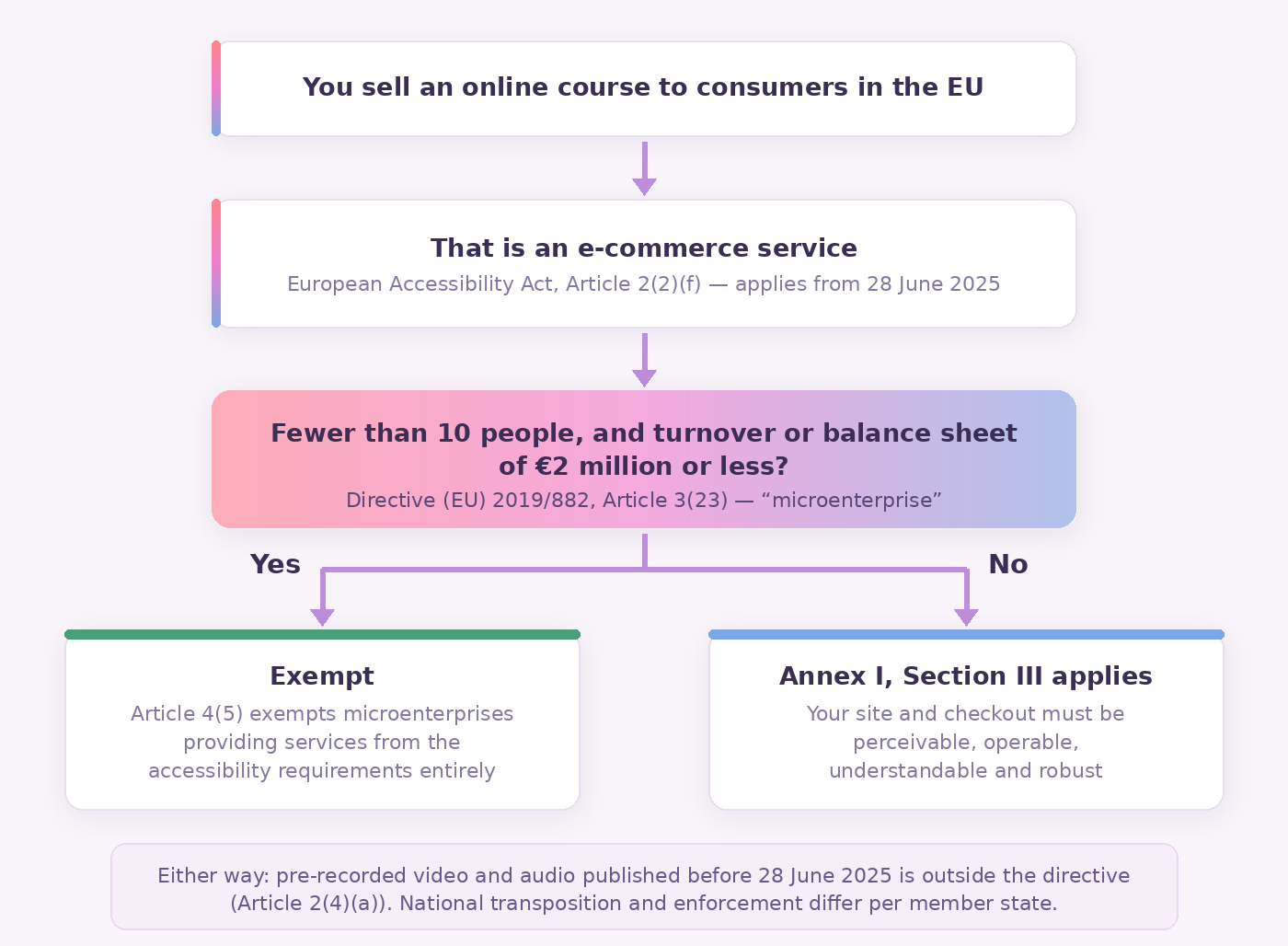
The European Accessibility Act is Directive (EU) 2019/882. Member states had to apply their national measures from 28 June 2025, which is the date every headline was hung on. Article 2(2)(f) puts “e-commerce services” in scope, and Article 3(30) defines them as services “provided at a distance, through websites and mobile device-based services by electronic means and at the individual request of a consumer with a view to concluding a consumer contract.”
That is a course sales page with a checkout on it. Recital 43 removes any doubt: the obligations “should apply to the online sale of any product or service.” So your site, your pricing page and your payment flow are the thing the directive is looking at — which, incidentally, is why the lesson we keep repeating about building the website properly matters more than most creators expect.
What exactly is the microenterprise exemption?
Article 4(5) of the directive says, in full: “Microenterprises providing services shall be exempt from complying with the accessibility requirements referred to in paragraph 3 of this Article and any obligations relating to the compliance with those requirements.”
Paragraph 3 is the paragraph that imposes the accessibility requirements on service providers. So the exemption is not a lighter version of the rules. It removes them.
A microenterprise is defined in Article 3(23) as “an enterprise which employs fewer than 10 persons and which has an annual turnover not exceeding EUR 2 million or an annual balance sheet total not exceeding EUR 2 million.” Fewer than ten people, and either the turnover or the balance sheet under two million. If you are teaching your own course, with a virtual assistant and an editor, you are comfortably inside that.
Three caveats, because a half-remembered exemption is worse than no exemption at all.
The exemption is for services. Microenterprises that place physical products on the market get a lighter documentation burden under Article 14(4), not a free pass. Recital 53 also says that to benefit, microenterprises “must genuinely fulfil the requirements of Commission Recommendation 2003/361/EC” — the EU rules on what counts as a small enterprise — so you cannot restructure into a cluster of tiny companies and expect that to hold. And the directive is transposed into 27 national laws, each with its own enforcement body and its own quirks, so the shape of the exemption where you are registered is worth ten minutes with a local source.
Your videos are not “audiovisual media services” — the rule everyone cites is the wrong one
If you have read that your course videos must be captioned because the EAA covers audiovisual media services, that is the wrong hook, and it is worth knowing why.
Article 3(6) defines “services providing access to audiovisual media services” as services “transmitted by electronic communications networks which are used to identify, select, receive information on, and view audiovisual media services…”. That is the delivery layer — players, set-top-box apps, connected-TV services, electronic programme guides. And “audiovisual media service” itself is borrowed from the Audiovisual Media Services Directive (the 2010 directive, as amended in 2018): content under the editorial responsibility of a media service provider, whose principal purpose is providing programmes to the general public, comparable to television.
A course you wrote and sell to enrolled students is not television. The provision that would genuinely reach your video lessons is the general one — Annex I, Section III, which asks that websites and mobile services be made “perceivable, operable, understandable and robust.” Those four words are the foundation of WCAG, and captions live underneath the first one. But Section III is exactly what Article 4(5) exempts microenterprises from.
And your back catalogue is carved out anyway
Article 2(4)(a) puts “pre-recorded time-based media published before 28 June 2025” outside the directive entirely. Article 2(4)(b) does the same for office file formats published before that date, and 2(4)(e) for genuine archive content that is not updated afterwards.
So even for a course business large enough to be caught by the rules, every video recorded and published before that summer is out of scope. Article 32 adds a transitional period: service contracts agreed before 28 June 2025 can run unaltered until they expire, to a maximum of 28 June 2030.
None of which is a reason to leave your lessons uncaptioned. It is a reason to stop reading the countdown-clock articles and make a calm decision instead.
So why bother, if nobody is going to fine you?
Because the people the law was written for are not a rounding error, and because captions turn out to help almost everyone who uses them, disability or not.
The World Health Organization estimates that 1.3 billion people experience significant disability — 16% of the world’s population, one in six of us. In the EU specifically, Eurostat found that 23.9% of people aged 16 and over reported an activity limitation in 2024: 17.2% some limitation, 6.7% a severe one. Eurostat is careful to note the figure is self-reported and excludes people in institutions, so it probably undercounts.
The more surprising number is who reaches for captions when they exist. In 2016 the Oregon State University Ecampus Research Unit surveyed 2,124 students across 15 institutions about captions and transcripts. Only 13% had registered with an office of disability services. Of the students who actually used captions, just 1.4% said they were not at all helpful and 59.1% called them very or extremely helpful. The reasons they gave most often were not about hearing: staying focused, retaining information, and coping with poor audio.
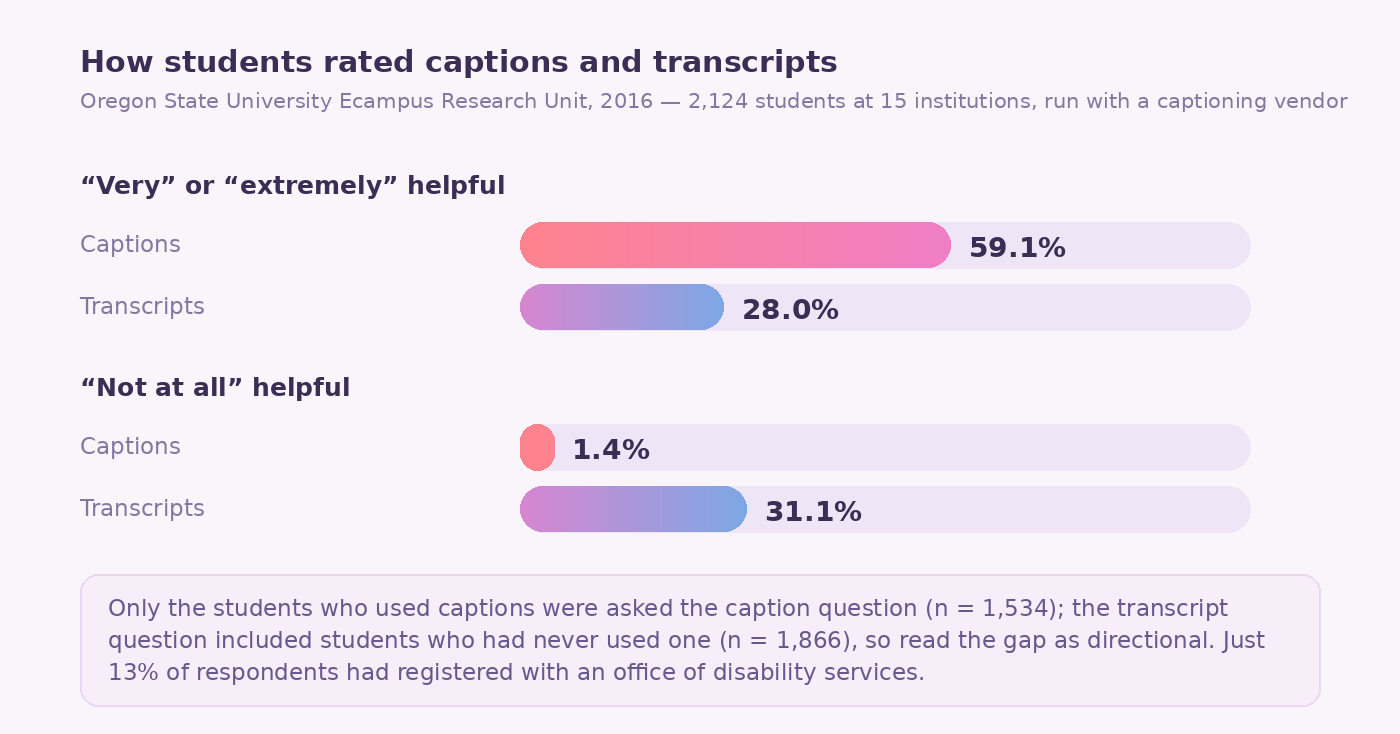
Three honest caveats on that study, because we would rather you trust the next number we give you. It was run in collaboration with a captioning vendor. It is ten years old. And the caption and transcript questions were not put to identical groups — only caption users were asked about captions — so treat the gap between them as directional rather than exact. Transcripts fared noticeably worse either way, with 31.1% of students calling them not at all helpful, which is a useful corrective to the idea that a transcript substitutes for captions. It does not. It sits alongside them.
There is also a much-repeated statistic that 80% of caption users are not deaf or hard of hearing. It traces to a genuine Ofcom consultation from 2006, which found that of the 7.5 million UK adults who had used TV subtitles at least once, over 6 million had no hearing impairment. Real, but it is about British television twenty years ago and “at least once” is doing a lot of work. We would not build an argument on it.
And then there is the plainest reason of all. One of the sites on our projects page is an online course in Dutch Sign Language, built to “improve communication between hearing and hard-of-hearing people.” When your students include people the internet routinely forgets, the effort stops feeling like compliance.
If you only do four things
These four cover the overwhelming majority of what matters for a video course, and none of them requires a consultant.
1. Caption every lesson — and fix what the robot got wrong
Captions are the single highest-value change, and they are a Level A requirement in WCAG 2.2 — success criterion 1.2.2, Captions (Prerecorded) — which is the lowest bar the standard has.
Auto-captions get you most of the way there for free, and the remainder is where your credibility lives. Speech recognition reliably mangles exactly the words your course depends on: your acronyms, your product names, your technical vocabulary, numbers, and anything said over background music.
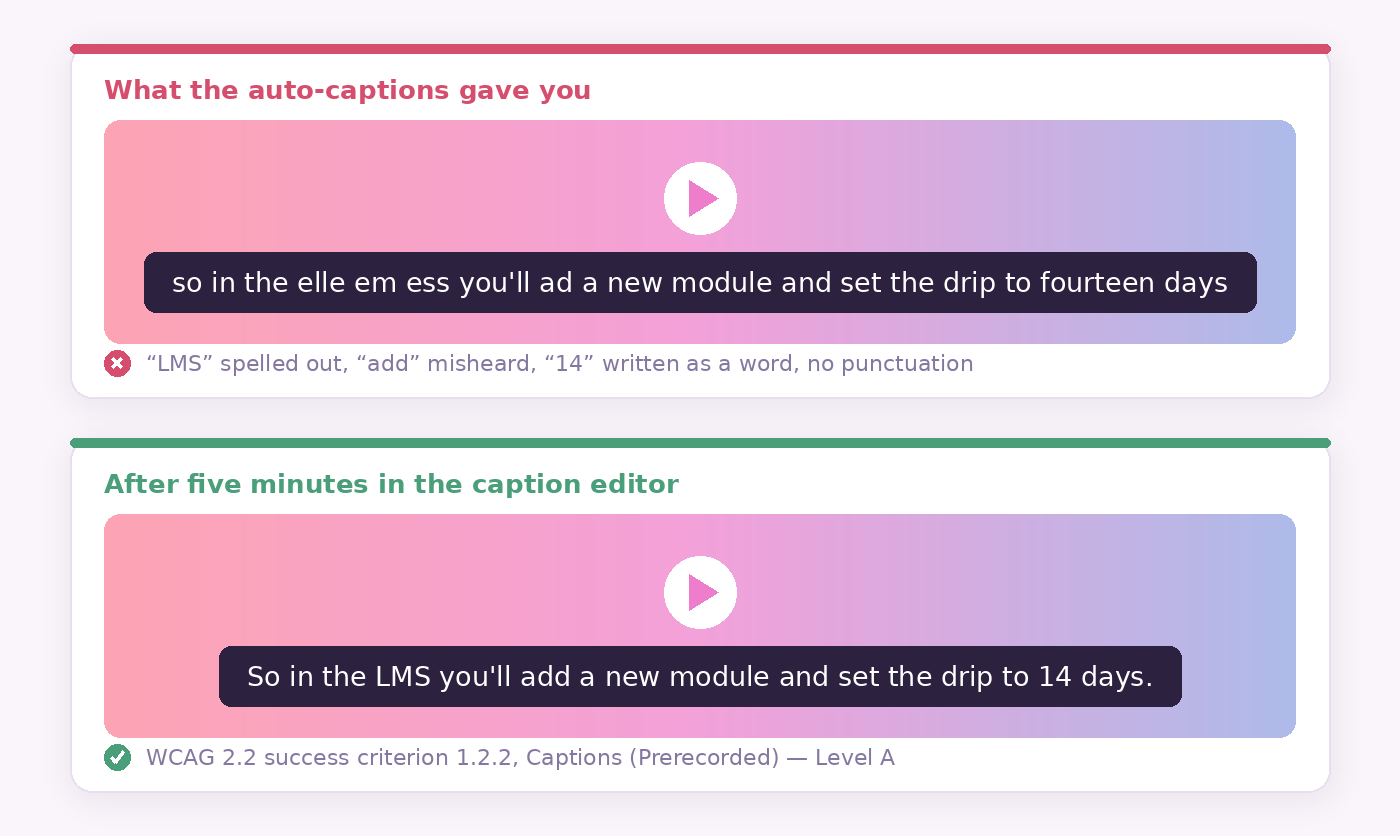
You will see “99% accuracy” quoted as the accessibility standard. We went looking for where that is written down, and it is not written down anywhere. It is not in WCAG, it is not in EN 301 549, and it is not in the DCMP Captioning Key, which says only that “errorless captions are the goal.” The 99% figure originates as a commercial accuracy guarantee sold by captioning vendors and then gets cited back as if it were a rule. The real test is functional: do the captions carry the information a viewer needs to understand the lesson, including speaker identification and meaningful non-speech sound?
One practical shortcut: better audio produces better auto-captions, so the microphone upgrade we argue for in our piece on course audio pays for itself twice.
2. Put a transcript under every lesson
A transcript is a plain-text version of the lesson sitting on the page beneath the player. It takes about two minutes, because you already have one — it is the caption file with the timecodes stripped out.
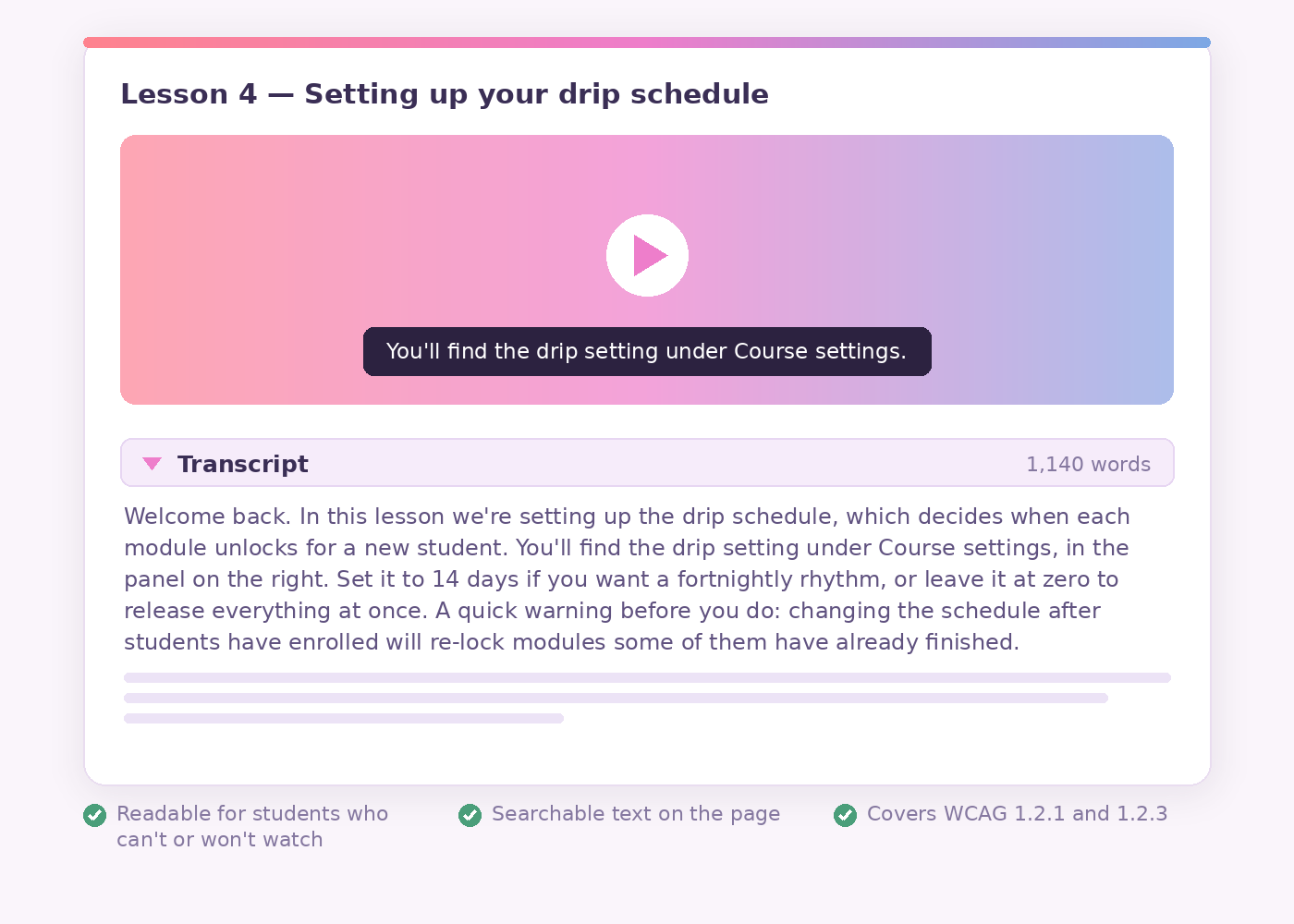
That satisfies WCAG 1.2.1 for any video-only content. It only gets you to 1.2.3 if you also describe what happens on screen, which is exactly the habit step four builds in. Beyond the standard, it serves the students who would simply rather read, or who want to find the one paragraph where you explained the thing they forgot. And because it is real text on a real page, it is the part of your video lesson a search engine can index best — which is why we treat transcripts as an SEO tactic as much as an accessibility one.
3. Make your slides readable before you make them pretty
WCAG success criterion 1.4.3 asks for a contrast ratio of at least 4.5:1 between text and its background, or 3:1 for large text — defined as 18pt, or 14pt bold, which works out at roughly 24px and 18.7px on screen. These are thresholds, not targets to round towards: 4.49:1 fails.
We measured our own palette rather than guess, and the results are a fair warning about brand colours generally.
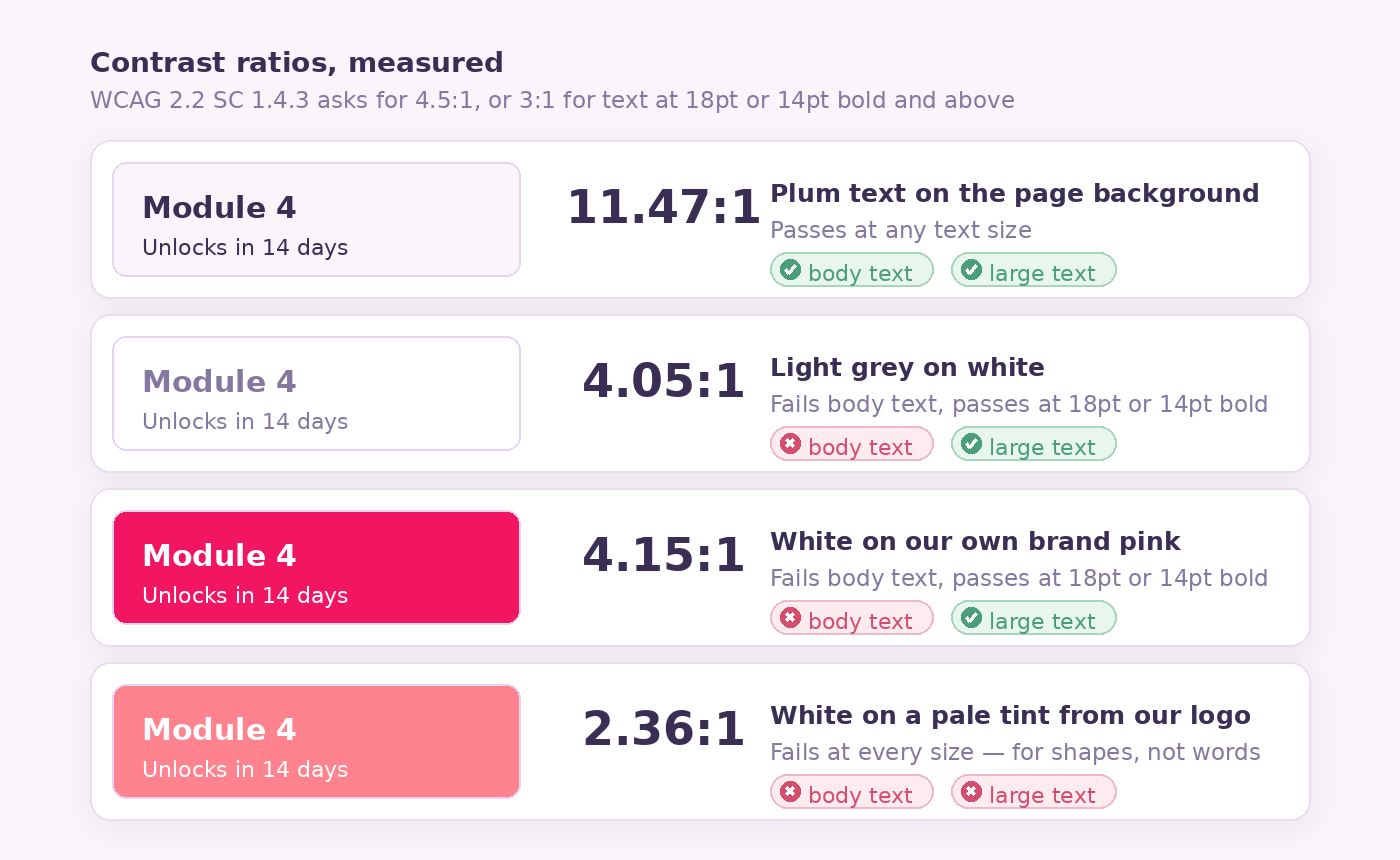
White on our brand pink comes out at 4.15:1. That is fine for a heading at 18pt or 14pt bold, and not good enough for body text — and the pale tints in our logo gradient are far worse, at 2.36:1, which is why they stay in shapes rather than words. The same arithmetic will apply to whatever palette you picked when you were designing your course site. Measure it before you set a body-text style you will live with for three years.
While you are there: never let colour be the only thing carrying a meaning. “The green modules are done” is invisible to a colour-blind student. “The modules with a tick are done” is not.
4. Say out loud what is only on the screen
This one costs nothing and nobody talks about it. When you record, describe the thing you are pointing at instead of pointing at it.
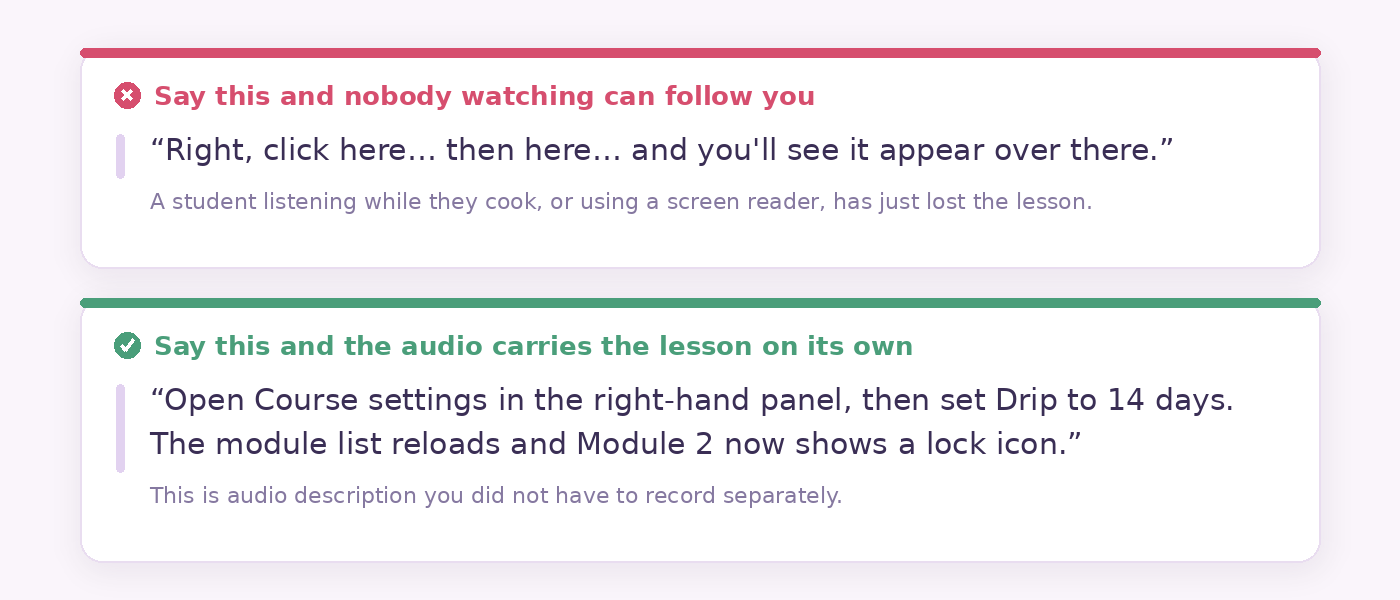
“Click here, then here” is a lesson that only works if you are watching closely. “Open Course settings in the right-hand panel, then set Drip to 14 days” works if you are listening in the car. It is audio description you never have to record separately, it is what turns your transcript into something usable on its own, and it makes the lesson better for every student.
What if you sell into the UK or the United States?
The EU microenterprise exemption stops at the EU border. Two other regimes are likely to matter to an English-language course, and neither has a small-business carve-out.
The UK: reasonable adjustments, no headcount threshold
Under section 29 of the Equality Act 2010, anyone “concerned with the provision of a service to the public or a section of the public (for payment or not)” is a service provider, and a duty to make reasonable adjustments applies. Section 20 gives it shape: where the duty relates to providing information, reasonable steps include “ensuring that in the circumstances concerned the information is provided in an accessible format” — and section 20(7) says that, as a general rule, you cannot pass the cost of an adjustment on to the disabled person. The duty is anticipatory, owed to disabled people generally rather than triggered by a request. There is no headcount threshold, and no technical standard either: “reasonable” is judged on the facts, including the size and resources of your business. A solo creator is not held to the same standard as a university.
The US: the DOJ’s position, and the rule that does not cover you
The Department of Justice has taken the position since 1996 that the ADA applies to web content, restated in its 2022 web accessibility guidance: the ADA’s requirements apply to what public accommodations offer, “including those offered on the web.” Two things to keep straight. That guidance is DOJ’s position, not settled law — the federal circuits are genuinely split on whether a business with no physical premises is a place of public accommodation. And the much-discussed 2024 DOJ web rule, which adopts WCAG 2.1 AA as a binding standard, applies to state and local government under Title II only. It does not reach private businesses, and its compliance dates were pushed back by an interim final rule in April 2026 to 26 April 2027 and 26 April 2028 depending on population size.
Worth knowing regardless: DOJ’s own list of Title III settlements includes a test-prep company over complaints that its online video courses did not provide captions. That is about as close an analogue to an independent course seller as the record offers.
Which standard should you actually aim at?
Aim at WCAG 2.2 Level AA, and ignore everything you read about WCAG 3.0 for now.
WCAG 2.2 has been a W3C Recommendation since October 2023, with the current edition dated 12 December 2024. WCAG 3.0 is still a working draft with years of work left in it, so any article urging you to prepare for it is selling something. In Europe the harmonised standard is EN 301 549, and version 4.1.1, adopted on 24 August 2026, was updated specifically to align with WCAG 2.2 Level AA. One caveat worth knowing: it only confers a presumption of conformity once it is cited in the Official Journal, and national publication runs to 31 May 2027 — so most national guidance still points at the older V3.2.1 and WCAG 2.1 AA. If you build to 2.2, you have covered both.
Level AA is where the requirements that bite for a video course sit. Captions for prerecorded video are Level A. Captions for live sessions are 1.2.4 at AA — relevant if you run cohort calls or webinars, and a reason to think about the format before you commit, which we dig into in our comparison of drip, cohort and self-paced delivery. Full audio description for prerecorded video is 1.2.5 at AA, and it is the one genuinely expensive requirement on the list — which is precisely why habit number four above is worth building, because a lesson whose narration is already self-sufficient needs far less of it.
What Maatos does and does not do about this
We would rather tell you what we do not ship than let you find out later.
Maatos gives you the container: your own branded course website and learning environment, video, audio, PDFs and attachments in every lesson, quizzes, certificates, a forum and student management with progress tracking, your own domain (included from the Premium plan up, with a one-time fee on Basic), and payments through your own Stripe or Mollie account. Because the branding is genuinely yours — colours, logo, styling — the contrast question in step three is yours to answer, and the palette you choose is the one your students will read for years.
What we do not do: we do not generate captions for you, we do not produce transcripts, we do not ship an accessibility checker in the editor, and we do not produce audio description. Captions are made in your editing or transcription tool and brought to the lesson with the video. If you need to confirm a specific playback detail for your own setup before you commit, ask us — a straight answer costs us nothing and guessing helps nobody.
If any of this sounds like more evenings than you have, that is what our done-for-you service exists for: we build the site, you record the lessons. And if you would rather see how the pieces fit together first, the rest of our course-creation writing is a decent place to wander.
Common questions about online course accessibility
Does the European Accessibility Act apply to me if I sell one course as a sole trader?
Its accessibility requirements almost certainly do not. Selling a course online is an e-commerce service and therefore in scope in principle, but Article 4(5) of Directive (EU) 2019/882 exempts microenterprises providing services from those requirements entirely. A microenterprise is an enterprise with fewer than 10 persons and either turnover or a balance sheet total of €2 million or less. Enforcement is national, so check how your own member state transposed it.
Do I have to caption videos I published before June 2025?
Not under the EAA. Article 2(4)(a) places pre-recorded time-based media published before 28 June 2025 outside the directive’s scope. That said, an uncaptioned back catalogue is still an uncaptioned back catalogue for the students trying to watch it.
Are automatic captions good enough?
Not as they come out. WCAG does not set a numeric accuracy threshold — the test is whether the captions convey the information needed to understand the content, including speaker identification and relevant non-speech sound. Auto-captions typically get acronyms, names, numbers and technical vocabulary wrong, which in a course is exactly the vocabulary that matters. Generate them automatically, then spend five minutes per lesson correcting them.
Where does the “99% caption accuracy standard” come from?
Not from a standard. It appears in neither WCAG 2.2, EN 301 549, the DCMP Captioning Key, nor DOJ guidance. It originates as a commercial accuracy guarantee offered by captioning vendors and gets quoted back as though it were a rule. The published requirements are qualitative.
Is a transcript a substitute for captions?
No. They do different jobs, and students rate them very differently — in the Oregon State survey, 59.1% of caption users found captions very or extremely helpful, while 31.1% of students called transcripts not at all helpful. Captions are synchronised with the video and satisfy WCAG 1.2.2. A transcript is a separate text alternative that helps people who prefer to read and makes your lesson searchable, and it only reaches 1.2.3 if it also describes what is happening on screen. Publish both.
What contrast ratio do my slides and course pages need?
WCAG 2.2 success criterion 1.4.3 asks for at least 4.5:1 for normal text and 3:1 for large text, where large means 18pt or 14pt bold and above — roughly 24px and 18.7px. The ratios are hard thresholds and must not be rounded up. Brand colours very often fall short: white on our own brand pink measures 4.15:1, which passes for a large heading and fails for body text.
Which WCAG version should I target in 2026?
WCAG 2.2 Level AA. It has been a W3C Recommendation since October 2023, and the European harmonised standard EN 301 549 V4.1.1, adopted in August 2026, aligns with it. WCAG 3.0 remains a working draft and is not something to plan around yet.
Does UK or US law let small course creators off in the same way?
No. The UK Equality Act 2010 imposes an anticipatory duty on service providers to make reasonable adjustments with no headcount threshold, though what counts as reasonable takes your size and resources into account. In the US, the DOJ’s position is that the ADA applies to web content, while the courts are split on purely online businesses; the 2024 DOJ web rule that adopts WCAG 2.1 AA binds state and local government only.
Where to start this week
Pick your most-watched lesson, generate the captions, spend five minutes fixing what the robot got wrong, and paste the transcript underneath. That is one lesson, about ten minutes, and a course that is easier to follow for nearly everyone who buys it — and usable for the students who otherwise could not. Then do the next one.
If you are still deciding where that course is going to live — and whether you want to own it or rent it — try Maatos free for 30 days and build the thing properly from the first lesson. Your palette, your domain, your students. Captions included, by you.