
Let’s start with the awkward bit. For a long time this article promised twenty prompts and gave you seven. If you ever counted, you were right to be annoyed. Here are the twenty, in the order you’d actually use them.
They run from “I think I know something worth teaching” to “the lessons are written and I’m ready to put them on my own site”. Each one comes with the bit most prompt lists leave out: what to change before you paste it, and how to tell whether the answer you got back is any good. Because that’s the real skill here. ChatGPT will always give you something. Knowing when to keep it is what separates a course you’re proud of from 40 lessons of confident-sounding filler.
One thing before you scroll. The prompts work far better if you spend five minutes on the setup below first. Skip it and you’ll spend the rest of the afternoon re-explaining your course to a chat window that keeps forgetting who your students are.
What ChatGPT is genuinely good at when you’re building a course
ChatGPT is a fast, tireless first-drafter with no ego about being edited. That’s the whole pitch, and it’s a good one.
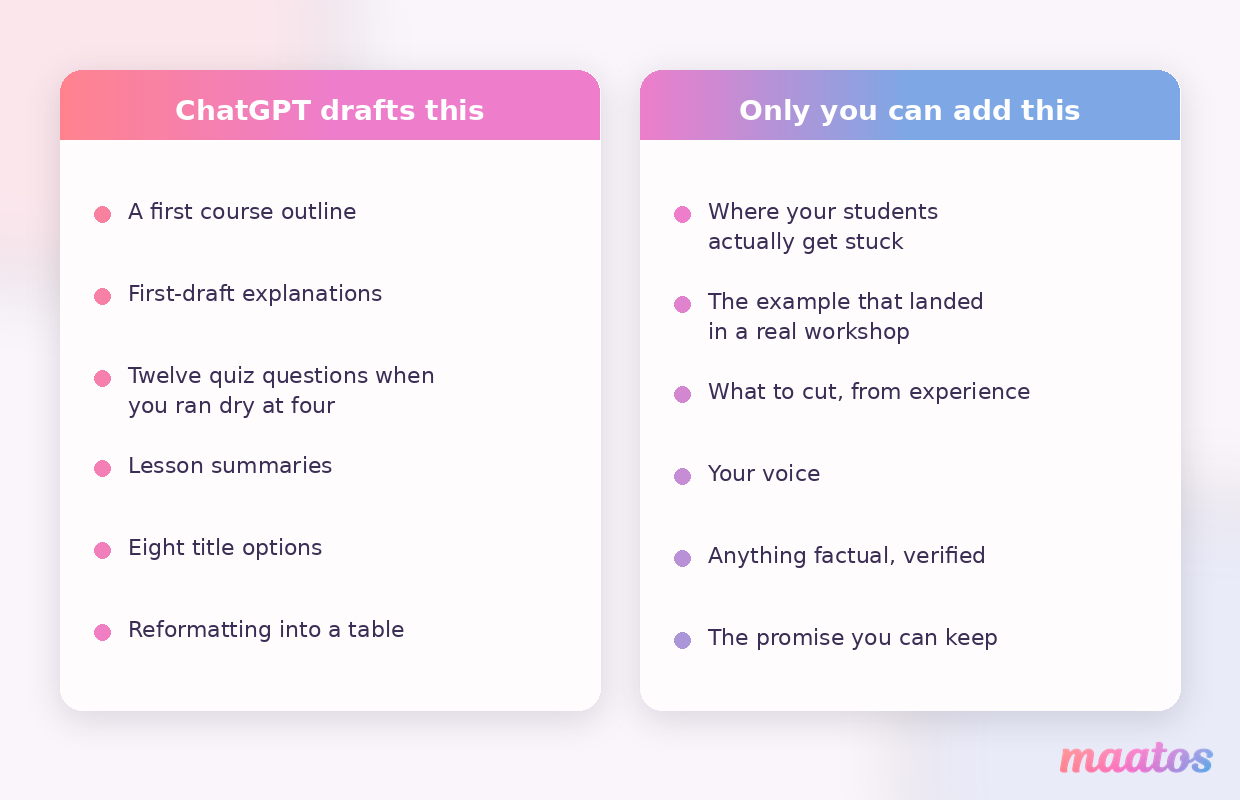
It’s strongest at the jobs that stall you: staring at an empty outline, rewriting the same explanation for the fourth time, inventing twelve quiz questions when you’ve run dry at four, turning a rambling voice note into something with a beginning and an end. It’ll happily produce ten module introductions and let you bin nine. It keeps a consistent tone across material you wrote over six different weeks in six different moods. And it’s very good at reorganising things you already have — a messy list of topics into a sensible order, a 2,000-word ramble into five key takeaways.
Where it’s weak is more specific than “it’s not human”. It doesn’t know what your students actually get stuck on, because it’s never taught them. It’ll invent statistics, case studies and sources with total confidence. It has no idea which of your examples landed in a workshop and which one got blank stares. And left alone, it writes in a flat, tidy register that every reader on earth is now trained to recognise — which is a genuine problem when you’re asking someone to pay for your expertise.
So the split is simple: ChatGPT does the drafting and the structuring, you do the knowing and the judging. Every prompt below is built on that division of labour. If you want the wider picture of where AI fits across a whole week of work rather than one course, we’ve mapped that out in AI workflows for course creators.
Set this up once, before you paste a single prompt
This is the step nearly every prompt list skips, and it’s the one that changes the output most.
Give this course its own space in ChatGPT
Modern ChatGPT lets you group related chats into a project with shared instructions and files that apply to every conversation inside it. Put this course in one. Everything you tell it about your students, your tone and your topic then survives across sessions, instead of dying with the chat you closed on Tuesday.
If your account doesn’t have projects, or you’re on a plan that limits them, the low-tech version works nearly as well: build the whole course in one long chat rather than starting a fresh one for every lesson. The features and plan boundaries here move constantly, so check what your own account actually offers rather than trusting any article’s screenshot, including ours.
Write the course brief you’ll reuse twenty times
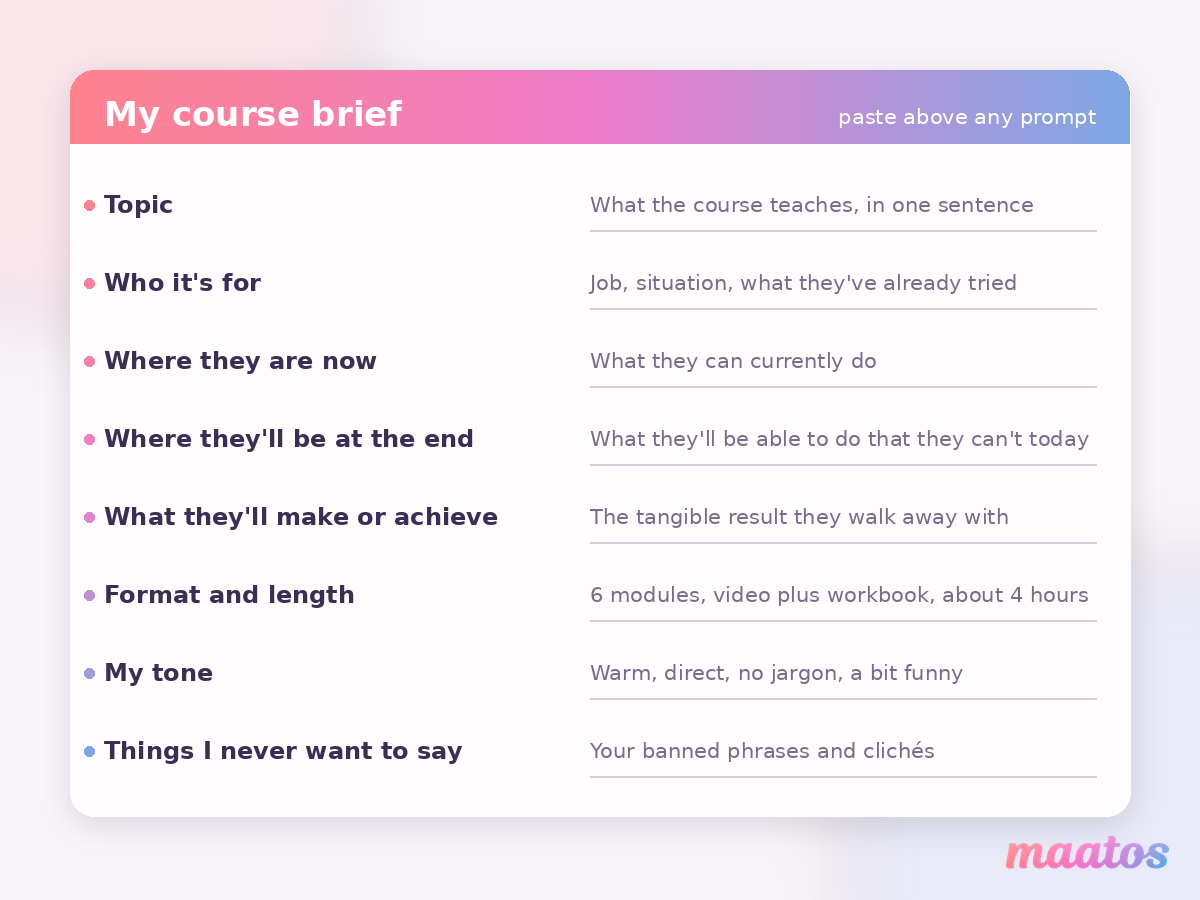
This is the artifact. Fill it in once, keep it in a note, and paste it at the top of any prompt below that needs context. It takes about four minutes and it removes roughly half the vagueness from everything that follows.
My course brief
Topic: [what the course teaches, in one sentence]
Who it’s for: [job, situation, what they’ve already tried]
Where they are now: [what they can currently do]
Where they’ll be at the end: [what they’ll be able to do that they can’t today]
What they’ll actually make or achieve: [the tangible result]
Format and length: [e.g. 6 modules, video plus workbook, about 4 hours]
My tone: [e.g. warm, direct, no jargon, a bit funny]
Things I never want to say: [your banned phrases, clichés you hate]
Paste that, then the prompt. The difference between “write a course outline about photography” and the same request with a filled-in brief attached is the difference between a Wikipedia summary and something that sounds like your course.
Give it a sample of how you actually write
Everyone tells you to “keep your voice” and then leaves you to work out how. Here’s the practical version: find 300 to 500 words you’ve already written that sound like you — a newsletter, a long post, the transcript of you explaining something out loud — and paste it in with the instruction “This is how I write. Match this register: sentence length, level of formality, how I use examples. Do not imitate the content, only the voice.”
Do it once, inside the project, and every draft afterwards starts closer to home. It’s not magic, and you’ll still edit. But you’ll be editing rather than rewriting.
What makes one prompt work and another one waste your afternoon
Six habits do most of the heavy lifting. They’re worth understanding rather than memorising, because they apply to every prompt in the list.
Be specific about the subject. “Write about marketing” gets you a beige encyclopaedia entry. “Explain how a freelance photographer should price a wedding package when they’ve never done one” gets you something usable. Name the topic, the situation and the constraint.
Say who’s listening and for how long. Learner level, background and course length change the answer completely. “A four-week introduction to Python for people who’ve never written a line of code, one hour a week” produces genuinely different material from “a Python course”. Duration matters as much as level: it tells ChatGPT how much to cut.
Ask for the shape you want. If you want a table, ask for a table. If you want five bullet points and not eight, say five. If you want a summary at the end of each explanation, request it up front. Structured output isn’t just tidier — it’s far easier to check, and much easier to paste into your course platform later.
Work in a chain, not one giant request. Nobody gets a whole course from one prompt, and the attempts that try read like it. Ask for the modules. Approve them. Then ask for lessons inside module one. Then the explanation inside lesson three. Each step gets the previous step’s approved output as its starting point, which is why the order of the twenty prompts below matters.
Iterate out loud. The first answer is a negotiating position. Tell it what’s wrong in plain language — “too broad”, “too formal”, “you skipped the part where they get stuck”, “cut this by half” — and it will fix it. Two rounds of that beats a perfectly engineered first prompt almost every time.
Adapt for how you teach. If you teach by story, ask for stories. If you teach by worked example, ask for worked examples with the numbers filled in. If your students learn by doing, ask for exercises before explanations. There’s a genuine grounding to this — we’ve written about the four best-known learning theories and what they mean for a course you’re actually building — but the short version is that the prompt should describe your teaching, not a generic one.
The 20 prompts, in the order you’d build a course
Each prompt has three parts: the prompt itself, what to change before you send it, and what a good answer looks like — the test that tells you whether to keep the output or push back. Paste your course brief above any prompt that needs context.
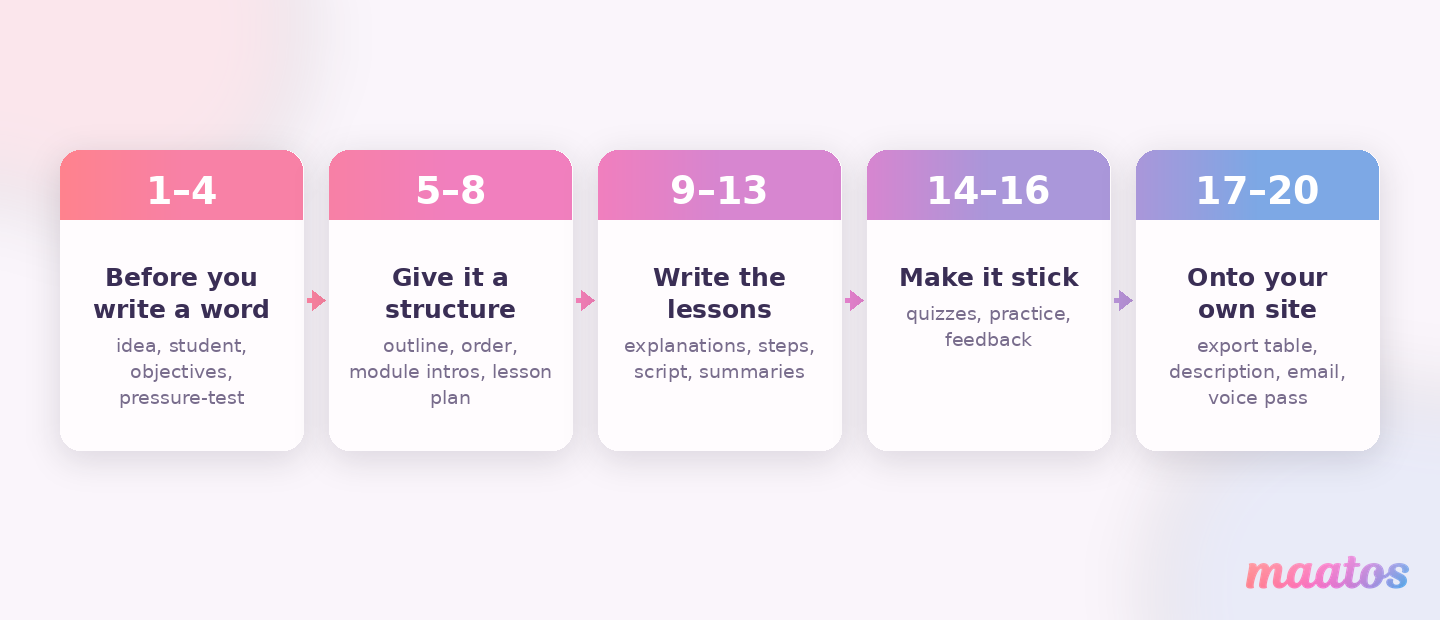
Before you write a word (1–4)
1. Turn what you know into a course idea someone will pay for
“Here is my background: [experience, jobs, things people ask you for help with]. Suggest six online course ideas I’m genuinely qualified to teach. For each one, name the specific person it’s for, the problem it solves, and why someone would pay rather than search for it free. Rank them by how easy they’d be for me to teach well.”
What to change: be honest and specific in the background. “Fifteen years in hospitality, currently training new managers” beats “business experience”.
What a good answer looks like: six ideas that are narrower than your job title, each naming a real person with a real problem. If you get “Introduction to Leadership” and “Advanced Leadership”, the background you pasted was too vague. Try again with the messy details.
2. Build a picture of the one student you’re teaching
“Based on my course brief, describe the single student this course is for. Include: what they’ve already tried and why it didn’t work, what they’re afraid of, what they’d say out loud if someone asked why they haven’t solved this yet, and the three questions they’d ask before buying. Then list what they already know, so I don’t waste lessons explaining it.”
What to change: if you have real customers, paste anonymised things they’ve actually said. Real quotes beat invented personas by a mile.
What a good answer looks like: the “what they’ve already tried” section should make you nod. If it reads like a marketing persona template — age, income, hobbies — ask again and tell it you want the frustrations, not the demographics.
3. Define the course objectives and who it’s for
“Define clear learning objectives for an online course on [subject] aimed at [target audience], specifying the key skills and knowledge they should be able to demonstrate by the end.”
What to change: push for observable verbs. Add “Every objective must start with something the student can do and someone else could watch them do — build, calculate, diagnose, write, present. No ‘understand’ and no ‘be familiar with’.”
What a good answer looks like: you can imagine testing each objective. This one deserves the extra round, because everything downstream is built on it — we’ve gone deeper on it in how to define clear learning outcomes.
4. Pressure-test the idea before you build it
“Argue against this course. Who is it not for? What would make someone regret buying it? What free resource is good enough that they’d choose it instead? What would I need to include to make that objection disappear?”
What to change: nothing. This one works as written and it’s the prompt people skip.
What a good answer looks like: at least one objection that stings. If everything it says is easily dismissed, tell it to be harsher. An hour here saves you from building six modules nobody needs.
Give it a structure (5–8)
5. Create a detailed course outline
“Create a structured course outline for [subject], with modules and lessons arranged in a logical order for a [duration]-week programme.”
What to change: add the constraint that actually shapes it — “Each lesson must be under ten minutes of video” or “Six modules maximum”. Without a limit you’ll get a syllabus for a degree.
What a good answer looks like: each module moves the student measurably closer to the outcome you set in prompt 3, and you can see where the difficulty steps up. If module two is where you’d get lost, so will they. Our guide to building a course outline students actually finish covers what to do with it next.
6. Fix the order so nobody drowns in module two
“Review this outline for sequencing. Where am I introducing a concept before the thing it depends on? Where does the difficulty jump too fast? Where could a student get a small win early? Suggest a revised order and explain each move.”
What to change: paste the outline from prompt 5.
What a good answer looks like: specific swaps with reasons, not a general “consider reordering”. The early-win suggestion is the valuable one — it’s the single biggest lever on whether people reach module three.
7. Write engaging module introductions
“Write a short introduction for each module of this course that sets clear expectations and gives the student a reason to care. Say what they’ll be able to do by the end of the module and why it matters now.”
What to change: add “No rhetorical questions and no ‘in today’s fast-paced world’.” You’ll thank yourself.
What a good answer looks like: each intro names a specific benefit rather than describing the topic. “By the end of this module you’ll have a working pricing sheet” beats “This module covers pricing”.
8. Turn one module into a lesson-by-lesson plan
“Take module [number] and break it into individual lessons. For each lesson give me: the one thing it teaches, what the student does during it, roughly how long it takes, and what they should be able to do afterwards. Flag any lesson that’s secretly two lessons.”
What to change: do this one module at a time. Asking for all six at once produces mush.
What a good answer looks like: the “secretly two lessons” flag actually fires somewhere. It usually should. If you want the whole curriculum stage in more depth, we’ve written a dedicated set in ChatGPT prompts for your course curriculum.
Write the lessons (9–13)
9. Explain a concept in plain language, with real examples
“Explain the concept of [topic] in simple, relatable language suitable for beginners, followed by real-world examples.”
What to change: name the reader’s world. “Use examples from running a small café, not from software.” Generic examples are the fastest way to lose someone.
What a good answer looks like: you could read it aloud to a friend without cringing. Watch for invented specifics — if it cites a study, a company or a number, verify it before it goes anywhere near a lesson.
10. Produce a step-by-step guide
“Produce a detailed, stepwise guide explaining how to complete [specific task or process] in the context of this course.”
What to change: state where the student is starting from and what they’ll have in front of them. Add “Flag any step where a beginner commonly goes wrong, and say what the mistake looks like.”
What a good answer looks like: you can follow it yourself without filling in a gap from your own head. That gap is exactly where your students will stop.
11. Write the video script
“Write a script for a [length]-minute lesson video on [topic]. Open with the problem, not with a welcome. Write it to be spoken aloud, in my voice, with short sentences and no bullet points read out. Mark where I should show something on screen.”
What to change: the length. Six minutes of script is a very different thing from twelve.
What a good answer looks like: it sounds wrong when you read it silently and right when you say it out loud. That’s the correct direction. There’s a fuller set of these in ChatGPT prompts to script your course lessons, and if you’re about to record, our guide to course video audio matters more than your camera does.
12. Write lesson summaries and key takeaways
“Summarise the main points from this lesson content into concise bullet points for quick review.”
What to change: paste the actual lesson. Add “Write them as things the student can do, not things they learned about,” and cap the number at four.
What a good answer looks like: a student who read only the summary could still do the thing. These double as your workbook pages and your recap emails, so they’re worth the extra round.
13. Make an unglamorous lesson interesting
“This lesson is necessary but dull: [paste it]. Give me three ways to teach the same content that would hold attention — a story, a worked example with real numbers, and a small task the student does before I explain anything. Don’t change the content, only the delivery.”
What to change: nothing, but only use it where you know the lesson is flat. Every course has two or three.
What a good answer looks like: the “task before explanation” option is usually the strongest. It’s also the one you’d never have written yourself at 11pm.
Make it stick (14–16)
14. Design quizzes and assessments
“Generate multiple-choice questions with an answer key covering the key concepts from [module or lesson], including an explanation for each correct answer.”
What to change: add “Wrong options must be plausible mistakes a real beginner would make, not obviously silly. No ‘all of the above’.” That single line is the difference between a real check and a formality.
What a good answer looks like: you have to think for a second before choosing. If every answer is obvious, the quiz measures nothing. More on that in ChatGPT prompts for course quizzes and in our piece on building quizzes that improve completion rather than anxiety.
15. Design a practice exercise, not just a quiz
“Design one practical exercise for this module where the student produces something real. Give me the brief they see, the materials they need, roughly how long it takes, and a short checklist they can mark their own work against.”
What to change: say what tools your students actually have. An exercise requiring software they don’t own is an exercise nobody does.
What a good answer looks like: the student ends up with an artifact — a draft, a plan, a spreadsheet, a photo. We’ve written more on this in designing practice exercises for online courses.
16. Write the feedback that comes with a wrong answer
“For each incorrect option in this quiz, write one or two sentences explaining why someone would think it was right and what to reconsider. Encouraging, never condescending, no exclamation marks.”
What to change: paste the quiz from prompt 14.
What a good answer looks like: the feedback teaches something rather than just saying “incorrect”. This is the most under-used prompt on the list and it costs you ten minutes.
Get it out of the chat and onto your site (17–20)
17. Ask for it in a format you can actually paste in
“Output the full course structure as a table with these columns: module number, module title, lesson number, lesson title, lesson type (video / text / quiz / exercise), estimated duration, learning outcome. One row per lesson, no commentary.”
What to change: match the columns to how your platform organises lessons.
What a good answer looks like: a clean table with no chatty preamble. This is the moment your course stops being a conversation and starts being a thing you can build, and almost no prompt list mentions it.
18. Write the course description and some title options
“Write a course description for this course aimed at [audience]. Lead with what they’ll be able to do, not with what the course covers. Then give me eight title options: four plain and descriptive, four with a bit more character. No colons in every single one.”
What to change: feed it prompt 2’s student picture, not just the topic.
What a good answer looks like: at least two titles you’d be happy to say out loud. There’s a full set of these in ChatGPT prompts to write your course description, and creating course pages that explain the value covers where they go.
19. Draft the launch email
“Write a short email announcing this course to people who already know me. Assume they’re busy and slightly sceptical. One specific thing they’ll be able to do afterwards, who it’s not for, and one clear link. Under 200 words.”
What to change: “who it’s not for” stays. It’s the line that makes the rest believable.
What a good answer looks like: it survives being read on a phone in a queue. For the whole selling side, see ChatGPT prompts for course marketing.
20. Strip the AI out of the writing
“Rewrite this to sound like a person. Remove: ‘in today’s world’, ‘dive into’, ‘unlock’, ‘leverage’, ‘elevate’, ‘moreover’, ‘furthermore’, ‘in conclusion’, ‘take it to the next level’. No stacks of bold labels standing in for sentences. No heading in Title Case. Vary the sentence length. Keep every fact and every example exactly as it is. Then list what you changed so I can check you didn’t quietly delete anything.”
What to change: add your own banned phrases from the course brief.
What a good answer looks like: the change list at the end is the point — read it. This prompt is the reason your course won’t sound like the forty other courses on the same topic that were also drafted in a chat window this year. Run it on everything before it ships.
Chain them: what to paste forward
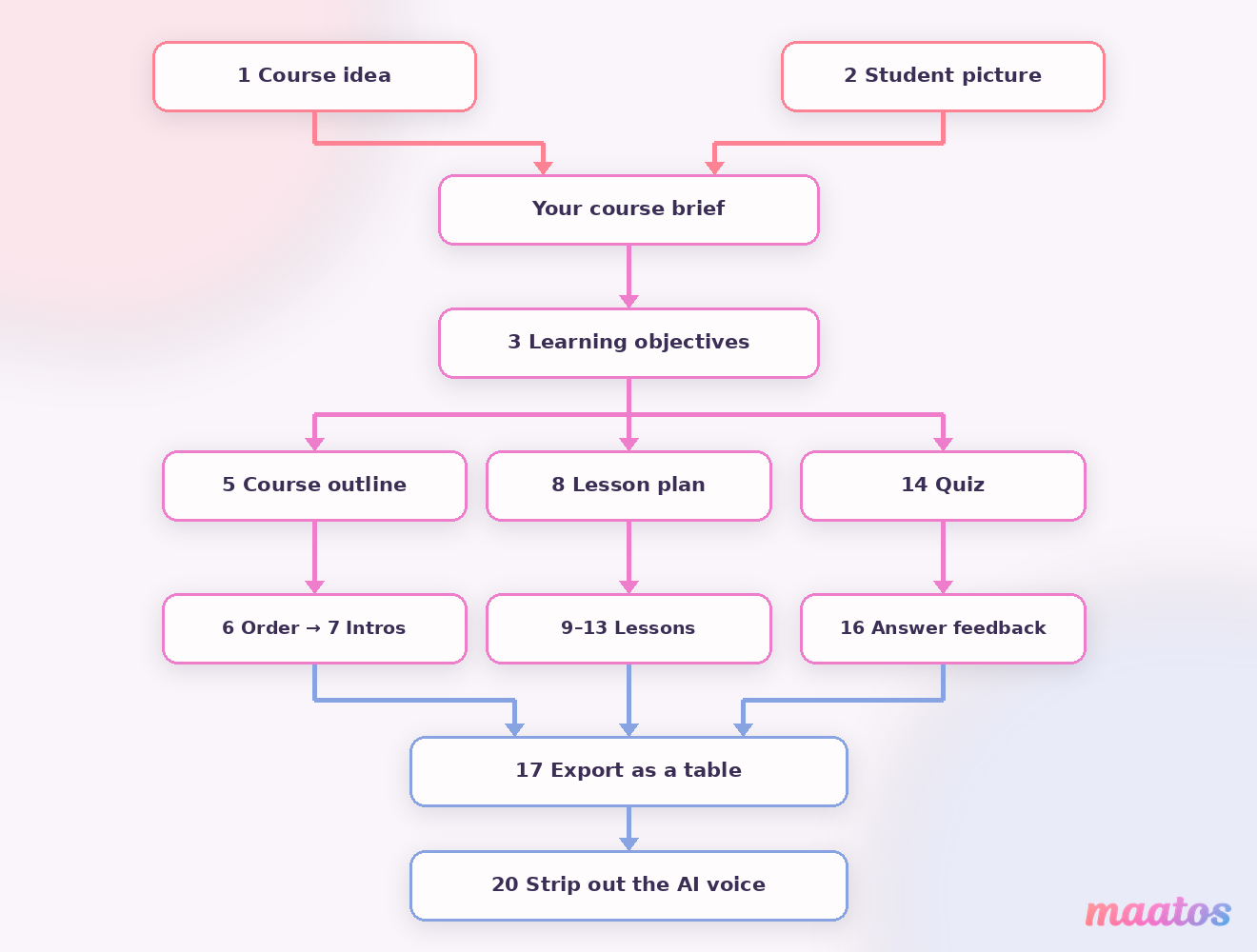
The prompts are worth more in sequence than individually, because each one’s approved output is the next one’s raw material. The handoffs look like this.
Prompt 1’s chosen idea goes into your course brief. Prompt 2’s student picture goes into prompts 3, 18 and 19. Prompt 3’s objectives go into prompts 5, 8 and 14 — every structural and assessment decision traces back to them. Prompt 5’s outline goes into 6, and the corrected outline from 6 goes into 7 and 8. Prompt 8’s lesson plan goes into 9, 10 and 11, one lesson at a time. Prompt 14’s quiz goes into 16. And everything, at the end, goes through 17 and then 20.
Approve before you pass forward. If you chain from an outline you weren’t happy with, you’ll be fixing the same flaw in thirty lessons instead of one.
Where ChatGPT will let you down
Worth saying plainly, because the honest limits are what make the rest usable.
It invents things. Statistics, studies, quotes, case studies, book titles, prices. It does this fluently and without hesitation. Anything factual that ends up in a lesson needs checking against a real source, and the more confident the sentence sounds the more you should check it.
It doesn’t know your students. It has no idea that everyone in your last cohort got stuck on the same thing in week three. That knowledge is the actual product you’re selling, and it can only come from you.
It flattens your voice. Left alone it converges on the same tidy, agreeable register, which is exactly why prompt 20 exists.
Ownership and disclosure need a moment’s thought. Terms around AI-generated content change, so check the current position of the tools you use and of any marketplace you sell through. Separately: don’t paste your students’ personal data into a chat window. And if a significant amount of your material was drafted with AI, telling people plainly tends to go down better than being found out later.
The rule that holds all of this together: use it for the first draft and the structure, never for the final say. Review and edit every output, add the anecdotes and the specialised knowledge only you have, adjust the complexity based on what real students struggle with, and keep the pedagogical decisions yours. The efficiency is real. The expertise still has to be.
Getting the course out of the chat and onto your own site
A finished set of lessons sitting in a chat window isn’t a course yet. It becomes one when students can find it, buy it, work through it and finish it — and that’s a different job from writing it.
That’s the part Maatos handles. You get your own branded course website on your own domain, built with a drag-and-drop editor, so the table you generated in prompt 17 becomes real modules and lessons without anybody touching code. Lessons take video, audio, PDFs and attachments, so the script from prompt 11 and the workbook pages from prompt 12 live in the same place. The quiz you drafted in prompt 14 gets rebuilt as a real quiz that marks itself, and students who finish can be awarded a certificate. There’s a forum if you want your students talking to each other rather than only to you.
On the selling side, payments run through your own Stripe or Mollie account, so students can pay by card, Apple Pay, Google Pay or the local methods they expect in their country, and the money arrives with you directly. VAT is calculated automatically and invoices go out without you doing anything. Yoast is built in for the SEO side, and you can connect Klaviyo, Mailchimp or ActiveCampaign so the launch email from prompt 19 goes to a list that stays in sync by itself. If you want to sell more than courses — templates, workbooks, a supporting product — the built-in e-commerce handles that too.
Student management shows you who’s enrolled, how far they’ve got and where they’re getting stuck. That last one is the loop that closes this whole article: the sticking points you find there are precisely the knowledge ChatGPT doesn’t have, and feeding them back into prompts 6, 13 and 15 is how the second version of your course beats the first.
Two honest notes. Maatos has no AI features — no writing assistant, no course generator. ChatGPT is your drafting tool; Maatos is where the finished thing lives and sells. And if the building part isn’t how you want to spend your week, our done-for-you service sets the whole platform up for you. You can see the full picture on the features page, what it costs on pricing, and what our team does on the services page. Before you set a price, it’s worth reading up on course pricing models that convert — the best-drafted course in the world still stalls if the price is wrong. Questions we haven’t answered here? The contact page is the fastest route to a real reply.
Frequently asked questions
Can ChatGPT create an entire online course for me?
It can draft one, but it can’t create one worth selling on its own. It has no access to your experience, your students’ sticking points or your voice, and it invents facts. Treat it as a fast first-drafter: it produces the outline, explanations and quiz questions, and you supply the judgement, the real examples and the final edit.
What’s the best ChatGPT prompt for creating a course outline?
The one that names the subject, the specific audience, the course length and at least one hard constraint, like a maximum number of modules or a maximum lesson length. Prompt 5 above is the base version. Without a constraint you’ll get a syllabus for a degree instead of an outline for a course.
How do I stop ChatGPT making my course sound like AI?
Two things. Give it 300 to 500 words of your own writing at the start and ask it to match the register, not the content. Then run prompt 20 over every finished lesson: a rewrite that bans the usual tells, keeps every fact intact, and reports back what it changed so you can check nothing was quietly dropped.
Do I need a paid ChatGPT plan to use these prompts?
No. Every prompt here works as plain text in a normal chat. Paid plans mainly buy you higher limits, more file uploads and features like projects, which make long course-building sessions more comfortable rather than possible. Plan boundaries change often, so check what your own account currently includes.
How long does it take to build a course this way?
Honestly, it depends far more on how well you know your subject than on the prompts. What AI reliably removes is the blank-page time and the reformatting time. What it doesn’t remove is deciding what to teach, checking anything factual, recording, and editing until it sounds like you. Anyone promising you a finished course in an afternoon is selling something.
Who owns the content ChatGPT writes for me?
The terms attached to AI-generated content differ by tool and change over time, so check the current terms of the tool you use and the rules of any marketplace you sell through. In practice the safer position is the one you’d want anyway: heavily edited output containing your own examples, your own structure and your own voice.
Should I tell my students I used AI?
There’s no universal rule, but if AI drafted a meaningful part of the material, saying so plainly tends to build more trust than staying quiet and being noticed. Students mind far less than creators expect — what they object to is paying for something generic, which is a content problem rather than a disclosure problem.
Start with prompt one
You don’t need all twenty today. Open a chat, fill in the course brief, and run prompts 1 to 5. That’s an afternoon, and by the end of it you’ll have an idea you’ve pressure-tested and an outline you believe in — which is roughly the point where most courses that never get made quietly stop.
If you want more of this while you work, the rest of the Creating Courses hub is where we keep it.
And when you’ve got lessons worth publishing, you’ll want somewhere of your own to put them: you can try Maatos free for 30 days and build your course site while the drafts are still warm. Good luck — go and write the thing only you can write.