

Ask most people what online teaching looks like and they picture the same thing: a grid of muted webcams, a teacher talking to their own reflection, and a dull ache behind the eyes by four in the afternoon. If you teach online that way, the picture is accurate. It is also only one of three ways to do it, and for most people who want to turn what they know into a living, it is not the best one to start with.
Online teaching means passing on knowledge or skills over the internet instead of in a room. You can do it live, with everyone in the same video call at the same time. You can do it self-paced, by recording your lessons once so students can follow them whenever it suits them. Or you can blend the two. Which of those you pick decides almost everything else: the tools you need, how your week looks, how many people you can reach and how your income grows.
So this guide starts with that choice. Then it covers what you gain, the tools that actually matter (fewer than you think), how to keep students engaged when you cannot see their faces, the mistakes that sink most first attempts, what to do when the technology fails, the three routes to your first paying students and a realistic plan for your first week. It ends with where online teaching is heading, the skills you will keep building and a short FAQ. We build course platforms, so we are not neutral about the self-paced route, and we will say where live teaching is simply the better fit.
Live, self-paced or blended: which kind of online teaching fits you?
This is the decision to make first, because it shapes everything after it.
Live teaching means you and your students meet at a set time in a video call. It feels personal. You see reactions, answer questions on the spot, and a good group gives the session energy you cannot fake in a recording. It is the natural choice for one-to-one tutoring, language conversation practice, coaching, and anything where you need to watch someone do the thing (a yoga pose, a guitar chord, a sales pitch) and correct them. The catch? Live teaching sells your hours. Teach the same lesson to ten groups and you stand in front of the camera ten times. Your income grows only as fast as your calendar fills.
Self-paced teaching flips that. You plan and record the lessons once, put them on a course platform with text, downloads and quizzes, and students work through them on their own schedule. The work is front-loaded: weeks of preparation before the first sale, then far less per extra student. That is why it scales. The same course can serve five people or five hundred without adding much to your week. The trade-off is distance: students can get stuck quietly, and nobody is there in the moment to notice.
Blended teaching combines the two, and in practice it is where many course creators end up. The core knowledge lives in a self-paced course, and you add live moments on top: a monthly question hour, a group kick-off, a feedback call at the end of each module. Students get the flexibility of recorded lessons and the accountability of a real person. You keep the live part small enough that it does not eat your week.
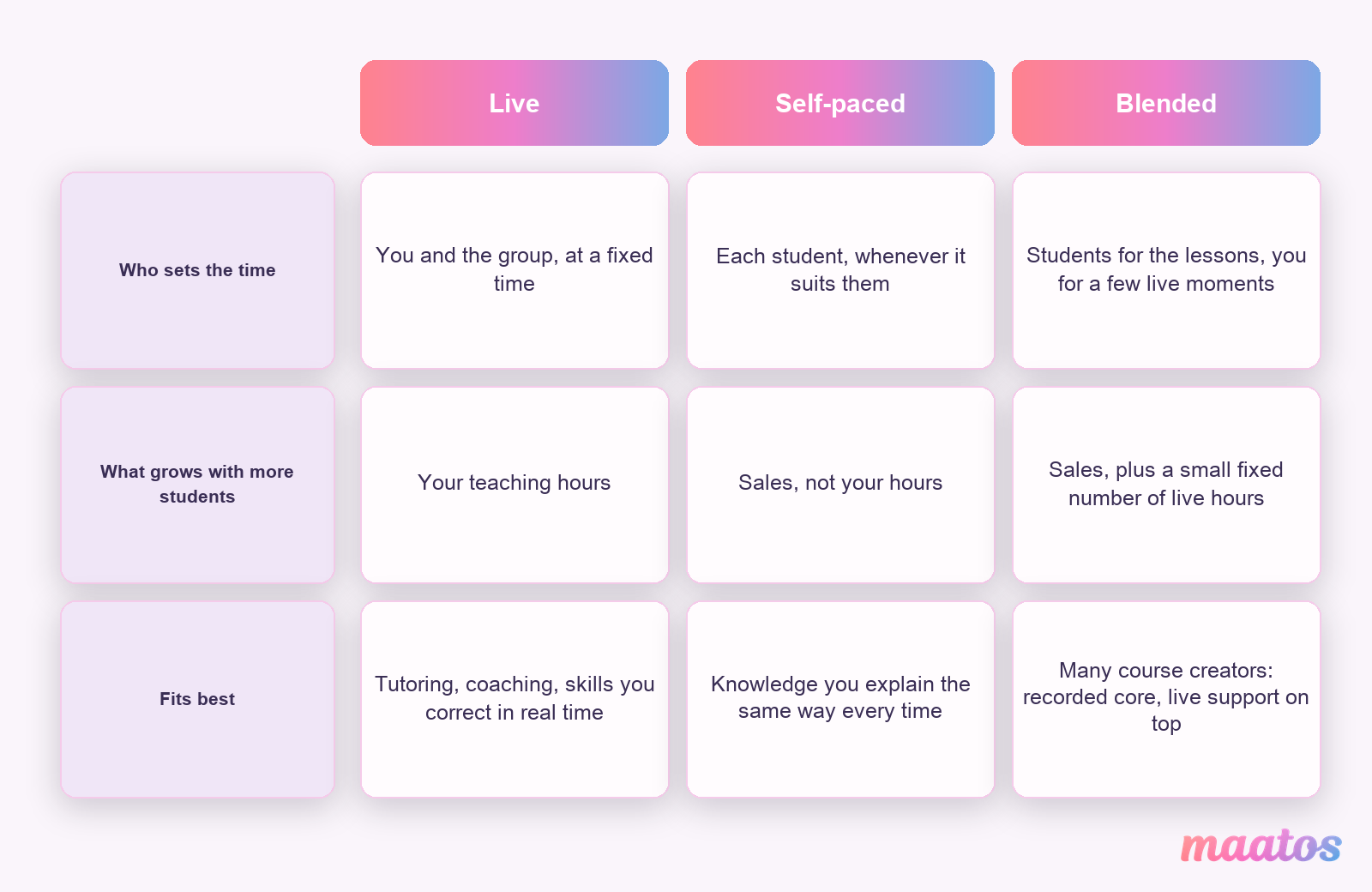
A quick way to choose: if your subject needs real-time correction, start live. If you explain the same things to every new client, record them. If you are not sure, start blended with a small group, because live sessions show you very quickly which questions keep coming back, and those questions are your first recorded lessons. Once you have made the basic choice, our comparison of drip, cohort and self-paced courses goes deeper into the delivery models, and there is more on course design in our creating courses section.
What are the real benefits of teaching online?
The benefits are real, but they are not equal for every format. Here they are with that caveat attached.
You decide when and where you work
No commute, no fixed timetable, no room bookings. Self-paced teaching gives you the most freedom here: you choose when to record and when to answer questions, and students choose when to learn. Live teaching gives you less, because you still have appointments, just on a screen. Either way you can fit your teaching around the rest of your life, combine it with other work, or teach several different groups from the same desk.
Your students can live anywhere
Your audience is no longer limited to people who can reach your building. You can teach someone in Dublin in the morning and someone in Singapore in the evening, their morning. That widens your potential income, and it also makes your teaching better: a group with different backgrounds asks questions you would never have heard locally. One practical note for live teaching: time zones are real. A group spread over many of them pushes you towards recorded lessons with a few live slots at times that work for most people.
Getting started costs very little
A physical classroom needs rent, furniture and travel. Online teaching needs a reliable computer, a stable internet connection and decent audio. That is most of it. A course website used to mean hiring a developer; today a hosted course platform gives you the site, the lessons, the checkout and the student accounts in one place. On Maatos, for example, the Basic plan is €49 a month (excluding VAT) with hosting included, and the first 30 days are free, so you can build before you pay anything.
Other things you will notice
You save the hours and money you used to spend travelling. You can scale by turning lessons you repeat into recordings. And you can update your material whenever you learn something new, without reprinting a workbook or re-booking a venue. A typo fix takes a minute; a new lesson takes an afternoon.
The point of all of this is control: over your time, your audience and your material. A course site of your own adds control over your prices and your student relationships too, which is why we care so much about that part. The Maatos features page lists what a course site includes, and the services page lists the help around it.
Which tools do you actually need to teach online?
Less than the internet tells you. There are three kinds of tools, and you rarely need all three at once.
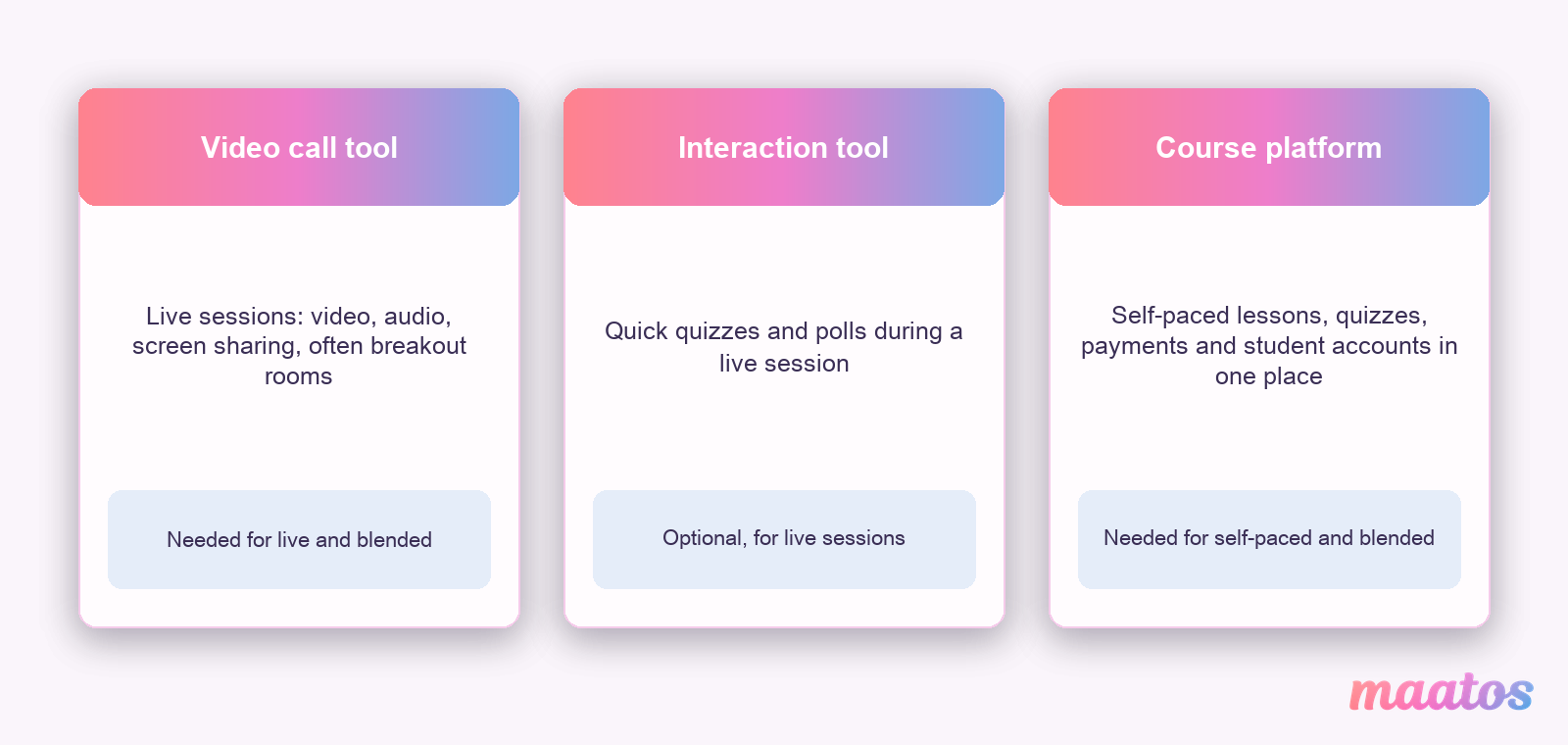
For live sessions you need a video call tool. Zoom, Microsoft Teams and Google Meet all handle the basics: video, audio and screen sharing. All three offer breakout rooms, but not on every plan (the free versions of Google Meet and Teams lack them, for example). Breakout rooms let you split a group into small teams for an exercise and bring them back. If you plan larger sessions where most people watch and a few ask questions, look at a webinar setup instead. We explain how to run your first webinar for free.
For interaction you can use a quiz or poll tool such as Kahoot or Mentimeter. A three-question quiz at the start or end of a live session tells you in thirty seconds whether the last part landed, and students enjoy it more than you would expect.
For self-paced teaching you need a course platform: the place where your videos, texts, quizzes, downloads, payments and student accounts live together. That is what a learning management system does; our guide to what an LMS is explains the parts. On a self-paced course the platform also does the interaction work that a quiz tool does live: Maatos, for instance, has built-in quizzes, certificates, a forum where students ask questions and help each other, and a student overview where you see progress and where people get stuck.
Prices and features of all these tools change often, so check them on the day you choose. And start with the smallest set that works. You can add a tool when you notice you miss something; removing one that your students have got used to is much harder.
A stable internet connection
Your connection is the one thing you cannot work around during a live session. Zoom’s own support pages recommend about 3.8 Mbps upload and 3.0 Mbps download for 1080p HD video in a group call, and 2.6 Mbps up and 1.8 Mbps down for 720p. Seeing the whole class in gallery view needs about 2 Mbps download for 25 video tiles and 4 Mbps for 49. Screen sharing on its own needs very little. Those figures are for one call; leave headroom if other people in your home are streaming at the same time. A wired Ethernet cable is more stable than wifi, and a phone hotspot is a decent backup if your line drops mid-lesson. For self-paced teaching the connection matters less, because a dropped upload can simply be restarted.
A computer that keeps up
A laptop or desktop with enough power to run a video call, share your screen and keep a few browser tabs open at the same time. A tablet or phone works for joining a call, but multitasking on a small screen is hard, so it makes a poor main teaching device. A second monitor is optional but lovely: your slides or notes on one screen, the students and the chat on the other.
Audio that does not tire people out
Students forgive average video much faster than bad sound, because your voice carries the lesson. A USB microphone or a decent headset beats a built-in laptop microphone, mostly because it picks up less of the room. Test your levels before every live session and before every recording day, so students hear you clearly without turning their volume up and down. Our piece on course video audio quality explains why a better microphone often does more than a better camera.
A space without distractions
A quiet room, a door that closes, and the people you live with knowing when you are teaching. Keep the background simple, real or virtual, so attention stays on you and your material. Light your face from the front: daylight from a window works well, and a small adjustable lamp covers the dark months.
Extra tools that help you explain
Beyond the basics, a few tools make explaining easier: screen sharing to show a process step by step, a digital whiteboard to sketch while you talk, and the poll or quiz tools mentioned above to check understanding. Add them one at a time, and only when you have a lesson that needs them. A setup students find easy to follow is worth more than an impressive one.
How do you keep students engaged online?
In a classroom you see when people drift off. Online you mostly do not, so you have to design for attention instead of reacting to it. This is where varied material earns its place.
Why mixing formats works
Mixing formats is not about decoration. Diagrams and short demonstrations make abstract ideas concrete. In a recorded lesson, a question or a small task every few minutes turns watching into doing, and people remember what they did better than what they heard. Variety also gives everyone something to hold on to: some of your students will get the idea from the diagram, others from your story, others only after they try it. And alternating text, images and sound is simply less tiring than an hour of one talking head. If you want the theory behind why this works, our guide to how people learn covers the four learning theories in plain language.
Formats worth using
The workhorse is the short instructional video that explains one thing step by step, with a real demonstration where you can, followed by a quiz inside the course so students check their understanding straight away and get feedback immediately. Slides help when they carry images and a few words rather than paragraphs, and audio or podcast-style versions suit students who learn on the way to work. Round it off with a discussion space, a forum or a live chat, where students talk to you and to each other.
How long should those videos be? There is real research here. Guo, Kim and Rubin studied 6.9 million video sessions across four edX courses and found that median engagement time was at most 6 minutes, regardless of total video length, and that students often watched less than half of videos longer than 9 minutes. Their advice was to plan lessons in chunks shorter than 6 minutes. That was free online courses, not paid ones, but it is a sensible default. Our piece on micro lessons versus long videos helps you decide when a longer lesson is still worth it.
Design tips that save you rework
Keep each piece focused on one idea; if a lesson needs a second “and also”, it is probably two lessons. Use clear visuals and clean sound, because both shape how credible you seem. Put videos, quizzes and readings in a logical order so each one sets up the next. And make it accessible from the start: captions on videos and alt text on images help deaf and blind students, and they also help everyone watching on a train with the sound off. Our guide to online course accessibility has the practical checklist.
Seven habits of online lessons students stay for
- Say upfront what students will be able to do after the lesson, in plain words. Confusion is harder to repair online than in a room where someone can raise a hand.
- Build a question, a quick quiz or a small task into every lesson. It keeps people with you and tells you how the material lands.
- Give the course a visible structure: modules with one clear goal each, so nobody loses track of where they are. Our guide to a course outline students finish shows how.
- Switch formats. Video, then a task, then a short text, then a discussion.
- Get students talking to each other, not only to you. A forum, a group exercise or a live question hour turns separate viewers into a group.
- Give feedback often, and make it specific and kind. Feedback is what turns information into learning. If you want useful feedback back from your students, we collected 22 questions that get useful answers.
- Be reachable. Tell students how to ask a question and how fast you answer. On a self-paced course that might be the course forum; on a live course, a fixed slot after each session.
Why your personality is the part nobody can copy
There are thousands of courses on most subjects. There is only one with you in it. Students stay more engaged when they feel they know their teacher a little, so let them. Tell the story of a mistake you made in your own work. Use the tone you would use with a client you like. Make the joke if it fits. Show that you still enjoy the subject, because enthusiasm is contagious, on a screen as much as in a room. You do not need to become a presenter. You need to stop hiding behind the slides.
What are the most common mistakes in online teaching?
Most first online courses do not fail on content. They fail on two quieter things: pacing and subject choice. If you have bought a ready-made course to teach from, both still apply, and adapting premade courses to your own teaching style is mostly about fixing these two.
Getting the pace wrong
Too fast and students feel lost; too slow and they get bored and leave. The fix starts with knowing what your students already know, so ask them before or at the start of the course. Then cut the material into small chunks with a short video, a question or a task between them, so people can digest one idea before the next arrives. If you release content over time, keep a steady rhythm: a new module every Monday builds a habit, an irregular schedule breaks it. And build in moments where students tell you how it is going, such as a one-question check at the end of each module, so you can adjust the pace instead of sticking to a plan that is not working.
Choosing the wrong subject
Teaching what you love matters, because your energy shows. But it has to meet a real need, or nobody enrols. Look at what people in your field actually ask about, in forums, comments and your own inbox. Stay where your knowledge is deep: students pay for expertise, and shallow knowledge shows the first time someone asks a hard question. A narrow topic often beats a broad one, because “bookkeeping for freelance photographers” finds its people faster than “bookkeeping”. And test the idea before you build the whole thing: a short survey, a waiting list, or a few paid pre-sales tell you more than any amount of planning. Our guide to a lean first course walks through that test.
Fixing pacing makes your course easier to finish; fixing the subject makes it easier to sell. Both pay off from your very first cohort.
How do you handle technical problems?
Technology that fails is the biggest source of frustration in online teaching, and most of it is preventable. The main rule is to test everything before it matters. Before a live session, check your camera, microphone and screen sharing in the actual tool you will use. Before you open a self-paced course, play every video, open every download and click every link as if you were a student. A run-through with one or two friends, set up the way our guide to practising your teaching before you publish describes, finds the problems you are blind to.
Have a small backup plan: your phone as a hotspot, the session link saved somewhere you can find it from another device, and the slides on a second device. For students using a tool for the first time, a short written guide or a two-minute video saves you a dozen emails. And when something does break mid-lesson, stay calm and say what is happening. Students mostly mirror your reaction. A teacher who says “my connection dropped, give me one minute” loses far less than one who panics.
How do you get started with online teaching?
There are three main routes to your first paying students, and they suit different people. Most teachers use more than one over the years.
Teaching through tutoring marketplaces
Tutoring marketplaces connect you with students who are already looking for a teacher. Preply and italki, for example, are best known for language lessons, and other services focus on school subjects. They usually take care of finding students, payments, scheduling and some of the support, so you can focus on teaching. Many ask you to apply, and some want proof of qualifications or a background check, which helps students trust you. You can start teaching quickly and you get feedback from real students.
The price is a commission or service fee on every lesson, and you work under the marketplace’s rules, pricing pressure and brand. Your students are the platform’s students: if you leave, they mostly stay. Check each platform’s current fee terms before you sign up, because they change. Some names from older guides have gone or changed: Chegg Tutors closed in 2021, and that same year VIPKid ended its core programme of overseas teachers for students in mainland China after China’s tutoring rules changed. That is a useful reminder of how much depends on a platform you do not control.
Selling courses on course marketplaces
If you prefer recorded courses, course marketplaces such as Udemy and Skillshare let you publish a course and reach their existing audience. You design the curriculum, record the lessons, add quizzes and downloads, and then the marketplace shows your course to its visitors. It is a reasonable way to test whether people want what you teach.
The trade-offs are similar to tutoring marketplaces. Udemy takes a share of each sale (how much depends on who brought the buyer in) and pushes discounts; Skillshare pays teachers from a subscription pool based on minutes watched, so you set no price at all. On both you have limited control over branding and how much you can contact your students. You still market your course yourself if you want it to sell well. Hosted course platforms such as Teachable are a different thing: they give you your own school instead of a spot in a shared catalogue, which brings you closer to the next route.
Building your own course website
The third route is your own course platform: your domain, your brand, your prices and your student list. You do the marketing, because no catalogue sends you buyers. In return you keep the relationship with every student, you decide the price and the format, and you can sell subscriptions or extra products alongside your courses. Pricing is a choice you make deliberately here, and our guide to course pricing models that convert helps with that.
This route used to require a web developer. A hosted platform has changed that. On Maatos you build the course with a drag-and-drop course builder, design the site with a drag-and-drop web editor, add video, audio and PDFs, and take payments through Stripe or Mollie, with VAT calculated automatically and invoices sent to your customers. You stay the seller, so if you sell to students in other EU countries the VAT rules for digital courses are still your responsibility; our guide to VAT on online courses in the European Union explains them. And if you would rather not design the site yourself at all, the done-for-you service builds it in your style.
Blending online and offline teaching
Online does not have to mean only online. Many teachers combine a self-paced course with in-person workshops, retreats or practice days, so students get the flexibility of recorded lessons and the depth of a day together. You can sell offline workshops from your course website next to your online courses, so it all lives in one place. On Maatos, the Premium plan includes an integration for live and in-person courses and a calendar for booking appointments.
Combining the routes over time
These routes are not either/or. A common path is to start on a marketplace to gain teaching experience and reviews, then build your own course website once you know what students ask for. Some of those students follow you, and the marketplace keeps sending new people your way while your own site grows. Others go the other way: they launch on their own site with a small group and use a marketplace later as an extra sales channel. What matters is that you know which part of your business you own.
Tools that make starting easier
Whichever route you take, choose tools that take the technical work off your plate. On your own platform, that means a course builder you can use without code, payments you can connect in a few clicks, and a design that matches your brand without hiring a designer.
The right route depends on how comfortable you are with technology and marketing, and how much independence you want. All three can lead to a sustainable teaching income. Only one of them gives you a domain, a student list and prices that are yours.
A realistic first week of online teaching
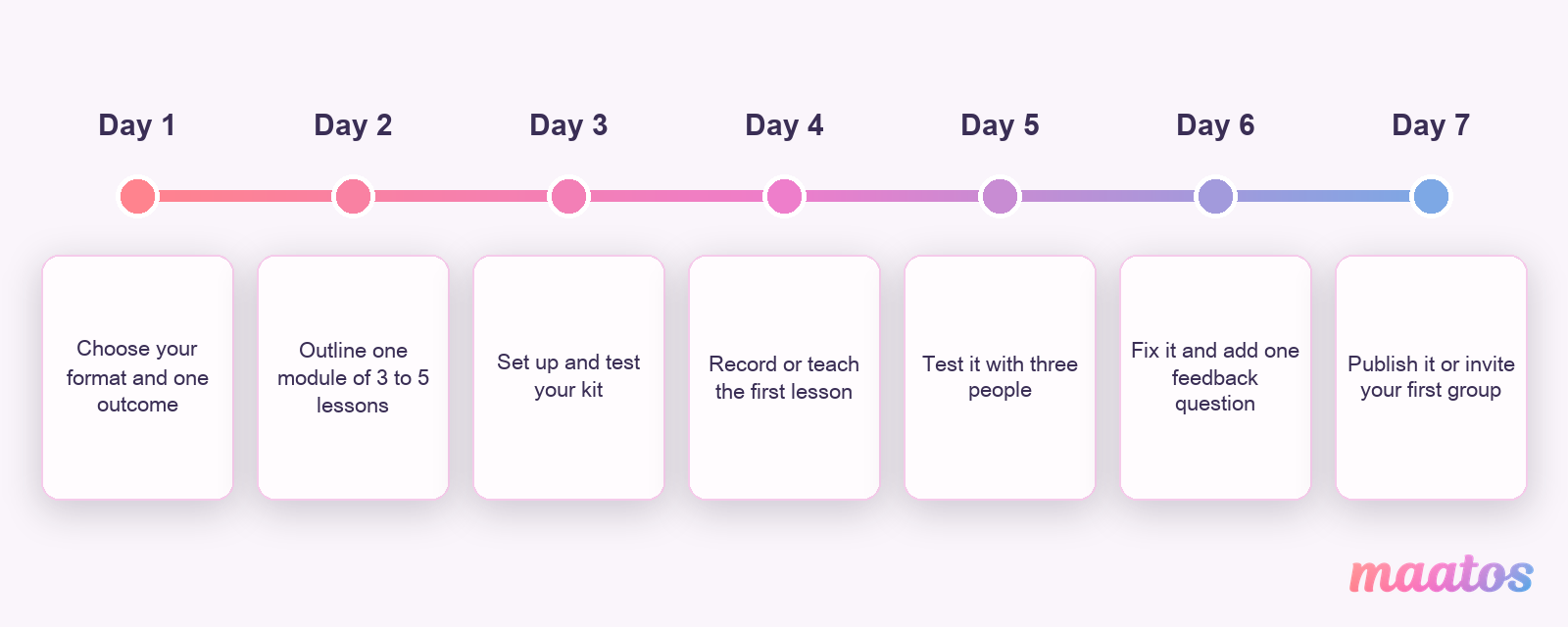
Starting feels overwhelming until you cut it into days. Here is a first week that gets one real lesson in front of real people, without pretending you can build a whole course in seven days.
-
Choose your format and one outcome. Live, self-paced or blended, using the questions from the start of this guide. Then write one sentence: “After this lesson, you can…”. Our guide to writing clear learning outcomes helps you make that sentence concrete.
-
Outline one module. Not the whole course. Three to five short lessons that lead to that one outcome, in a logical order from basic to harder.
-
Set up and test your kit. Microphone, camera, light, the video call tool or the course platform. Record thirty seconds and listen back with headphones.
-
Record or teach the first lesson. Keep it short. Done is better than polished: you will redo it after the feedback anyway.
-
Test it with three people. Friends, former clients or colleagues. Watch where they hesitate, and ask what was unclear.
-
Fix what they found and add one feedback question. A single question at the end of the lesson (“What was the most useful part, and what was unclear?”) gives you more than a ten-question form.
-
Publish it or invite your first group. A free pilot lesson, a small paid cohort, or your first lesson on your own site. Then listen.
If you want the full process for building a course from scratch after that first week, our step-by-step guide to creating an online course picks up where this plan stops.
Where is online teaching heading?
Online teaching has become normal, and a few forces are shaping it. None of them change the basics in this guide, but they shape what students expect.
What is driving the growth
Technology is the first driver. AI tools now help teachers draft quiz questions, create transcripts and captions, and summarise lessons, and adaptive learning systems can suggest the next lesson based on how a student did on the last one. Useful, as long as you check what the tool produces: an AI-drafted quiz question with a wrong answer key does more damage than no quiz. If you use AI to help write your lesson scripts, our prompts for course scripts keep your own voice in charge.
Flexibility is the second. Adults with jobs and families fit learning into evenings, lunch breaks and commutes. That favours self-paced and blended formats, and it is why short lessons that work on a phone matter.
The third is reach. The internet makes niche expertise viable. A course on a rare craft, a small language or a specialist professional skill may have too few students in one city, but enough across a continent.
Trends worth knowing
Microlearning means short lessons focused on one idea, often with a quick quiz or a single visual. They fit busy schedules and the attention research above.
Gamification adds points, badges and progress bars, which can motivate some students, especially in long courses. Use them lightly: a visible sense of progress usually does more than a leaderboard, which can discourage the people at the bottom.
Mobile learning is simply reality now: many students watch your lessons on a phone. A course site that works well on small screens is no longer optional; our guide to a mobile-friendly course website covers what to check.
Learning communities are the fourth trend. Students increasingly expect to learn with other people, not only from a teacher. Forums, cohort groups and live question hours recreate the classroom feeling online and help people stay to the end.
Where the opportunities are
Professional development keeps creating demand: people retrain, learn new tools, or need a certificate for their job. Practical skills in technology, languages, health and wellbeing, and creative work tend to be steady areas, and every profession has its own niche topics that general platforms cover badly. Teachers who listen to what their audience asks for, rather than following the latest hype, find those gaps first.
Data helps you improve once students are in. A student overview that shows progress and where people get stuck tells you which lesson to rewrite next, and our guide to student engagement metrics that matter explains which numbers to watch.
Do you need tech skills or subject expertise?
Both, but not in equal measure on day one. Your subject knowledge is the reason anyone signs up. Your technology skills decide whether that knowledge reaches them without friction.
Why both matter
Deep subject knowledge lets you design meaningful lessons, answer the hard questions and explain the same idea in three different ways when the first one does not land. That is what students pay for, and it is what builds their trust.
Technology skills let you present that knowledge clearly: running a video call smoothly, editing a short video, setting up a quiz, organising lessons on a course platform. You do not need to be technical. You need to be comfortable enough with your own tools that they disappear in the background while you teach.
Keep learning, one tool at a time
Tools change, and student expectations change with them. You do not have to follow every update. Pick one skill per month to get better at, from a tutorial, a webinar or a short course. Try one new format at a time, a quiz in your next live session or a short demonstration video instead of slides, and see how students respond. And ask your students what works for them: they will tell you if the platform is confusing or a video is too long, often before you notice it yourself.
Good subject knowledge with simple, well-used technology beats brilliant technology with shallow knowledge every time.
Practical ways to build both
Start small: one new tool, used properly, before you add the next. Join a community of other teachers or course creators, online or local, where people share what works. Look at the data your platform gives you, such as completion and quiz results, to see where the technology helps and where it gets in the way. And stay flexible: if students respond better to a different structure or format, change it. Your first version is not your final version.
Frequently asked questions about online teaching
What do you need to start teaching online?
A computer with a stable internet connection, a decent microphone and webcam, and a place to teach. For live lessons that is a video call tool such as Zoom, Microsoft Teams or Google Meet. For self-paced lessons it is a course platform where your videos, quizzes, payments and students live together. Beyond that, you need a clear plan and knowledge you enjoy sharing.
Is online teaching hard if you are not technical?
No. Most tools are built for people without a technical background, and a hosted course platform handles the hosting, security and payments for you. Start with one lesson, test it with a few people, and add tools only when you need them.
What is the difference between live teaching and an online course?
In live teaching everyone meets at the same time in a video call: personal and responsive, but it costs your time every single session. An online course is recorded once and students follow it whenever it suits them, so you can sell it many times without extra hours. Many teachers combine the two.
How long should online lessons be?
For recorded lessons, short is safer. A large study of edX courses found that median engagement time was at most 6 minutes, regardless of video length, so plan lessons in chunks shorter than 6 minutes and split longer topics into several lessons. Live sessions can run longer, but build in a task or a question regularly, so nobody only listens for long stretches.
Can you make money teaching online?
Yes. Live tutoring earns you money per hour; a self-paced course can be sold again and again without extra teaching time. On your own platform you set your own prices and keep the student relationship. On marketplaces you trade part of your revenue for their audience.
How do you keep students’ attention online?
With variety and interaction. Alternate video with tasks and quizzes, keep each part short, ask questions, give feedback, and let your personality show. A lesson where students have something to do keeps them far better than one where they only listen.
Start with one lesson
Online teaching is not something you finish preparing for. You learn most of it from your first real students, which is why the best first step is small: one format, one outcome, one lesson in front of real people. If the course route fits you, build that first lesson on your own platform. You can try Maatos free for 30 days and have your first module online before the trial ends.