

You know your subject inside out. You have taught it in rooms, on calls, over coffee. And then you decide to put it online, and within an afternoon you are staring at a dozen tools that all promise roughly the same thing in roughly the same words. One acronym keeps turning up in the middle of all of it: LMS.
An LMS (learning management system) is software for building, delivering and keeping track of online courses. Your lessons, your students, their progress, their quiz results and their certificates all live in one place instead of scattered across a video host, a folder of PDFs and a long email thread.
That is the short answer. The longer answer is more useful, because “LMS” covers everything from a university system serving forty thousand students to the platform a single coach uses to sell one course. Below is what an LMS actually does, how it differs from the four other terms people use as if they meant the same thing, what the different types cost, and — the part almost nobody writing about this will tell you — how to work out whether you need one at all.
What does LMS stand for?
LMS stands for learning management system. It is worth pulling the three words apart, because each one is doing real work:
Learning is the content: your videos, audio, documents, slides, quizzes and assignments. Management is the part that separates an LMS from a folder of files — enrolling people, deciding who sees what and when, and recording what they did. System means it holds all of that together in one login, for you and for them.
You will also see it written out as “learning management system” in full, and in Europe you will occasionally hear VLE used to mean the same thing. More on that in a moment.
So, what does an LMS actually do?
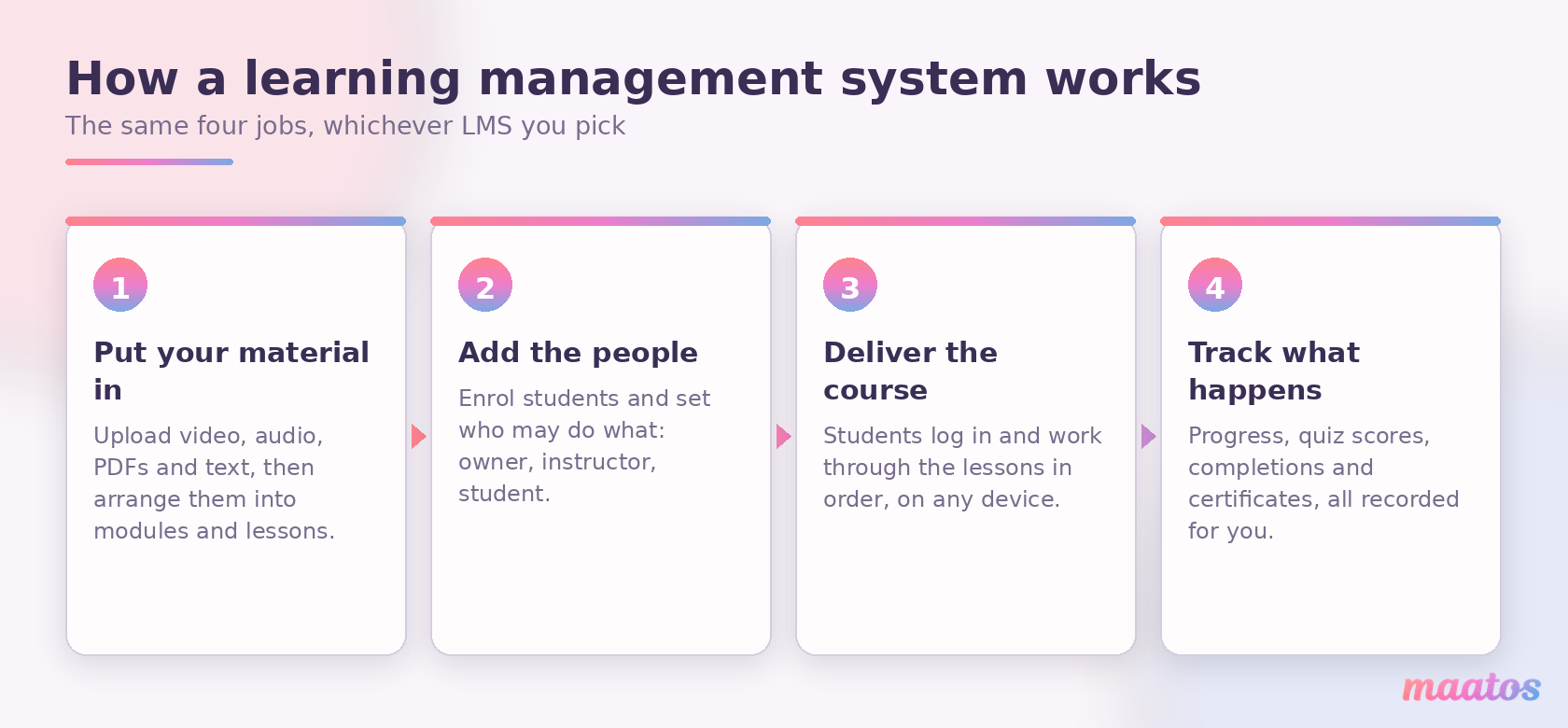
An LMS does four jobs, and every system on the market is a different opinion about how to do them. Whatever you end up choosing, the shape of the work is the same.
First, you put your material in. You upload video, audio, PDFs and text, then arrange it into modules and lessons in the order you want people to meet it. Because all sorts of media can be used, you are not forced into one teaching style — you can film yourself, screen-record a demonstration, write, or mix all three.
Second, you add the people. Students get accounts, and you decide what each type of account may do. Third, the LMS delivers the course: students log in, work through the material, and pick up where they left off, usually on whatever device is nearest. Fourth — and this is the job a pile of files can never do — it tracks what happens. Who started, who finished, who scored what, who stopped dead in module three.
That fourth job is the one people underrate before they start teaching online, and the one they rely on most after six months. Knowing that eleven of your last twenty students quit at the same lesson is not an admin detail — it is the single most useful thing anyone will ever tell you about your course.
Who does what: the three roles
Almost every LMS splits people into three kinds of account, and understanding the split saves confusion later. The owner or administrator controls the platform itself: settings, payments, branding, who else gets access. The instructor builds and runs courses, answers questions and sees results. The student can see only what they are enrolled in.
If you are a company or a school, those are three different people, and the permission model matters a lot. If you are a solo course creator, all three are you — which is exactly why enterprise systems built around elaborate role hierarchies tend to feel like wearing a suit three sizes too big.
What are the benefits for instructors?
The biggest benefit of an LMS for you as an instructor is that it brings teaching and selling into the same place. You get a proper website — with a blog, sales pages, and whatever else you need — and behind it the machinery that a normal website simply does not have: enrolment, progress, quizzes, certificates and access rules.
You can build a genuine learning experience rather than a video dump. Forums and comment sections let students talk to you and to each other, and you can release material to specific people at specific moments instead of handing everything over on day one. If you have ever wondered whether to drip-feed lessons or open the whole thing at once, that is a real decision with real consequences, and we have written about drip, cohort and self-paced delivery separately.
Then there is the money. On your own platform, the revenue is yours. There is no marketplace taking a percentage of every sale, no algorithm deciding which of your courses gets shown this week, and no risk of a competitor’s course appearing underneath yours on your own page. You pay a subscription for the platform and keep what you earn — a difference that compounds quietly and quickly, which is why we made the arithmetic explicit in the case against platform fees and in the long-term benefits of owning your course website.
You also own the relationship. Your students’ email addresses are yours, your domain is yours, and your reputation accrues to you rather than to a marketplace brand. If setting all of this up sounds like more than you want to take on, that is a normal reaction — it is why Maatos offers a done-for-you service, where we build the platform around your course while you concentrate on teaching. You can also just look through the features and see what the thing actually does before deciding anything.
What are the benefits for students?
An LMS is only worth having if your students find it worth using, so it is fair to ask what they get out of it.
Mostly they get one place to go. Everything you have made sits in a single, organised environment instead of arriving in fragments across email, a file-sharing link and a video platform. They can see how far along they are, come back to a lesson they half-understood, and find the community you have built around the subject. That centralisation quietly changes how they see you: you stop being someone who sent them some videos and become the person they go to when they need to know something about this topic.
They also get to learn at their own pace, on their own schedule, on the device they happen to have. And the personal feel of your own branded environment does more than people expect — a course that lives on your site, in your colours, with your voice running through it, is experienced differently from the same lessons uploaded to a marketplace that hosts ten thousand other courses.
None of that runs on autopilot. Students still need answers to their questions and a reason to come back, and keeping them engaged is its own craft. If you want more students to reach the end, quizzes that build confidence rather than anxiety and certificates people actually care about both do real work. And if what you want is simply more students, we have written a whole piece on how to sell your course more often.
LMS, LXP, CMS, VLE or course platform: what is the difference?
Five terms get used as though they were interchangeable, and they are not. Buying the wrong one is a genuinely expensive mistake, so here is the short version.
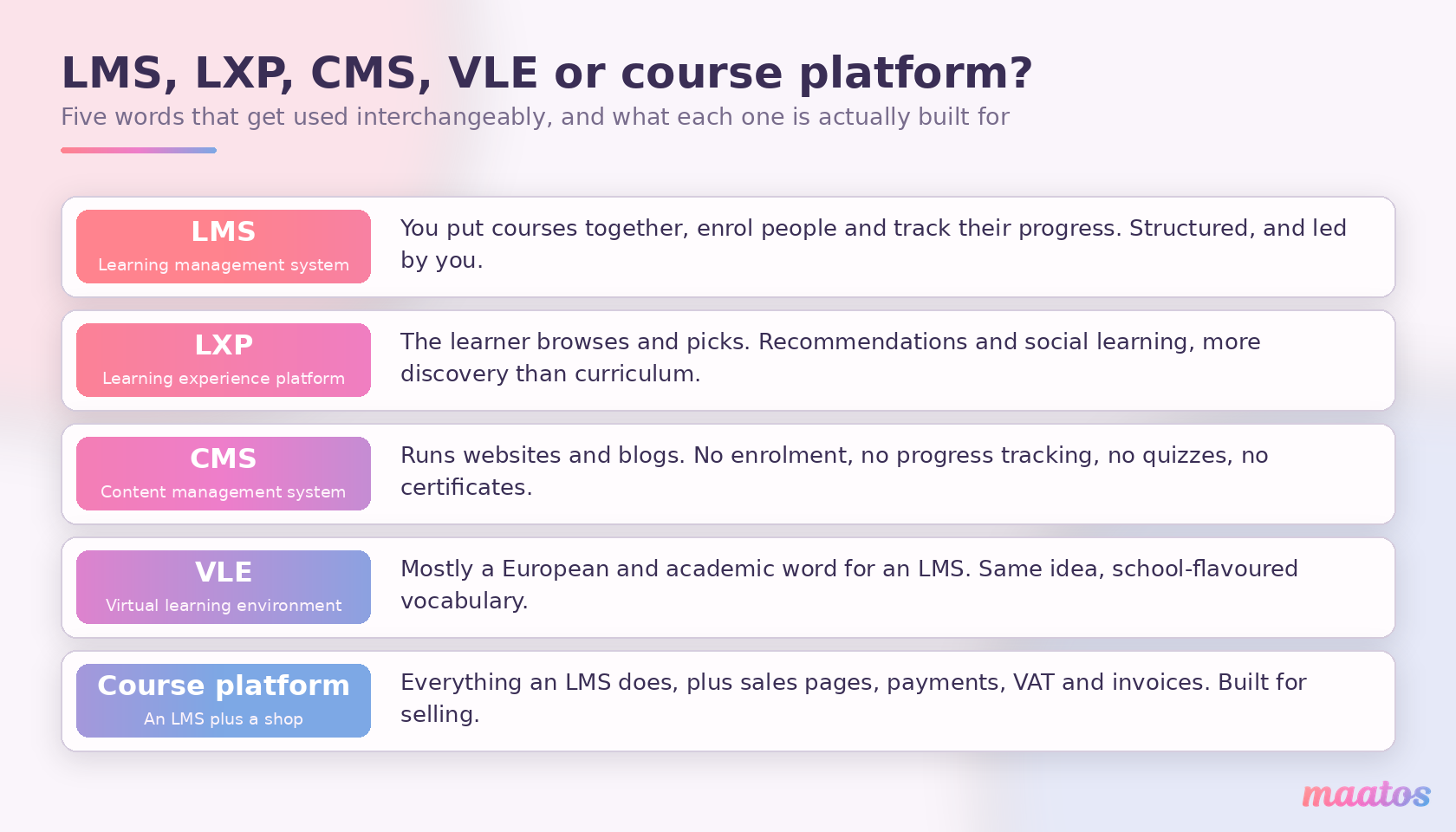
An LXP (learning experience platform) is the one you will most often see set against an LMS. The difference is who is steering. An LMS is led by you: you assemble a course, enrol people and follow their progress. An LXP is led by the learner, who browses a library, follows recommendations and picks what to look at next — closer to a streaming service than to a curriculum. Large organisations sometimes run both. If you are making a course and selling it, you want an LMS.
A CMS (content management system, of which WordPress is the obvious example) runs websites and blogs. It is excellent at publishing pages and completely uninterested in learning: no enrolment, no progress tracking, no quizzes, no certificates. Plenty of people bolt an LMS onto a CMS, and if you are weighing that up, CMS or LMS: which do you need? goes through the decision properly.
A VLE (virtual learning environment) is largely a European and academic word for an LMS. The feature overlap is nearly total; the difference is vocabulary and emphasis, with VLE carrying more of a school and university flavour.
And then there is what you might call a course platform — an LMS with a shop attached. Everything the LMS does, plus sales pages, checkout, payments, VAT handling and invoices. It is a meaningful category precisely because a system built for a company’s internal training has no reason to know how to take money from a stranger in another country, and a system built for selling has to.
What types of LMS are there?
The types of LMS differ mainly in one respect: who is responsible for keeping the software running. That single question decides most of the others, including what it really costs you.
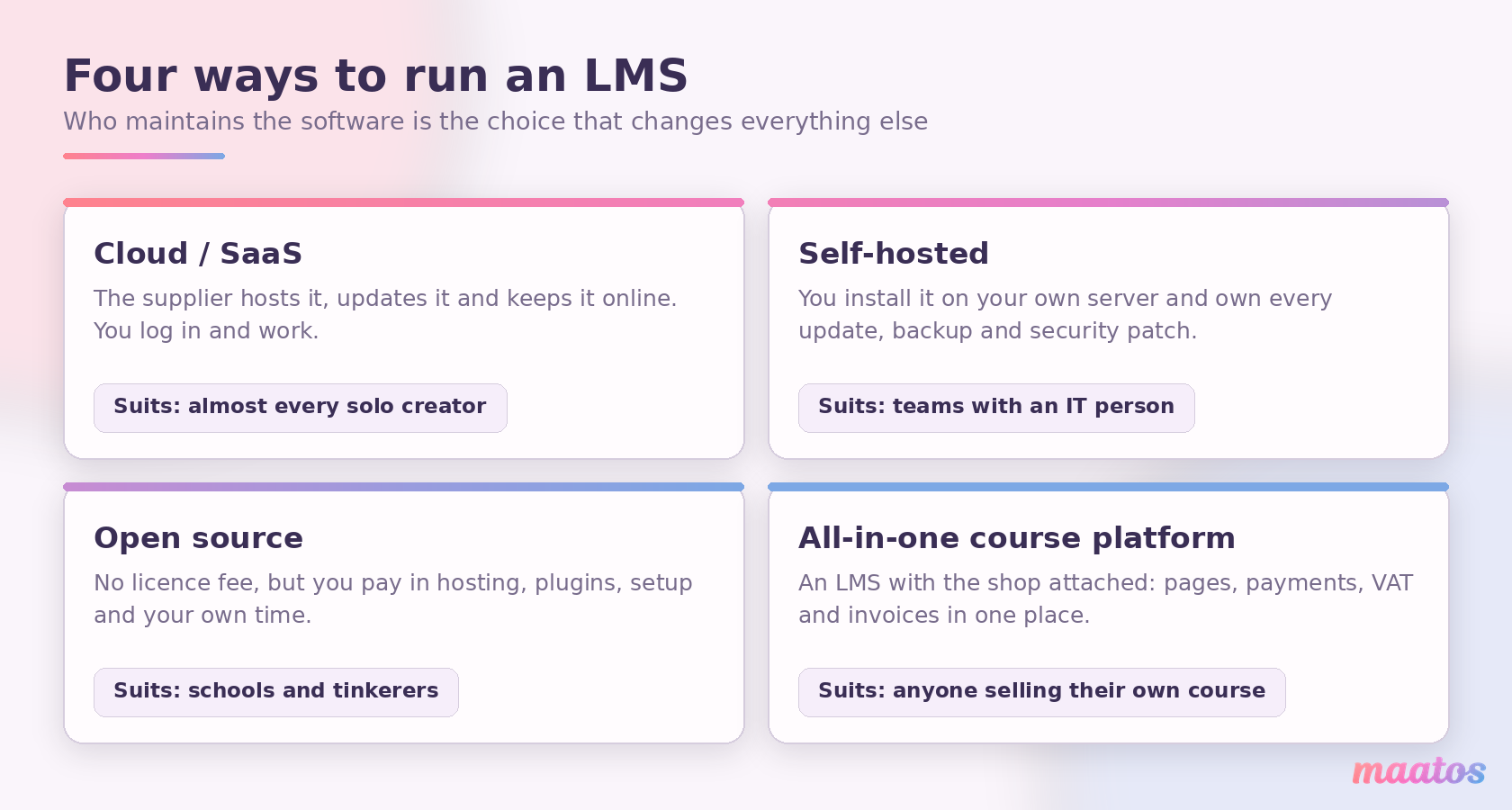
With cloud or SaaS software, the supplier hosts it, updates it, backs it up and keeps it online, and you simply log in and get on with your course. For almost any individual creator this is the sensible default, for the unglamorous reason that server maintenance is a job, and it is not the job you signed up for.
Self-hosting means installing the software on your own server, which buys you complete control and hands you complete responsibility: updates, backups, security patches, and whatever happens at two in the morning when something breaks. It makes sense when you have someone technical on hand, or strict rules about where data must physically live.
Open source is where the arithmetic misleads people. Moodle is the best-known example and it really is free to download — it is just not free to run. You pay in hosting, in plugins, in setup, and above all in your own hours. That trade is excellent value for a school with technical staff and poor value for a solo creator whose time is the scarcest thing they own. We have put the two side by side in open source versus SaaS course platforms.
Finally there is the all-in-one course platform: an LMS with the commercial side already attached, so pages, payments, tax handling and invoices come in the same box. This is the category Maatos is in, and it exists because people selling their own courses kept having to glue three tools together to do one job.
A quick note on the fear that stops a lot of people here: no, you do not need to be able to code. Not for the cloud options, anyway. We wrote do you need to code to build a course website? and the skills you actually need because it is the question we are asked more than any other.
SCORM and xAPI: do you actually need them?
Look at LMS software for more than an hour and you will meet two acronyms that sound important and mostly are not, for most readers of this article.
SCORM (Sharable Content Object Reference Model) is a long-standing standard for packaging course content so it can be moved between systems. Build a module in one authoring tool, export it as a SCORM package, drop it into any SCORM-compatible LMS, and that LMS will play it and record completions and scores. xAPI — originally called Tin Can — is the more flexible successor. It can record learning that happens outside the LMS entirely, writing those records to a separate store known as an LRS (learning record store).
Here is the part the buyer’s guides tend to skip. If you sell courses to companies, SCORM or xAPI support may be non-negotiable, because your client wants to run your material inside the system they already have. If you sell directly to individuals, you can almost certainly ignore both. Your students are not going to import your course into anything; they are going to log in and watch it. Do not pay a premium for standards compliance you will never use — but do check before you commit if corporate clients are anywhere in your plans, because retrofitting this is painful.
What does an LMS cost?
There is no single answer, because “LMS” spans free software you host yourself and enterprise contracts negotiated by procurement departments. What you can do is understand the two things that determine your bill.
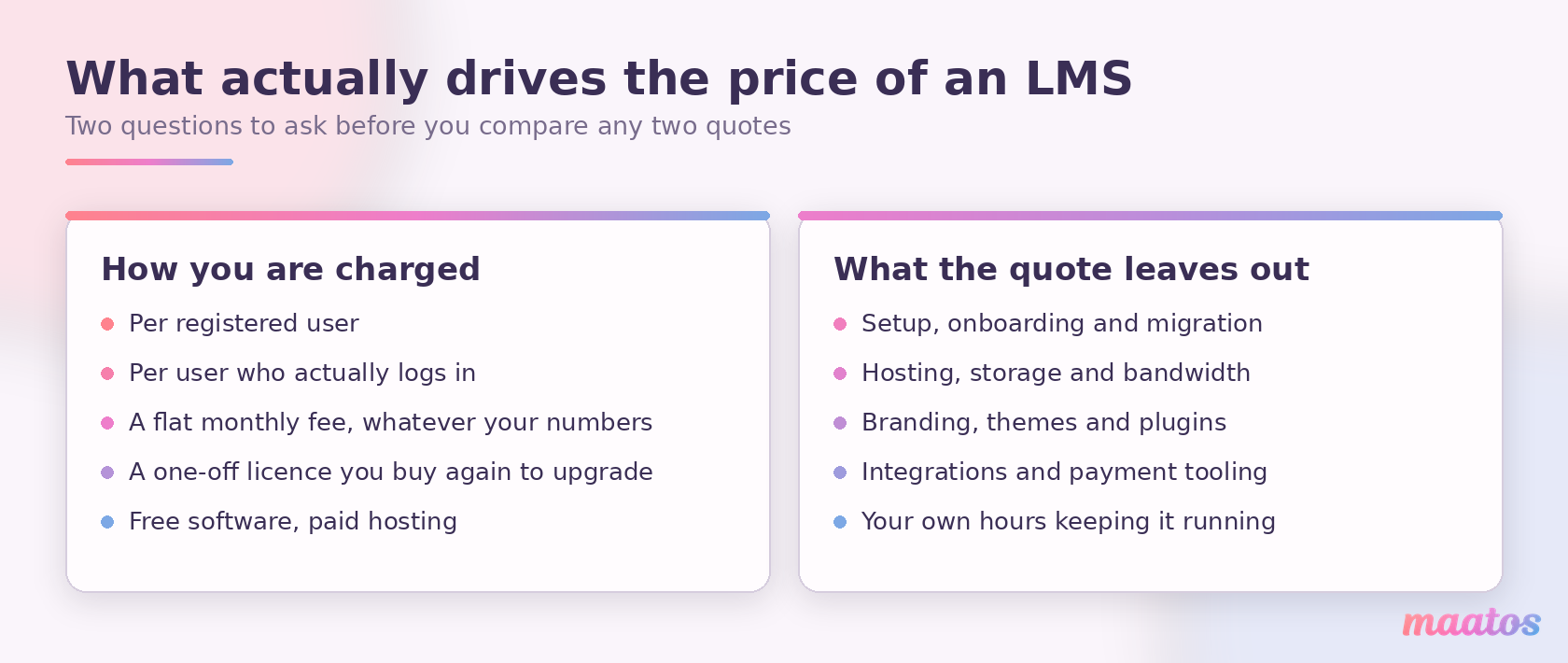
The first is the pricing model. Some systems charge per registered user, which punishes you for every account that ever existed. Some charge per active user — only the people who actually logged in during the month — which is kinder if your student numbers are lumpy. Some charge a flat monthly fee regardless of numbers. Some sell a perpetual licence you buy once and buy again when you want the next version. And open source charges nothing for the software and everything for the hosting.
The second is what the quote leaves out. Setup and onboarding fees. Data migration. Hosting, storage and bandwidth. Branding and themes. Plugins for things you assumed were included. Integrations with your payment provider and email tool. And your own hours, which are real money even when no invoice arrives.
We are not going to quote competitors’ prices here, for the simple reason that they change constantly and half the figures circulating in comparison articles are already wrong. Go to the pricing page of anything you are considering and read it yourself.
What we can be exact about is our own. Maatos is a flat monthly fee rather than a per-user one: Basic at €49 per month excluding VAT (€40.83 per month billed annually) for up to three courses, Premium at €99 (€82.50 annually) for up to fifteen courses, which adds subscriptions, payment in instalments and booking for live sessions, and Complete at €199 (€165.83 annually) for unlimited courses plus the selling machinery — an affiliate system, sales funnels, order bumps, upsells and A/B testing. Hosting, secured media storage and the course builder are in every plan, and the first 30 days are free. There is also a Builders plan at €10 per month that gives you every feature except students, for the very common situation where the course is going to take longer to build than you first thought. Since we just told you to look for the thresholds, here are ours: no plan charges you per student, but past roughly 5,000 active monthly users we will get in touch to talk through the options, and a single course running much beyond about 200 lessons sits better on a higher plan. The current figures are always on the pricing page.
Do you actually need an LMS?
Almost nobody in this corner of the internet will ask you that, because almost everybody writing about learning management systems is selling one. So, honestly:
If you are running one short course for a handful of people you already know, you may not need an LMS yet. A shared folder, a video link and an email will get you through a first cohort, and there is nothing embarrassing about starting there. Selling something before you build the platform for it is often the smart order to do things in.
You need an LMS when the manual version starts costing you more than the software would. The signals are consistent: you are sending the same access email over and over. You have lost track of who paid and who did not. Someone asked for a certificate and you made one in a word processor. You want to know where people give up and you have no way to find out. You would like to sell the course while you sleep. Any two of those together and the spreadsheet era is over.
And the case gets more urgent once you are taking payments from other countries, because tax on digital sales is the part that turns admin into a genuine risk. Maatos applies the VAT rules you configure and sends the invoices out by itself, which is less exciting than a feature list but saves more evenings. What no platform can do is decide your position for you — you are the seller, so knowing what you have to charge and where stays with you. If you would like to understand that obligation rather than just automate the paperwork, we have a plain-language guide to handling VAT and sales tax on digital courses.
Your own platform, or a marketplace?
This is the decision underneath the LMS question, and it deserves stating plainly because the two options are not really competing on features.
A marketplace brings you an audience. That is a real benefit and it is why they work. In exchange, it takes a share of every sale, sets the discounting rules, keeps the customer relationship, and lists competing courses next to yours. Your students are the marketplace’s students who happen to have bought from you.
Your own platform brings you no audience at all. You have to build that, which is slower and harder, and anyone who tells you otherwise is selling something. In exchange you keep the revenue, the email list, the pricing decisions, the branding and the relationship. You can raise your price without asking permission. You can email your students without paying for the privilege.
Neither is objectively right. What tends to be true is that the marketplace is a reasonable way to start and a poor place to stay, because everything you build there accrues to someone else. If you are already selling elsewhere and thinking about the move, moving your course to your own platform without losing students walks through it step by step, and Maatos compared with Skool covers one of the specific comparisons people ask about most.
How do you choose an LMS?
Choosing well is mostly a matter of asking the questions in the right order. Features come last, not first.
- Decide who this is for. Internal training for staff, or courses you sell to the public? The answer rules out entire categories immediately, because systems built for one are usually awkward at the other.
- Write down what you must be able to do. Take payments? Issue certificates? Run live sessions? Sell subscriptions? Keep this list short and honest, and separate it from the list of things that merely sound appealing.
- Work out who maintains it. If the answer is not “someone else”, budget the hours properly and then decide again.
- Check what happens as you grow. Does the price jump at a threshold you will cross next year? Is there a per-user cost that scales badly? Ask before you are locked in.
- Ask who owns the data. Can you export your students, your content and your sales records if you leave? A platform confident in its product will say yes without flinching.
- Actually use it. Build one real lesson in the trial, not a test one. The difference between a platform you enjoy and one you tolerate only becomes obvious when you are doing the fiddly work of arranging your own material.
If you want to go deeper on the specifics, building a course platform from scratch and building your own course website pick up where this leaves off, and creating an online course covers the material itself.
Where did the LMS come from, and where is it going?
The idea is older than the web. PLATO, developed at the University of Illinois from the 1960s onwards, put lessons and exercises on networked terminals decades before anyone said “e-learning”. Norway’s NKI Distance Education Network was running fully online courses on its own system, EKKO, from 1987, and is often cited as the first full learning management system — though that title is genuinely contested, which is worth knowing if you assumed all of this came out of Silicon Valley. The category as we now use the word took shape in the late 1990s, when WebCT and Blackboard both arrived in 1997.
As for the future: some of the trends in education currently under way are not going to reverse. Online learning keeps taking a larger share of how people acquire skills, and an LMS keeps getting better at putting the right material in front of the right person at the right moment. Expect that to continue across almost every sector, since almost every sector now trains someone.
Worth keeping your head about one thing, though. A great deal is currently being claimed on behalf of AI in learning software, and not all of it survives contact with reality. Some of it is genuinely useful — spotting where learners struggle, suggesting what to review. Some of it is a feature list riding a wave. A personal reply to a stuck student still beats a clever algorithm more often than the marketing suggests, and if you are going to use AI, using it to help you build the course itself is the version with an obvious payoff.
What is not in doubt is that an LMS has stopped being a filing cabinet for lesson material and become the place a teaching business actually runs. Which leaves the only question that matters: what are you going to do with one?
Setting up your own LMS
If you have read this far, you are probably not researching the term any more — you are working out whether to start. The honest advice is to stop comparing and build one real lesson somewhere, because you will learn more in that hour than in another week of reading.
With Maatos you can do that without any technical knowledge: your own branded course website, the drag-and-drop builder, video, quizzes, certificates and a forum, with Stripe and Mollie handling payments and VAT and invoices taken care of automatically. You can try it free for 30 days and see how your own material feels inside it. If you would rather have it built for you, that is what our done-for-you service is for, and if you are still weighing things up, the full feature list and the plans are the quickest way to see whether we fit. There is plenty more on the practical side of this in our Build Course Website section.
You already have the hard part. The knowledge is yours; this is just the room you teach it in.
Frequently asked questions about learning management systems
The abbreviation “LMS” means learning management system. It is software for building, delivering and tracking online courses, so your lessons, students, progress, quiz results and certificates all sit in one place.
An LMS does four things: it stores and organises your course material, it enrols people and controls who sees what, it delivers the lessons to students on any device, and it records what happens — progress, quiz scores, completions and certificates.
The difference is who decides what happens next. With an LMS that is you: you set the curriculum, fix the order and check who completed what. With an LXP (learning experience platform) it is the learner, choosing from a library the way they would choose a film. LXPs are largely an answer to a big-company problem — thousands of staff and no single syllabus that fits them all.
A CMS (content management system) such as WordPress runs websites and blogs, but has no enrolment, no progress tracking, no quizzes and no certificates. An LMS is built for learning. Many people run a CMS for their marketing site and an LMS for the courses behind it.
In practice, yes. VLE is the term you are far more likely to meet in a British or European university than in a software catalogue, and it carries more of a timetable-and-teaching flavour. If a supplier calls its product a VLE, expect something aimed at institutions rather than at someone selling a course.
They are packaging and reporting standards, so a course built in one tool can be played by a different system and still report scores and completions back. The practical test is who is buying: a corporate client who wants to run your material inside their own platform will ask about them, and a member of the public buying your course will never know they exist.
It depends far more on the pricing model than on the brand. Systems charge per registered user, per active user, a flat monthly fee, or a one-off licence; open-source software is free but you pay for hosting and your own time. Always check what the quote leaves out: setup, migration, hosting, branding, plugins and integrations.
Yes — open-source systems such as Moodle are free to download. They are not free to run, because you take on hosting, updates, security and setup yourself. For a solo course creator that time cost is usually higher than a subscription would have been.
Not for your very first small group — a folder, a video link and an email can carry one cohort. You need one once you are re-sending access emails, losing track of who paid, making certificates by hand, or want to sell while you sleep. Taking payments from other countries is the point at which it stops being optional.
A marketplace brings you an audience but takes a cut of every sale, sets the discounts and keeps the customer relationship. Your own platform brings no audience, so you build that yourself, but you keep the revenue, the email list, the pricing and the branding. A marketplace is a reasonable place to start and a poor place to stay.
Not with a cloud or all-in-one platform, where hosting, updates and security are handled for you and you build courses in a drag-and-drop editor. Self-hosted and open-source systems are a different matter — there you are the one responsible for the server.
Only if it was built for selling. A system designed for internal company training has no reason to take money from a stranger abroad. On Maatos, payments run through Stripe and Mollie, VAT is calculated automatically and invoices are sent to your customers without extra work from you.