
Nobody sets out to write a bad quiz. What happens is that it’s the last thing left before launch, it’s late, and you write six questions off the top of your head about the things you happened to say in the video. The next morning you have a quiz that tests whether someone was awake — not whether they can do the thing you spent four lessons teaching.
That’s the gap ChatGPT is genuinely good at closing. Hand it a lesson’s learning outcome and a few sentences about who’s taking your course, and it will write questions faster than you can type them. The catch is that a lazy prompt — “write 5 quiz questions about email marketing” — gives you exactly the quiz you’d have written at 11pm anyway, only with worse wrong answers. The prompts below brief it properly: on the outcome being tested, on the mistakes your students actually make, and on the level of thinking you’re after. This is the assessment spoke of our wider set of ChatGPT prompts to build your course — that one helps you plan it, the scripting prompts help you say it, and this one checks whether any of it landed.
Can ChatGPT write quiz questions for your online course?
ChatGPT can write a usable draft of a quiz in under a minute, and it is genuinely good at the part most course creators find tedious: inventing three or four wrong answers that are wrong for interesting reasons. What it cannot do is know your subject better than you, and it will occasionally write a question with two defensible answers or a “correct” answer that’s out of date. So every question it produces is a draft that needs your eyes on it — not a finished assessment.
There’s a second thing worth knowing before you start, because it changes what you’re aiming for. Quizzes aren’t only a measuring tool; the act of being tested is itself one of the strongest ways to make learning stick. In a well-known Washington University study, students who were tested on what they’d read remembered substantially more a week later than students who simply reread it (Roediger & Karpicke, Psychological Science, 2006). That’s the real argument for putting a short check at the end of every lesson: not to grade anyone, but to make them pull the answer out of their own head while it’s still warm. If quiz anxiety is your worry, we’ve written separately about building quizzes that improve completion rather than stress — this piece is about getting the questions themselves right.
What should you tell ChatGPT before it writes a single question?
Give ChatGPT four things before you ask for questions — the outcome, the audience, the mistakes and the format — and the first draft comes back close to usable instead of generic. Skip them and you’ll get bland recall questions about vocabulary, because vocabulary is all it can infer from a topic name.
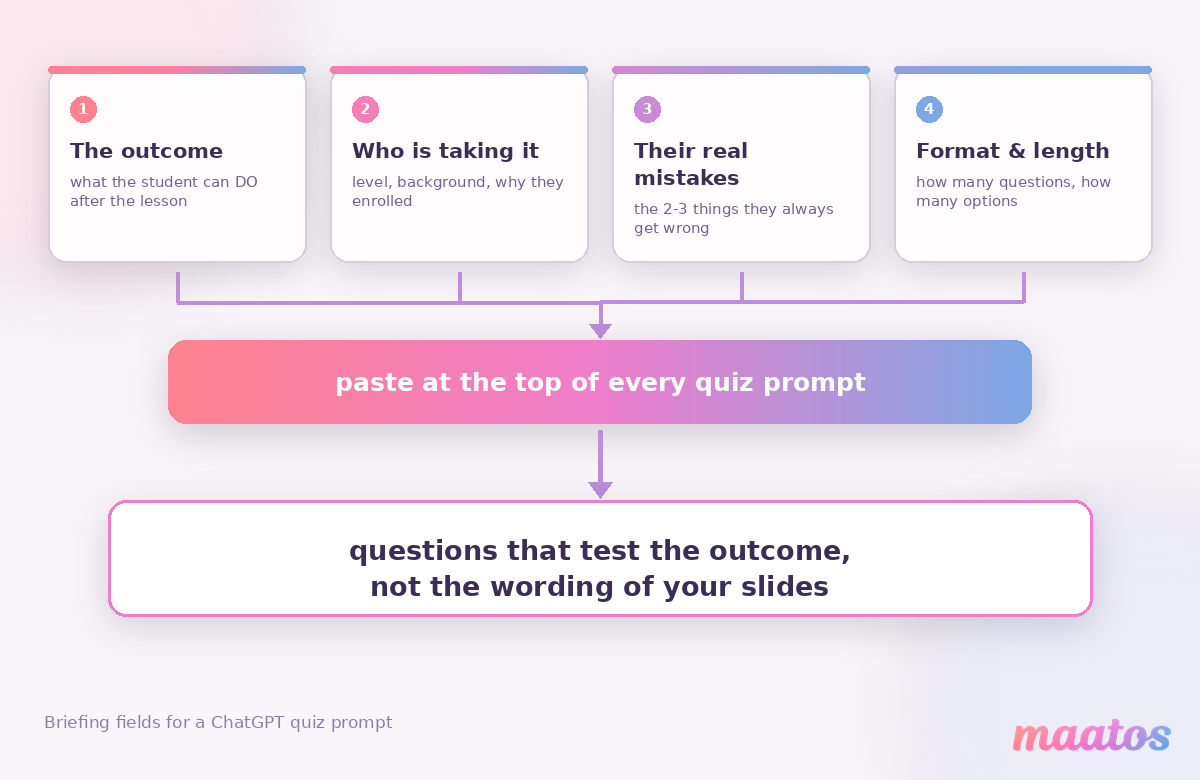
The first is the outcome you’re testing, phrased as something a student can do: “price a freelance project using a day rate” beats “understand pricing”. This is where most weak quizzes fail before a question is even written, and it’s why we bang on about writing clear learning outcomes — a fuzzy outcome can only produce a fuzzy question. The second is who’s taking it, because a check for a complete beginner and a check for someone levelling up look nothing alike.
The third is the one almost everyone leaves out, and it’s the one that transforms the output: the mistakes your students genuinely make. You know them. You’ve answered the same three confused emails forty times. Type them in — “they always confuse revenue with profit”, “they think a bigger list is automatically better” — and ChatGPT will build its wrong answers out of real misconceptions instead of obvious nonsense. A wrong answer that no one would ever pick teaches nothing; a wrong answer that half your students find tempting teaches a lot. The fourth is simply format and length: how many questions, multiple choice or open, and how many options each.
Which ChatGPT prompts write quiz questions worth answering?
Write one lesson’s quiz at a time, and always ask for the reasoning behind each answer — that’s the difference between a quiz you can trust and one you have to rewrite. Here are six prompts that do the real work, each with why it’s phrased that way and what you still need to fix by hand.
Turn one learning outcome into application questions
This is the workhorse. Notice that it asks for questions about doing the thing, and demands an explanation for every option.
I’m writing a short quiz for one lesson of my online course on [topic]. The learning outcome is: after this lesson the student can [outcome]. My students are [who they are and what they already know]. Write 4 multiple-choice questions that test whether they can actually apply this, not whether they remember my wording. Give each question 3 options. For every option, tell me in one line why it is right or why a student might wrongly pick it. Vary which position the correct answer sits in.
Why it works: asking for the reasoning per option forces the model to justify its distractors, and weak ones become obvious immediately. Three options is a deliberate choice, not laziness — a meta-analysis of eighty years of multiple-choice research concluded that three well-written options generally work as well as four or five, and let you cover more ground in the same time (Rodriguez, Educational Measurement: Issues and Practice, 2005). Most fourth options are filler anyway.
Make it human: check every “correct” answer against what you’d actually say in your field, and cut any question where you find yourself thinking “well, it depends.” Ambiguity feels clever and reads as unfair.
Build the wrong answers out of real student mistakes
Distractors are where quizzes are won or lost, so it’s worth a prompt of its own.
Here’s a quiz question I’ve written: [paste question and correct answer]. My students commonly get this wrong in these specific ways: [list two or three real misconceptions]. Write two wrong answers based on those misconceptions — each one should be genuinely tempting to someone who half-understands the topic. Don’t write anything absurd, and keep all options roughly the same length.
Why it works: it turns your support inbox into assessment design. When a student picks a misconception-based distractor, you learn something specific about where your teaching is thin, which is far more useful than a raw score.
Make it human: read the three options aloud in a row. If the correct one is noticeably longer, more hedged or more carefully worded than the others, rewrite it — that’s the single most common giveaway in a multiple-choice quiz.
Rewrite a recall question as a scenario
The fastest upgrade you can make to an existing quiz.
Rewrite this question so it tests application instead of recall: [paste question]. Put it in a short, realistic scenario a [your audience] would actually face — two or three sentences of context, then the question. Keep it under 60 words in total and don’t add any information the lesson didn’t cover.
Why it works: a scenario forces the student to use the idea rather than recognise a phrase. The word-limit instruction matters more than it looks — without it you’ll get a paragraph of scene-setting nobody reads.
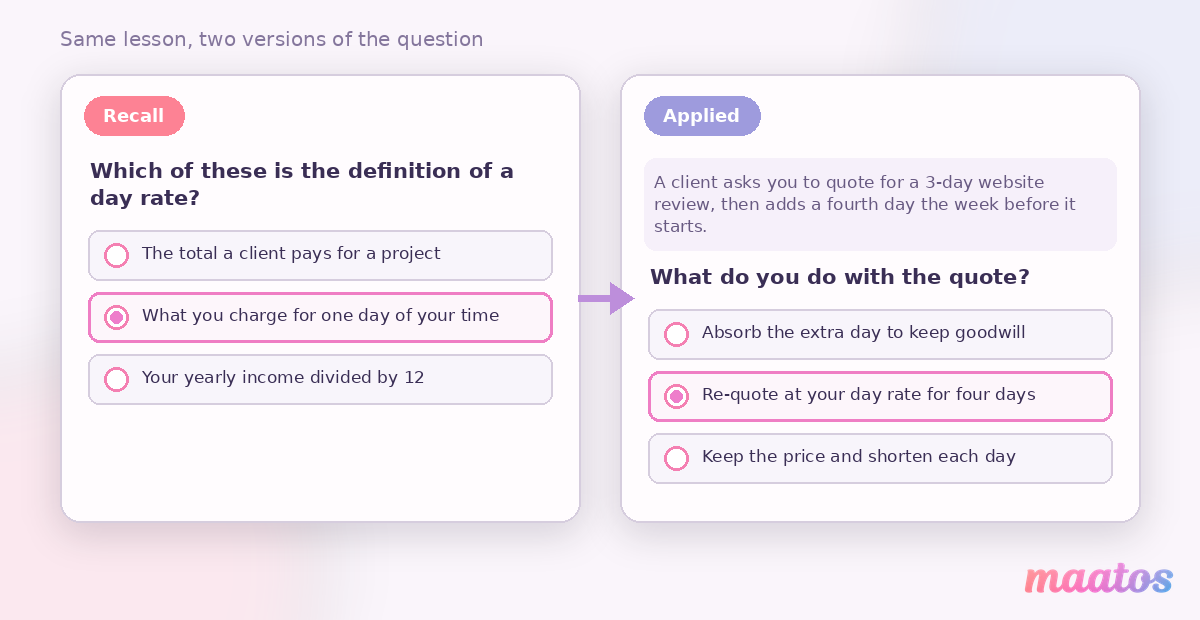
Make it human: swap the invented scenario for one from your own work. “A client emails on a Friday asking for a discount” beats any generic situation ChatGPT will invent, and it’s the sort of detail students quote back to you months later.
Write feedback for every answer, right and wrong
Feedback is the part almost everyone skips, and it’s where a quiz stops being a test and starts being a lesson.
For each option in this question, write one or two sentences of feedback the student sees after answering: [paste question and all options]. For the correct answer, confirm briefly why it’s right. For each wrong answer, explain the specific misunderstanding behind it and point to what to revisit — warm and matter-of-fact, never patronising, no exclamation marks.
Why it works: a student who picks a wrong answer is, at that exact moment, more receptive to the correction than at any other point in your course. Answering “incorrect” and moving on wastes it.
Make it human: cut anything that sounds like a chatbot being encouraging. “Not quite — this is the one that trips most people up, and here’s why” is right. “Great effort! Let’s dive back in!” is not.
Spread an end-of-module check across levels of thinking
For the longer check at the end of a module, ask for a deliberate mix.
Write an 8-question end-of-module quiz for a module covering [outcomes]. Spread the questions across levels of thinking: 2 that check they remember the key distinctions, 4 that require them to apply the ideas to a situation, and 2 that ask them to judge between two defensible options and justify the choice. Label which is which so I can check the balance, and keep every question answerable from the module alone.
Why it works: left alone, ChatGPT drifts towards the easiest questions to generate, which are recall ones. Naming the mix — a rough nod to the classic ladder from remembering through applying to evaluating — forces the harder questions into existence. Labelling them lets you see the shape of your quiz at a glance.
Make it human: the two judgement questions are the ones worth your attention. They should have a defensible answer and a defensible runner-up, with the feedback explaining the trade-off. That’s where the real teaching happens.
Write a diagnostic for the very start of the course
A short check at the beginning does two useful jobs at once.
Write a 5-question diagnostic quiz for the start of my course on [topic], aimed at [audience]. The goal isn’t to grade anyone — it’s to show a student what they don’t yet know so the course feels relevant, and to show me where the group actually starts. Keep it non-threatening: no trick questions, and frame the intro line so a low score feels like useful information rather than a verdict.
Why it works: a student who discovers a gap in the first five minutes has a reason to keep going, and you get a genuine read on your audience’s starting point rather than a guess.
Make it human: write the intro line yourself, in your own voice. It sets the tone for how every later quiz in the course feels.
How do you stop AI-written quiz questions from giving the answer away?
Scan every AI-generated question for four specific tells, because ChatGPT reproduces the same bad multiple-choice habits it learned from the internet. Any one of them lets a student score well without knowing the material — which is worse than no quiz at all, because now you have a number you trust and shouldn’t.
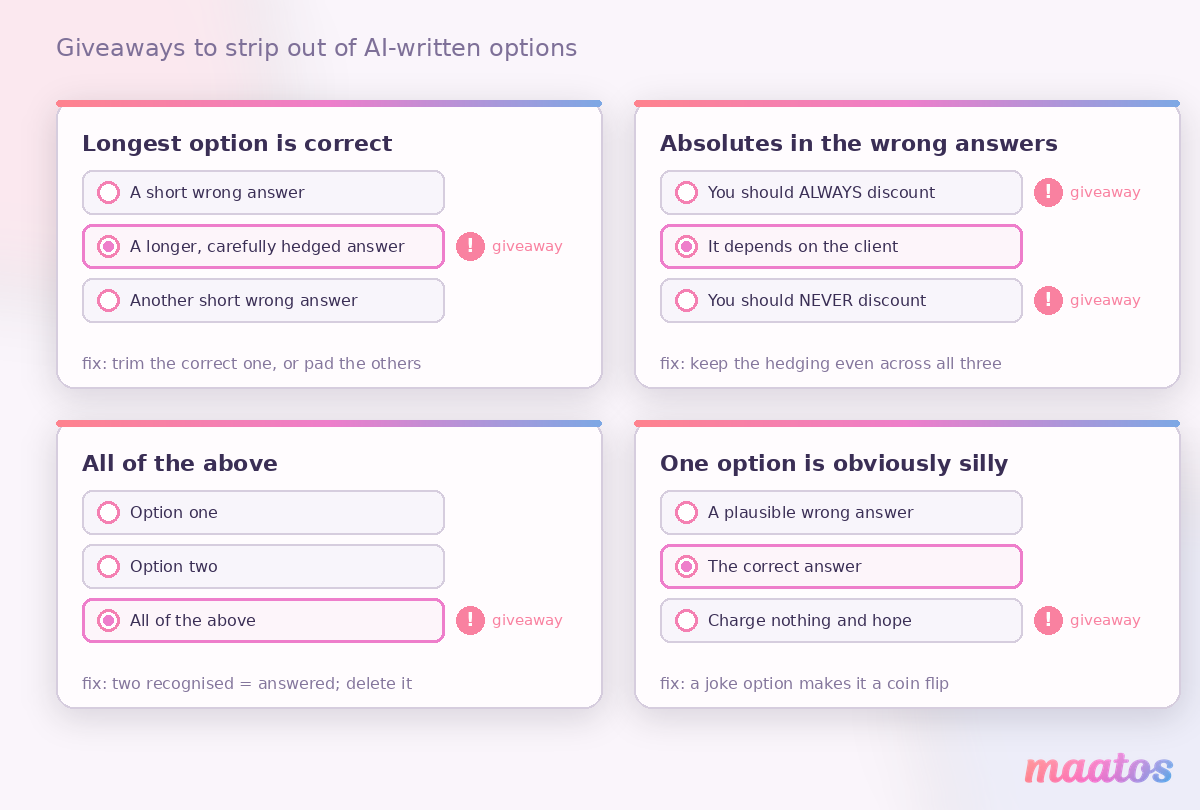
The longest option is the right one. Correct answers get hedged and qualified into being longer than everything around them. Trim it, or pad the others to match.
The wrong answers contain “always” or “never”. Experienced test-takers eliminate absolutes on sight. Keep the hedging language even across all three options.
“All of the above” turns up. It’s a gift: recognise two correct options and you’re done, without ever considering the third. Ask ChatGPT explicitly not to use it, or delete it on sight.
One option is obviously silly. A three-option question with one joke answer is really a two-option question — a coin flip. Every wrong answer has to be someone’s genuine mistake.
There’s a fifth tell that isn’t about the options at all: the questions all sound the same. Six questions in a row that open “Which of the following best describes…” read as machine-made, whoever wrote them. Ask for varied phrasing, then vary it further yourself.
How many quiz questions does a lesson actually need?
Keep per-lesson checks short — three to five questions is plenty — and save the longer eight-to-twelve-question quiz for the end of a module. This isn’t a rule handed down from anywhere; it’s what tends to work in practice, and the logic is simple. A short check straight after a lesson works because the material is still fresh and the student is still in motion, so answering feels like part of the lesson rather than an exam. A longer check at the end of a module works because you want to know whether the pieces have connected.
Where the quiz sits matters as much as what’s in it. Directly after the lesson, before anything else, gets the retrieval benefit. Buried in a resources tab at the end of the course, it gets ignored. And if you gate a certificate behind a final quiz, say so up front — people plan for a test they know is coming and resent one they don’t.
One more thing worth doing once your first cohort has been through: look at which questions everyone gets wrong. A question with a 20% success rate usually means the lesson is unclear, not that the students are. Watching which items fail is one of the more honest engagement signals you can track, and it tells you exactly which lesson to rewrite first. On Maatos, quizzes are built into the course itself and the student overview shows you where people get stuck, so that loop doesn’t need a spreadsheet — you can see it in the same place you built the lesson (see what’s included).
What should you never let ChatGPT decide for you?
Never publish an AI-written question without checking the facts, the fairness and the phrasing yourself — those three things are yours, and no prompt transfers them.
Facts first: language models state wrong things with total confidence, and in a quiz a wrong “correct answer” doesn’t just mislead one student, it teaches the mistake to everyone who takes it. Check anything numerical, anything regulatory, and anything that’s changed in the last two years against a source you trust. Anything specific to your own methods, ChatGPT is simply guessing at.
Then fairness. Read each question as someone outside your usual audience: does answering it require knowledge of a particular country’s rules, a cultural reference, or an idiom that a non-native speaker would trip over? Course audiences are international, and a question that quietly tests reading comprehension rather than your subject is a question that’s broken.
And phrasing. Read the whole quiz aloud in one go. If it sounds like a different person wrote it than the one in the videos, students notice — the same way they notice when the lesson script sounds off. Rewrite until the questions sound like you asking them, because that’s what they are.
Frequently asked questions
Can ChatGPT generate a whole quiz for my online course?
Yes, in about a minute — but treat it as a first draft. Brief it with the learning outcome, your audience and the mistakes your students really make, then check every correct answer yourself. The wrong answers are usually the part worth the most editing.
What’s the best ChatGPT prompt for multiple-choice questions?
The most reliable pattern is: state the learning outcome, describe the audience, ask for application rather than recall, specify three options, and require a one-line justification for every option. That last instruction is what makes weak distractors visible straight away.
How many options should a multiple-choice question have?
Three is usually enough. A meta-analysis of eighty years of research found three well-written options perform about as well as four or five while letting you ask more questions in the same time (Rodriguez, 2005). A fourth option is only worth adding if it’s genuinely tempting.
Do quizzes actually help students learn, or just measure them?
Both, and the learning part is the bigger prize. Retrieving an answer from memory strengthens it more than rereading does — the effect shows up clearly on delayed tests (Roediger & Karpicke, 2006). A short quiz after each lesson is a teaching tool that happens to produce a score.
How do I stop AI quiz questions from sounding robotic?
Give it your own examples and vocabulary in the brief, ask for varied question openings, and rewrite the feedback text yourself. Read the finished quiz aloud — anything you wouldn’t say out loud gets cut.
Should students be able to retake a quiz?
For lesson checks, yes — the point is practice, not judgement, and a retake means a second round of retrieval. For a final assessment tied to a certificate, decide up front and say so clearly, so nobody discovers the rule by failing.
Try it on one lesson this week
Pick your weakest lesson — the one that generates the most confused emails — and run the first prompt against it. Twenty minutes later you’ll have four questions that test whether the lesson worked, and you’ll probably discover the lesson needs a rewrite too. That’s the useful part.
When you’re ready to put those questions in front of real students, Maatos gives you quizzes, certificates and a student overview inside the same platform you build your course on, with your own branding on top. You can try it free for 30 days and have your first quiz live the same afternoon. And if you want more of this, the rest of our course-creation guides pick up where this one leaves off — starting with planning the curriculum those quizzes are meant to check.