
You can teach your subject in your sleep. Then the camera’s red light comes on, and the same explanation you’ve given a hundred times suddenly won’t come out straight — so you either freeze, or you ramble for nine minutes and re-record it four times.
That gap between knowing your material and saying it cleanly on camera is exactly where a script helps, and it’s exactly where ChatGPT earns its place. Give it your lesson outline and it will hand you a spoken draft in seconds — something you can shape and say out loud instead of staring at a blank page with a microphone in your hand. The trick is that a lazy prompt like “write a script about time management” gives you a stiff little essay that no human would ever say aloud. The prompts below do the opposite: they brief ChatGPT on what one lesson needs to teach, who’s watching and how you actually talk, then they show you how to strip the robot out afterwards. This is the recording-side companion to our broader set of ChatGPT prompts to build your course — that one helps you plan the thing; this one helps you say it.
Can ChatGPT actually write a script for your course video?
ChatGPT can write a genuinely usable first draft of a lesson script, but it can’t write the version you record — only you can do that. Think of it as a fast, tireless writing partner that turns your bullet points into full sentences, suggests an order, and drafts a hook you’d never have bothered to write yourself. What it can’t do is know the story about the client who ignored your advice, the mistake you made in year one, or the exact way you say “right, so here’s the thing.” Those are the moments that make a lesson stick, and they have to come from you.
So the honest workflow is a loop, not a button. You brief it, it drafts, you rewrite the parts that don’t sound like you and drop in your own examples, and you read the result aloud to catch anything a real person would never say. Used that way, ChatGPT easily halves the time it takes to get from outline to “ready to record.” Used as a copy-paste-and-hit-record machine, it produces exactly the flat, samey lessons students click away from. You need a clear outline before any of this works, so if your modules and lessons aren’t mapped yet, start with our guide to planning your curriculum with ChatGPT and come back here to script them one at a time.
What should you give ChatGPT before it writes a word?
Give ChatGPT five things about the lesson before you ask for a script, and the draft comes back three-quarters finished instead of generic. A script is only as good as the brief behind it, and the five things below take about two minutes to jot down once you’ve done it a couple of times.
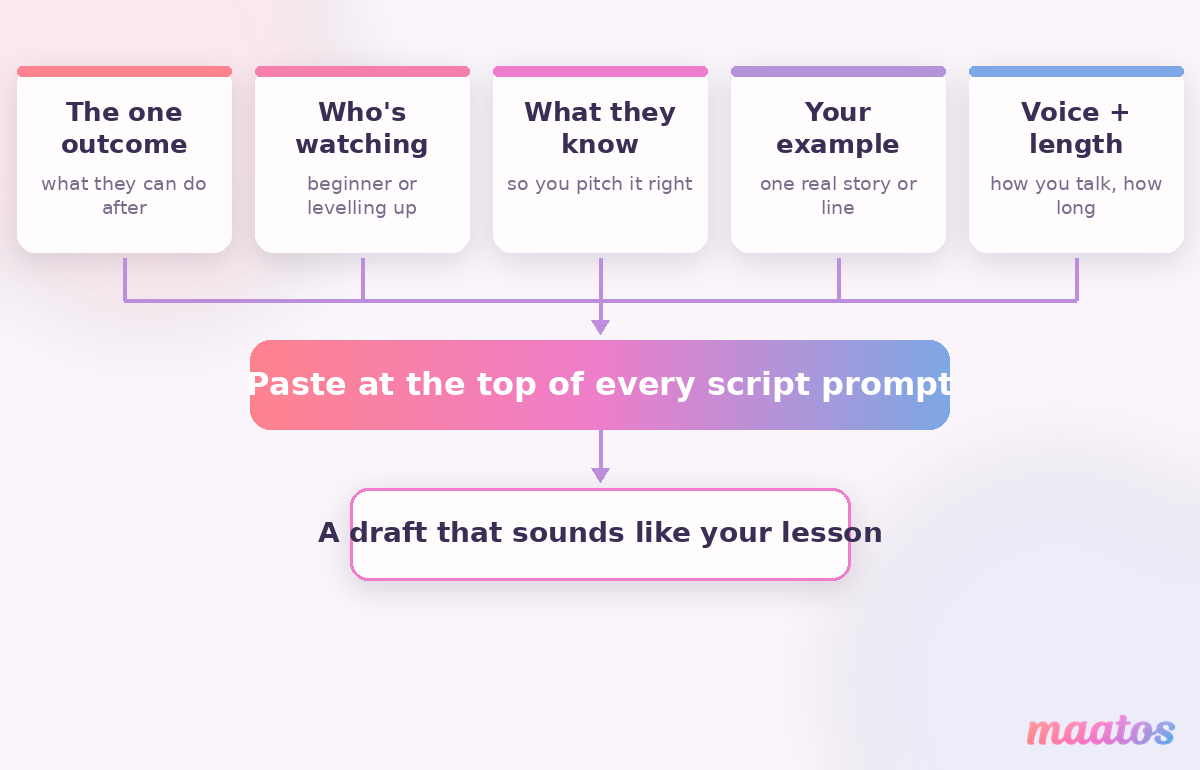
The first is the one thing this lesson teaches — a single outcome the student can do afterwards, not a vague topic (more on why that matters in our piece on clear learning outcomes). The second is who’s watching and the third is what they already know, because a script for a nervous beginner sounds nothing like one for someone levelling up. The fourth is your example — even one line, “I once watched a founder lose a week to this,” gives the draft a spine ChatGPT can build around. And the fifth is your voice and the length you’re aiming for: tell it “write the way I’d explain this to a friend over coffee, short sentences, no jargon, about three minutes spoken” and half the editing is done before you start. That last instruction quietly does more than the other four combined.
Which ChatGPT prompts turn a lesson outline into a script?
Script one lesson at a time, and ask for a spoken draft rather than an article — the wording of the prompt is what decides whether you get something sayable or something stiff. Here are the prompts that do the real work, each with the reasoning behind it and a note on how to finish it off by hand.
Turn a lesson’s bullet points into a spoken draft
This is the workhorse — it converts the notes you already have into something you can read off a teleprompter.
[Paste your brief.] Here are the bullet points for this lesson: [paste them]. Write this as a spoken script for a short course video. Use natural spoken English — contractions, short sentences, the odd aside — not written-essay style. Open with a one-line hook, teach the points in a logical order, and end by telling the student exactly what to do next. Aim for about [X] minutes when read aloud.
Why it works: naming “spoken English, not essay style” is the single instruction that stops ChatGPT from writing paragraphs no one talks in. Make it human: read it out loud once and mark every place you stumble — those are the sentences to rewrite in your own words.
Write a hook for the first fifteen seconds
Most course videos lose people in the opening line because they start with “In this lesson we will…”. A good hook names the problem instead.
Write five different opening lines for this lesson, each under 20 words. Don’t summarise what the lesson covers — instead, name the frustration the student feels right now, or promise the specific thing they’ll be able to do by the end. Conversational, no hype.
Why it works: asking for five and banning the summary opener forces variety and kills the dullest default. Make it human: pick the one you could say with a straight face and trim it until it sounds like you, not a trailer.
Drop in a real example or analogy
ChatGPT can’t invent your war stories, but it can help you shape one you feed it — or offer analogies you then sanity-check.
The key idea in this lesson is [idea]. Suggest three plain-language analogies a beginner would instantly understand, and rewrite this rough story of mine into two tight sentences I can say on camera: [paste your rough anecdote].
Why it works: it separates the two jobs — polishing your real example, and brainstorming analogies — so you keep the authenticity and get the help. Make it human: bin any analogy that’s even slightly off; a wrong metaphor confuses more than no metaphor.
Get talking points instead of a full script
If reading a full script makes you sound wooden, ask for a skeleton you can improvise around instead.
Turn this lesson into a talking-points outline, not a full script: a one-line hook, then 5–7 bullet cues in the order I should cover them, then a one-line close. Each bullet should be a trigger phrase I can expand in my own words, not a full sentence to read.
Why it works: many people deliver far more naturally from cues than from a word-for-word script — this gives you structure without the stiffness. Make it human: rehearse it once out loud; if a cue doesn’t jog the right point, reword the cue, not your delivery.
Write the voiceover for a screen recording or slide lesson
For faceless lessons — screen-shares, slide decks, tutorials — the script is the whole lesson, so it’s worth getting tight.
Write a voiceover script to narrate a screen recording that shows [what’s on screen, step by step]. Sync the narration to the actions: say what I’m about to do, then what the result means. Calm, clear, one instruction at a time — assume the viewer is following along on their own screen.
Why it works: telling it to match narration to on-screen actions produces a script you can actually record against, instead of prose that drifts away from what’s showing. Make it human: run the recording and the script together once — real timing always needs a few pauses the draft didn’t plan for.
Cut a script that runs too long
A recorded ten-minute lesson usually wants to be six. ChatGPT is ruthless in a way that’s hard to be with your own words.
This script runs about [X] minutes and I need it closer to [Y]. Cut it down without losing the core teaching: remove repetition, tighten wordy sentences, and drop any tangent that doesn’t serve the one outcome. Keep the hook and the close. Show me what you cut.
Why it works: “show me what you cut” lets you veto anything important, so trimming never quietly removes the good bit. Make it human: if it cut a story you love, put it back — but somewhere else, or in its own micro-lesson.
Shorter, focused lessons almost always beat long ones for completion, which is worth keeping in mind while you trim; our take on micro-lessons versus long videos explains where the line usually sits.
How do you make an AI script sound like you and not a robot?
You make an AI script sound human by reading it aloud and rewriting every line you’d never actually say — that one pass matters more than any clever prompt. ChatGPT has tells, and once you can hear them you can’t unhear them: it loves to open with “In today’s fast-paced world,” it reaches for unlock, elevate, leverage, dive in, and it writes in an even, listy rhythm where every sentence is the same tidy length. Real speech is lumpy. You start a thought, interrupt yourself, land a short punchy line after a long one.
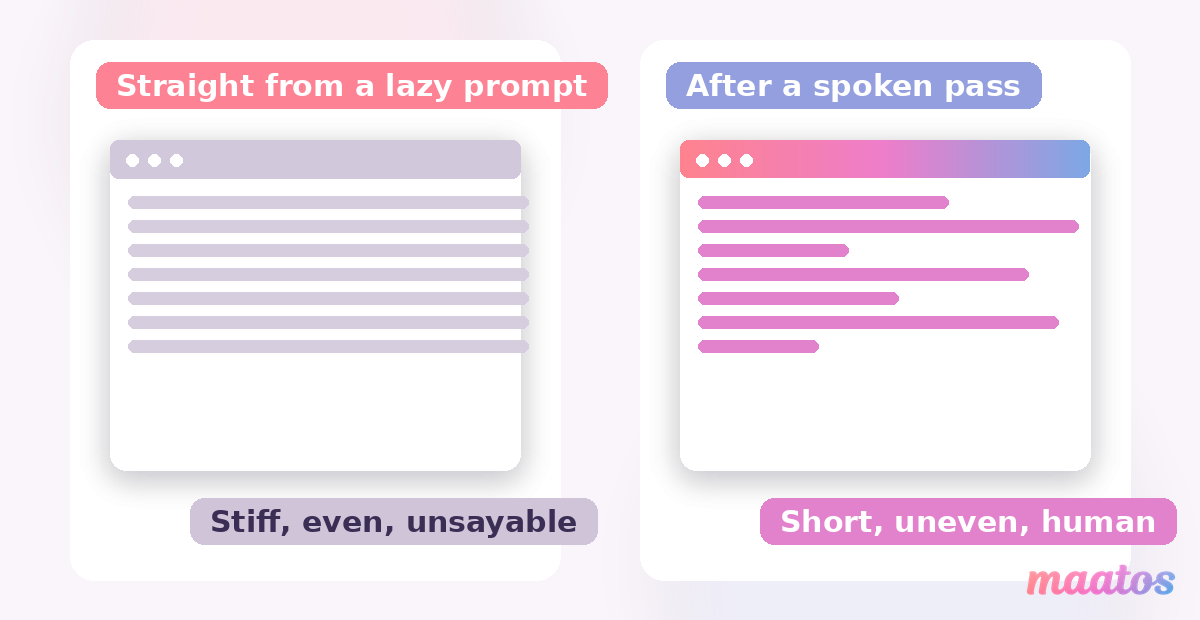
So do a spoken pass, not a reading pass. Contractions everywhere — “you’ll,” “it’s,” “don’t” — because nobody says “you will” out loud. Swap any word you wouldn’t use with a student for the plain one you actually use. Break the metronome rhythm by cutting some sentences in half and letting others run. And cross out anything that sounds like a brochure; if a line could sit on any course in any niche, it isn’t teaching yours. The same anti-robot instinct applies when you write the copy that sells the course, which is why our prompts for course marketing lean on the exact same “now make it human” habit. The goal isn’t to hide that you used AI — it’s that the lesson sounds like the person students signed up to learn from.
Should you read the script word-for-word on camera?
For most people, no — a full script is best used to prepare, then delivered from memory or from talking points rather than read line by line. Reading verbatim tends to flatten your voice: your eyes track the text, your intonation goes robotic, and viewers can feel it even when they can’t see the script. The exceptions are voiceovers and screen recordings, where reading a tight script is completely fine because there’s no eye contact to lose, and legally sensitive material where you need the wording exact.
A workflow that suits most creators is to write the full script, read it aloud two or three times until the shape sticks, then record from the talking-points version so you sound like you’re teaching rather than reciting. If a teleprompter genuinely helps you, use one — just deliver a few words behind the scroll so it doesn’t drag your pace. None of this is about the gear anyway; when you’re ready to actually record, our practical guide to making your course videos covers the setup without the overwhelm, and the rest of our guides for course creators cover everything either side of it.
Keep the script honest: check it against what you’re actually teaching
Before you record, read the finished script once against the lesson’s outcome and ask a blunt question: does saying all of this actually get the student to that result? ChatGPT will happily write a confident, polished line that promises something your lesson doesn’t deliver, or state a “fact” it half-invented. Both are worse than a rough script, because a student who was promised one thing and got another asks for a refund — and a wrong fact in a lesson quietly costs you trust. You are the subject-matter expert in the loop; the AI drafts, but you sign off on every claim. That single check is what separates a course that uses AI well from the flood of ones that clearly didn’t read what the machine gave them.
Frequently asked questions
Can ChatGPT write a script for my course video?
Yes — it writes a strong first draft from your lesson outline in seconds, including a hook and a logical order. But it can’t add your real examples, stories or the way you naturally talk, so treat its output as a draft to rewrite and say aloud, never a finished script to read cold.
How long should a course lesson script be?
Match it to the lesson, not a word count, but a useful rule of thumb is that people speak approximately 130–150 words a minute, so a five-minute lesson is roughly 650–750 spoken words. Shorter, focused lessons usually see higher completion than long ones, so when in doubt, cut.
Will an AI-written script hurt my SEO or feel generic?
There’s no automatic penalty for using AI to help write a script — search engines and platforms judge whether the lesson is useful, not how the first draft was produced. The real risk is generic content: an unedited AI script sounds like every other course, and that’s what loses viewers. Editing it into your own voice with your own examples is what keeps it from feeling generic.
Full script or bullet points — which should I record from?
Write the full script to think it through, then record from bullet-point talking points if reading verbatim makes you stiff. Faceless formats like voiceovers and screen recordings are the exception, where reading a tight script word-for-word works well because there’s no eye contact to lose.
Does this work for voiceover or faceless courses?
Especially well. For screen recordings, slide lessons and tutorials the script is the entire lesson, so a prompt that syncs narration to what’s on screen, one instruction at a time, gives you something you can record against directly.
Do I still need a course outline first?
Yes. Scripting works lesson by lesson, so you need the modules and lessons mapped before these prompts help. Sort the structure first — our curriculum prompts do exactly that — then script each lesson here.
Your lessons are written — now they need a home
Once ChatGPT has helped you script and record your lessons, they need somewhere to live that’s genuinely yours: your own branded course site, your own student experience, no platform taking a cut of every sale. That’s the part Maatos handles, so you can stay focused on teaching while we take the technical worry off your plate. Have a look at what the platform gives you, or just start free and build your course site — you can have your first scripted lesson uploaded and looking the part today. You’ve got the knowledge; this is the easy bit.