
You know your subject cold. You could talk about it for hours. So why does the blank document where your course outline is supposed to live stay blank for weeks?
It’s not a knowledge problem. It’s a sorting problem. Everything you know is tangled together in your head, and turning that tangle into a sequence a beginner can follow is genuinely hard — which is exactly the job ChatGPT is good at, if you ask it properly. The catch is that “make me a course outline about X” gives you a bland, generic skeleton any beginner could have guessed. The prompts below are different: they treat ChatGPT as a planning partner that pulls the curriculum out of your expertise, instead of inventing a forgettable one from scratch. Copy them, swap in your details, and you can go from a brain-dump to a real module-and-lesson structure in an afternoon.
These are the outline-and-curriculum prompts specifically. If you want the wider set — prompts for descriptions, quizzes, intros and the rest — that lives in our 20 ChatGPT prompts to build your course. This piece goes deep on the part most people get stuck on: the structure.
Why does a vague prompt give you a vague curriculum?
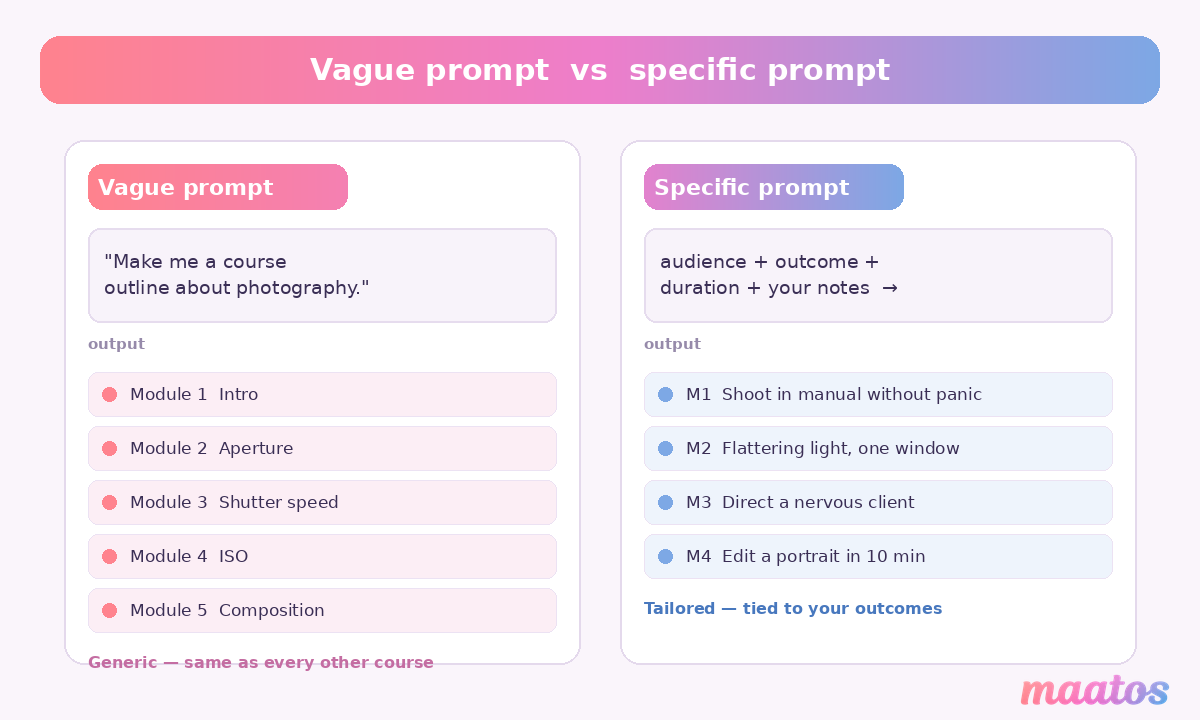
A vague prompt gives you an average curriculum because ChatGPT fills the gaps you leave with the most common answer it has seen. Ask it for “a photography course outline” and you’ll get aperture, shutter speed, ISO, composition — the same ten modules as every other beginner course on the internet. There’s nothing yours in it: not your angle, not the mistakes you watch students make, not the shortcut you’ve spent years refining.
The fix is to feed it your raw material and your constraints first, then ask for structure. Tell it who the learner is, what they should be able to do at the end, how long the course should run, and what you actually know. Now it has something specific to organise, and the output stops sounding like a template.
What should you do before you open ChatGPT?
Decide on the transformation first: where the learner starts and where they finish. This one sentence is the spine of the whole curriculum, and it’s the thing ChatGPT can’t invent for you because only you know what a good result actually looks like in your field.
Write it down plainly — “a complete beginner goes from never having touched a camera to confidently shooting a paid portrait session” — and keep it on screen while you prompt. Everything you ask ChatGPT to build hangs off that promise. If you want to do this part properly, it’s worth getting your learning outcomes clear and specific before you structure anything, because a curriculum built on vague outcomes (“understand the basics”) drifts the moment you start writing lessons.
With the transformation and a rough sense of your audience in hand, you’re ready to prompt.
Which ChatGPT prompts actually plan a curriculum?
The eight prompts below run in order, each feeding the next. Treat them as a workflow, not a pick-and-mix: the magic is in the chain. Paste your own details into the brackets, and read every answer with a sceptical eye — you’re the subject expert, ChatGPT is the fast intern.
1. Turn your brain-dump into teachable themes
Start by getting everything out of your head and letting ChatGPT sort it, rather than asking it to come up with the content.
I’m an experienced [your role] and I want to build an online course that teaches [specific skill] to [who your students are]. Here is everything I know about the topic, completely unstructured: [paste a long brain-dump — bullet points, half-sentences, whatever]. Group this into 4 to 6 themes that could each become a module. For each theme, tell me what a learner would be able to do after it, and flag anything obvious that’s missing for a total beginner.
Why it works: you supply the expertise, so the themes come from your material. The “what’s missing” flag is the useful bit — it catches the curse-of-knowledge gaps you stopped noticing years ago.
2. Define the outcomes the course owns
My course promises a learner goes from [starting point] to [end result]. Write 5 to 7 specific, measurable learning outcomes for the whole course. Start each with an action verb like design, build, calculate or pitch. Avoid vague verbs like understand, know or learn about.
Outcomes written as actions are what stop a curriculum from sprawling. If an outcome can’t be demonstrated, it isn’t an outcome — it’s a topic, and topics multiply forever.
3. Draft the module skeleton
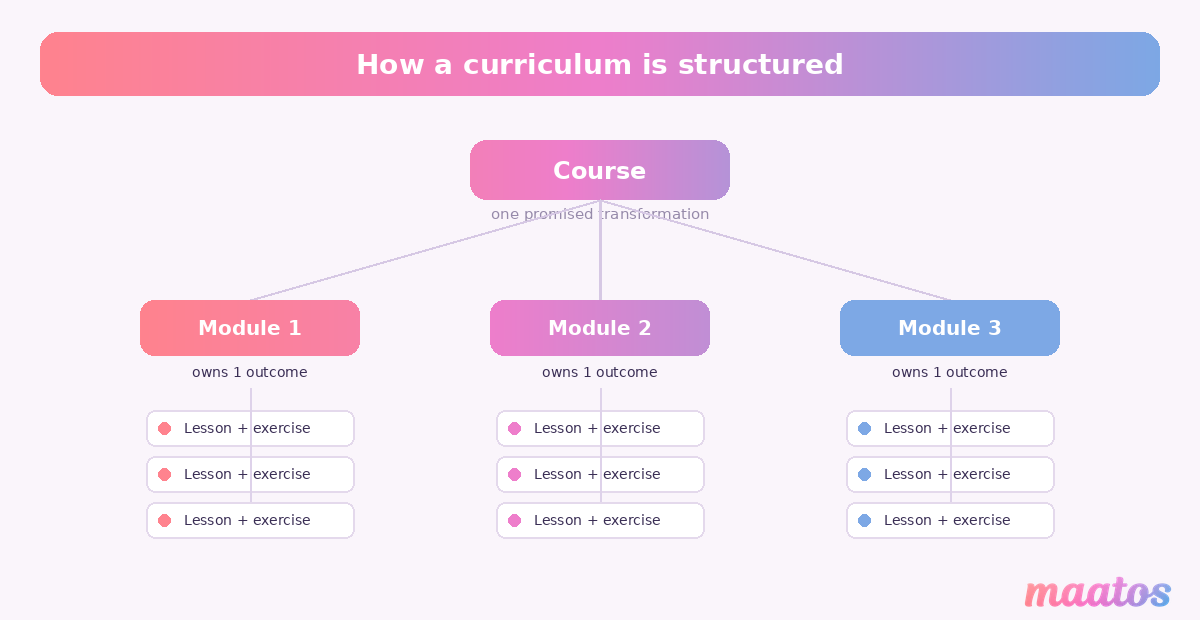
Using those outcomes, propose a module-by-module outline for a course that takes roughly [X hours] to complete. For each module give a working title, the single outcome it owns, and 3 to 5 lesson titles. Order the modules so each one builds on the one before it.
This is the moment the curriculum appears. Tying each module to exactly one outcome is what keeps it tight — if a module owns three outcomes, it’s really three modules wearing a trench coat.
4. Pressure-test the sequence
Look at this outline as a learning journey for someone who knows nothing at the start. Are the modules in the right order? Point out any lesson that assumes knowledge I haven’t taught yet, and tell me where to move it.
Experts teach in the order things make sense to them, which is rarely the order a beginner needs. This prompt catches the lesson you’ve put in module four that secretly depends on something in module six.
5. Explode one module into real lessons
Take Module [n]: [title]. Break it into individual lessons of 5 to 10 minutes each. For each lesson, give the title, the one thing it teaches, and a single practical exercise the learner does to prove they got it.
Do this module by module, not all at once — the answers are sharper when ChatGPT focuses on one chunk. The “one thing it teaches” rule is what keeps your lessons short and finishable, which matters more than people think; it’s half the reason some course outlines actually get finished and others get abandoned at module two.
6. Hunt for gaps like an annoyed customer
Act as a sceptical learner who paid full price for this course. Read the outline and tell me: what questions would I still have at the end? What did the course promise but not deliver? What prerequisite did it quietly skip?
Switching ChatGPT into a critical role surfaces the holes you’re too close to see. It’s uncomfortable and it’s the most valuable prompt in the set.
7. Cut it down to a first course
This outline is too ambitious for a first course. Cut it to the 20% that delivers 80% of the promised result. Tell me what to drop, what to keep, and what to save for a future follow-up course.
Almost every first curriculum is too big. A tighter course ships sooner, gets finished more often, and leaves you obvious material for a second product later.
8. Make the titles earn the click
Rewrite each module and lesson title so a prospective student instantly sees the benefit, not just the topic — but keep them honest, no hype.
“Module 3: Lighting” tells a browser nothing. “Module 3: Get flattering light with one window and zero gear” sells the outcome. Good titles do quiet marketing work on your sales page later.
How do you stop ChatGPT inventing a generic course?
You stop it by staying in the editor’s chair the whole way through. ChatGPT is brilliant at structure and speed and genuinely bad at knowing which details actually matter in your craft — so every answer it gives is a draft you correct, never a final you accept.
Three habits keep the output honest. Feed it your real examples and war stories rather than asking it to generate them, because lived specifics are exactly what AI can’t fake. Check each module back against your learning outcomes and delete anything that doesn’t serve one. And read the whole thing aloud at the end: if it sounds like a course you’d be bored teaching, your students will be bored taking it, and no prompt fixes that — only your judgement does. Used this way, AI handles the sorting so you can spend your energy on the teaching, which is the part nobody else can do.
From AI outline to a course people finish
A curriculum is the skeleton; finishing rates come from how you flesh it out. Once ChatGPT has handed you a sequenced module-and-lesson structure, the work shifts to writing lessons that are short enough to complete, exercises that prove learning, and a through-line a student can feel. The structure you just built makes all of that easier, because every lesson now has a clear job. For the next step, our guides on writing a course outline students actually finish and setting clear learning outcomes pick up exactly where this leaves off, and the rest of the Creating Courses library covers recording, structuring and the parts in between.
FAQ
How do I use ChatGPT to outline a course? Give ChatGPT your audience, the transformation your course promises, a rough duration and an unstructured brain-dump of what you know — then ask it to group that into 4 to 6 modules, each tied to one learning outcome, with 3 to 5 lessons apiece. Prompting it with your raw material first is what produces a tailored outline rather than a generic template.
What prompts help plan a curriculum? A working chain is: turn a brain-dump into themes, define measurable outcomes, draft a module skeleton, pressure-test the order, break each module into short lessons, hunt for gaps as a sceptical learner, cut the scope to a first course, then sharpen the titles. Running them in sequence beats any single “make me an outline” prompt.
Can AI structure modules and lessons for me? Yes — ChatGPT can propose modules, sequence them and break each into lessons with exercises in minutes. What it can’t do is judge which details matter in your field or supply your real examples, so treat its structure as a fast first draft you edit against your own expertise and learning outcomes.
Is it okay to use AI to build my curriculum? It’s fine and increasingly normal, as long as the expertise and the final judgement are yours. The risk isn’t using AI; it’s shipping whatever it hands you without checking it against what you actually know. Keep yourself in the editor’s seat and the result is a course only you could have made — built faster.
Pull your scattered expertise into a brain-dump, run it through these prompts, and you’ll have a curriculum by the end of the day. When you’re ready to turn that outline into a real course on a site that’s yours, you can start building free with Maatos — no code, no platform fees, just your knowledge and the tools to teach it.