
You asked ChatGPT to write your lesson, it gave you 600 tidy words, and you read them back with a sinking feeling: this could be anyone’s course. No story only you could tell. No opinion worth arguing with. Just… competent filler. If that’s the reason you’ve half-abandoned AI for your course, you’re right to be picky — but you gave up one step too early.
The problem was never the AI. It was the workflow around it. Drop a cold prompt into a blank box and you’ll get the average of everything ever written on the topic, which is exactly what “generic” means. Build a proper workflow — one that feeds the tool your voice, your beliefs and your actual research before it writes a word — and the same AI turns into the fastest first-draft partner you’ve ever had. It still won’t replace the part of you that makes people buy your course. It clears the road so you can get to that part sooner.
This is a guide to those workflows: how to train AI on how you sound, how to research and plan at scale without going bland, a repeatable start-to-finish process you can run for every lesson, and where the finished work lands — on your own course platform, built and sold on your terms. Think of it as the system behind the ChatGPT prompts we share elsewhere: the prompts are the tools, this is how you hold them.
Why does AI content come out so generic in the first place?
Generic AI content is what you get when a broad tool meets a broad prompt. Ask for “a lesson about email marketing” and the model does the only sensible thing it can: it averages the entire internet’s idea of an email-marketing lesson and hands it back. It’s not being lazy. It simply has nothing of yours to work with, so it reaches for the middle of the road.
For a course creator that middle of the road is expensive in three quiet ways. It flattens your voice, so the writing could belong to any of a thousand instructors. It loosens the reader’s attention, because learners can feel when there’s no real person behind the words — and a bored learner is a learner who never reaches module three. And over time it blurs your brand, because the thing that made people choose you in the first place gets sanded down into something interchangeable.
What standard prompts can’t give you
A stock prompt is built for everybody, which is precisely why it can’t sound like anybody. It doesn’t know the analogy you always reach for, the hill you’re willing to die on, or the phrase your students quote back to you months later. It defaults to received wisdom and safe clichés because that’s the safest bet when it knows nothing about the person asking.
So the fix isn’t a cleverer one-line prompt. It’s giving the model context it never had: who you’re teaching, what you believe, how you talk, and what you’ve already made. Everything that follows in this guide is really just different ways of feeding it that context.
What generic content quietly costs you
When your material reads like a rehash of the top ten search results, learners notice — even if they can’t name why. Repetitive phrasing chips away at how expert you seem. The absence of any emotional pull makes courses easier to abandon than to finish. And every generic lesson is a missed chance to tell the story that would have made someone recommend you.
There’s a related trap worth naming: leaning too hard on other people’s content to fill the gaps. It feels efficient, but borrowed material dilutes the one thing you can’t outsource — your point of view. AI trained on your voice is the opposite move: it helps you produce more of what’s distinctly yours, faster.
The way out
The way past generic AI output isn’t to abandon AI or to accept its first draft. It’s to change the order of operations — train the tool first, then let it draft, then add the part only you can add. If you’d rather hand the heavy lifting to someone else entirely, our done-for-you service builds the course with you while keeping your voice front and centre, and it’s worth weighing that against the pricing of doing it yourself. Either way, the principle is the same: your voice leads, the AI follows.
How do you train AI to actually sound like you?
You train AI to sound like you by giving it two things it can’t guess: a clear picture of how you communicate, and a clear statement of what you believe. Get those on paper and almost every “AI sounds robotic” problem dissolves, because the model finally has a reference for you instead of the average of everyone.
Capturing your voice and your beliefs
Your voice is the texture of how you write and speak: your tone, the words you reach for, sentence length, the jokes you allow yourself, the things you’d never say. The fastest way to capture it is to gather what you’ve already made — a few blog posts, a newsletter or two, a transcript of you explaining something you love — and read it with a highlighter, noting the patterns. A ten-minute voice memo where you talk through how you teach and why often reveals more than an hour of trying to write it down. Distil all of it into a short “how I sound” note you can paste into any tool: formal or casual, playful or plain, fast or measured, the phrases you own.
Your beliefs are the convictions your course rests on. What do you stand for in your subject that not everyone agrees with? What’s the myth you keep busting? What personal story shows why you teach the way you do? List those plainly. Together, the voice note and the belief list become the raw material you feed the AI — the difference between a tool that mimics a style and one that carries your actual point of view.
Getting your style into the draft
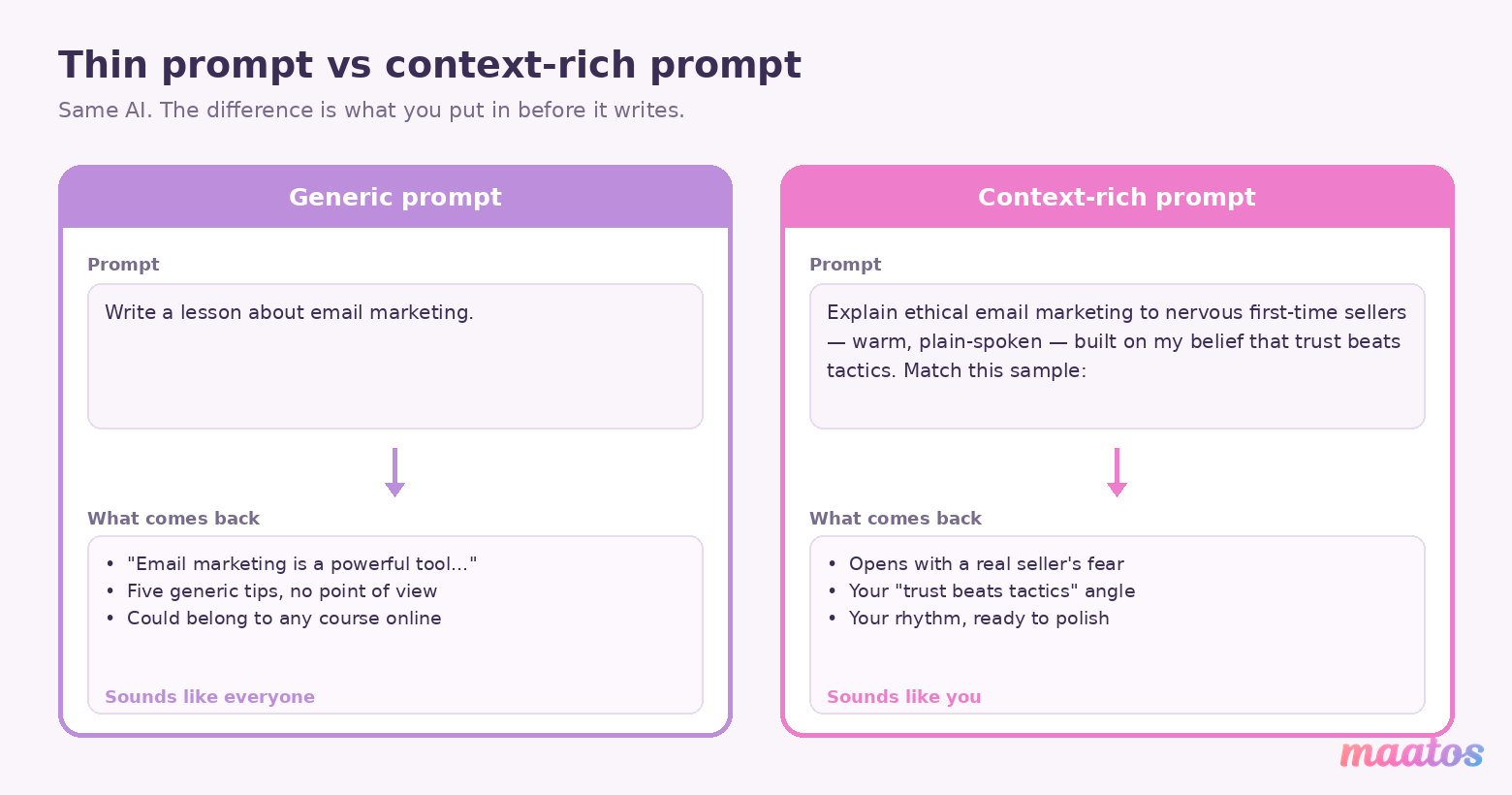
Once you’ve captured voice and beliefs, you put them to work in three ways. The first is richer prompting. Instead of “write a lesson about marketing,” you write “explain ethical email marketing to nervous first-time sellers, warm and plain-spoken, and lean on my belief that trust beats tactics” — and you paste your voice note underneath. The instruction now carries tone and stance.
The second is showing rather than telling. Drop two or three paragraphs of your own past writing into the prompt as a worked example and ask the model to match that register. Most tools imitate a concrete sample far more faithfully than an adjective. The third is a short feedback loop: read the draft, mark what rings false, tell the AI exactly what to change (“cut the corporate wrap-up, keep the story, shorten the sentences”), and it recalibrates. A couple of rounds of that and the model has effectively learned your ear for the session.
If you want a running start on the prompt wording itself, the companion pieces on prompts for your course curriculum and for lesson scripts give you tested phrasings to adapt rather than invent from scratch.
Why the training pays off
Front-loading your voice and beliefs changes the economics of every lesson afterwards. Your material stands out because it carries your fingerprints instead of a template’s. Learners connect faster and stay longer, because the writing feels like a person they’ve chosen to learn from. Your brand stays consistent from module one to module twenty. And — the part people underestimate — you spend far less time editing, because an on-voice first draft needs a polish, not a rescue. The upfront hour of voice work is the single most valuable hour in the whole process.
Can AI research and scale your content without making it bland?
Yes — as long as the research is pointed at your angle and the scaling preserves your voice instead of watering it down. The failure mode is using AI as a firehose. The fix is using it as a well-briefed assistant that knows what you’re looking for and how you sound.
Research agents that fetch your kind of material
An AI research assistant is most useful when you give it your ethos as its brief. Told what topics matter to you, which sources you trust, and what angle your course takes, it can gather relevant material, skip the parts that clash with how you teach, and hand you tight summaries instead of a hundred open tabs. The point isn’t to have it think for you — it’s to compress the hours you’d otherwise lose to reading, so the raw material feeding your lessons is already filtered through your point of view rather than scraped at random.
One honest caveat, because it matters: AI can misremember, and it will occasionally invent a statistic or a source with total confidence. Treat every fact it hands you as a lead to verify, not a citation to trust. Check the number, open the real source, and never let a tool put words in a researcher’s mouth. Your name is on the course; the fact-checking stays yours.
Multiplying one good idea into many
Content multiplication is taking a single strong piece — a lesson outline, a core explanation, a hard-won insight — and expanding it into a family of related material without losing the thread. From one solid concept you can branch into deeper sub-topics, then adapt the same idea into a quiz, a summary, a worked example or a discussion prompt. Done well, every offshoot still carries the original’s voice; the idea gets wider reach, not thinner substance.
This is how you get real volume without the assembly-line feel. Rather than starting cold fifteen times, you start once from something genuinely yours and let the workflow fan it out — the reach multiplies while the point of view stays intact.
What this looks like in practice
Picture a creator teaching mindfulness. She points a research assistant at recent, reputable work that fits her approach, gets back short summaries she’s actually verified, and multiplies those into a lesson script, a guided-practice transcript and a set of reflection prompts — all in her steady, unhurried voice. Or a leadership coach who starts from one conviction about how people really change, and fans it out into a month of lessons, scenarios and quick knowledge checks that all sing from the same songbook. In both cases the AI handled the spread; the creator supplied the soul.
What is the Hook × Belief Matrix, and how do you plan a whole course with it?
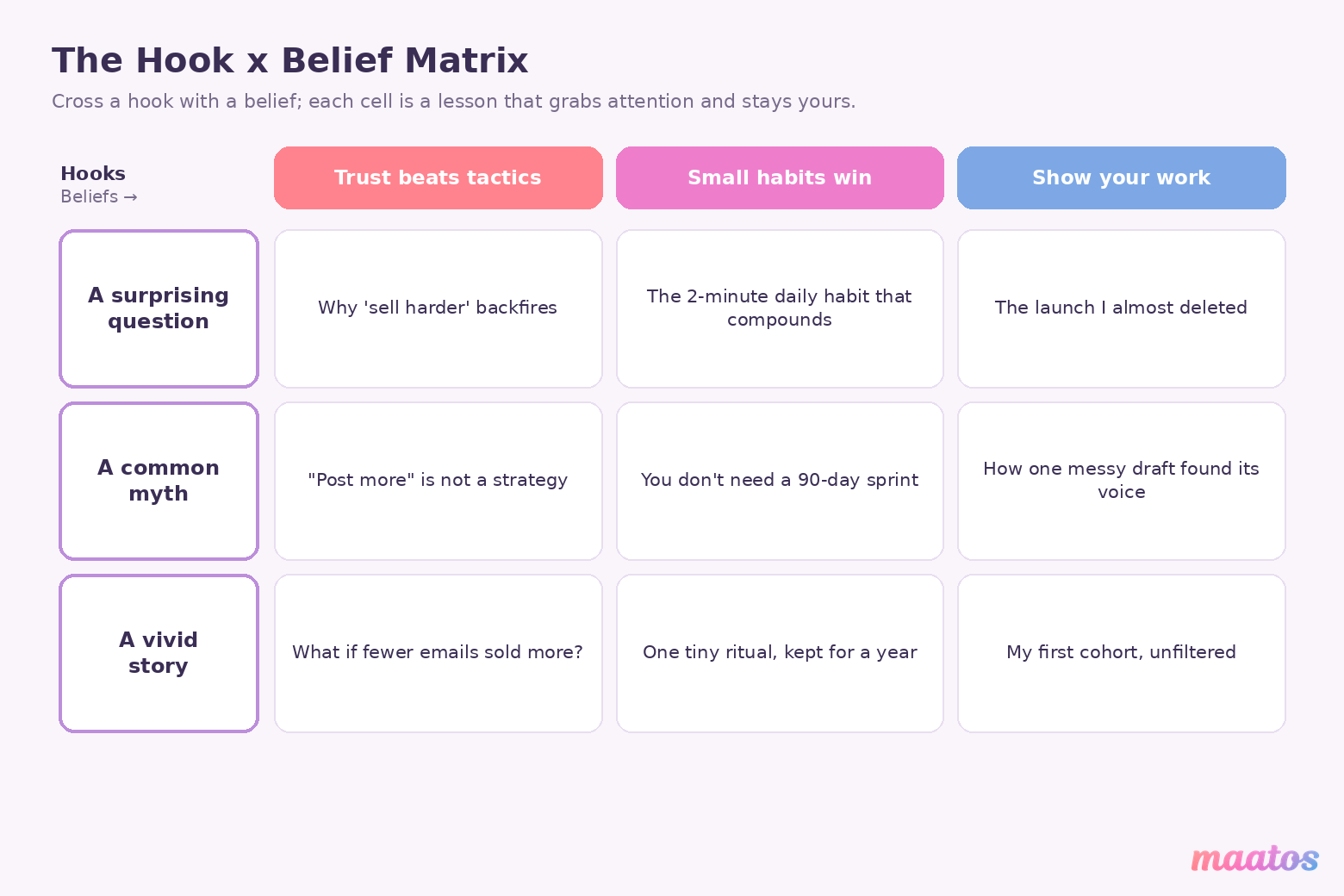
The Hook × Belief Matrix is a simple planning grid that crosses the things that grab attention with the things you actually believe, so every lesson is both interesting and unmistakably yours. It’s the antidote to the blank page — and to the opposite problem, a pile of AI-generated topics with no spine.
How the matrix works
You build it from two lists. Down one side go your hooks — the questions, myths, surprising facts or little scenes that make someone lean in. Across the top go your beliefs — the principles you want the course to carry. Where a hook meets a belief, you’ve got a lesson: a topic that earns attention at the door and delivers your actual perspective once the reader is inside. Fill the grid and a scatter of ideas becomes a structured set of lessons, each anchored so it can’t drift into generic territory. Each cell is also a head start on the lesson’s name — turning a good hook into a lesson title people actually finish is half the battle won before you’ve written a word.
Running a planning session
The matrix really earns its keep in a focused batch session. Block an hour, work across the grid, and you can map weeks of lessons in one sitting — often a full 90-day run. Because every cell is already tied to a belief, the AI you use to expand each one has a firm brief to work from, so the drafts come back on-message instead of vague. You do the strategic thinking once, up front, rather than scrambling for a topic every time you sit down to write.
Why it beats writing lesson by lesson
Planning this way buys you consistency, because every lesson echoes the same core perspective. It buys relevance, because each hook is chosen for a real learner itch. It lowers the mental load of production, since the hard “what should this even be about” decisions are already made. And it tends to lift engagement, because curiosity-driven hooks married to genuine conviction are simply more compelling than another neutral overview. Creators who plan against a matrix usually report smoother weeks and fewer 11pm “what do I write tomorrow” panics.
Where does AI fit while you’re actually building the course?
AI fits before and around the building — it drafts, researches and polishes — and then the finished, human-checked material goes into your course platform, where you assemble and sell it. It’s worth being precise here, because a lot of writing on this topic blurs the line and implies the platform does the AI thinking for you. It doesn’t, and it shouldn’t have to.
Here’s the honest division of labour. Your AI tools — ChatGPT, Claude, a research assistant, whatever you like — live in the drafting stage. They turn a rough outline into a structured first pass, spin up quiz questions to react to, and compress a dense source into something a beginner can follow. That output is a starting point, never the final word.
Then it comes home to Maatos, where the course actually lives. Maatos gives you a drag-and-drop builder to lay out multimedia lessons, built-in quizzes and certificates to make the learning stick and official, a forum and student management to run the cohort, and Stripe and Mollie payments with built-in e-commerce so you can sell it under your own brand rather than renting space on someone else’s marketplace. The AI helps you make the content; your own platform is where you own and sell it. Keeping those two jobs separate is what stops you outsourcing the part that matters — your judgement — to a tool that was only ever meant to speed up the draft.
The combination works precisely because each half stays in its lane: AI drafts fast, you decide what’s true and what’s yours, and your platform carries it to learners under your name.
How do you edit AI drafts without sanding off your voice?
You edit AI drafts by fixing what’s genuinely wrong while defending what’s genuinely yours — and by refusing to let a grammar checker bully your personality into corporate mush. The goal of the edit isn’t a flawless draft; it’s a draft that still sounds like a person.
Editing that goes past grammar
A basic grammar tool will happily “correct” the very things that make you you — the deliberate fragment, the aside, the joke that needed that exact rhythm. Better editing works at a higher level: keeping your tone consistent across a whole lesson, untangling a knotty sentence without flattening the idea inside it, and suggesting changes that fit the lesson’s goal rather than a generic style rule. The test is simple — does the edit make the point clearer, or just blander? Keep the first kind, reject the second.
Keeping your voice while you clean up
The trick is to be selective. Take the fixes that are plainly right — a typo, a subject-verb slip, a genuinely tangled clause — and leave your stylistic choices alone. If you use a tool that accepts a style guide, feed it your preferences so it stops “fixing” your favourite constructions. And treat the whole thing as a conversation: accept, reject, tweak, and over a few lessons the tool learns which of your quirks are features, not bugs.
Editing for the learner, not the algorithm
Readability is part of the edit, but readability for your learners, not for a score. Simplify jargon when it’s a barrier — and keep it when it’s the vocabulary your field actually uses and your students need to learn. Break a wall of text into steps someone can follow on a phone between meetings. Use headings and the occasional list where they genuinely help scanning. The aim is a lesson that’s easy to move through without being stripped of the substance that made it worth taking.
Editing isn’t about perfecting every word. It’s about making sure your voice comes through clearly — and cutting the two sentences the AI added out of habit.
What are agentic AI assistants, and can they run bigger chunks of the work?
Agentic AI assistants are tools that don’t just answer a single prompt but carry out a small multi-step job on your behalf — researching, summarising, monitoring, then reporting back — often by breaking the task into pieces and handling each one. For a course creator juggling ten roles, they can quietly absorb the repetitive middle of the work.
In practice, a well-set-up assistant can pull together up-to-date research on a topic so your material doesn’t quietly go stale, summarise a stack of sources into something you can skim, watch for shifts in your field or in what learners are asking so you know when a lesson needs an update, and take routine steps off your plate so you stay on the creative decisions. You’re not handing over authorship — you’re delegating the errands.
The payoff is time and steadiness: fewer hours lost to admin and curation, a consistent voice across everything the assistant helps prepare (because you’ve briefed it on how you sound), and the ability to run a multi-step production process without dropping the ball on quality. It lets you spend your attention where it actually moves the needle — designing the learning and connecting with students — while the machinery handles the granular bits. The same honesty rule from earlier still applies: an agent can gather and draft, but you sign off on what’s true.
How can you automate the busywork around course creation?
You automate the busywork by connecting your AI tools to the apps you already run your work in — your notes, your calendar, your files — so the admin around a course looks after itself and you stay on the teaching. None of this lives inside your course platform; it’s the workshop around the build.
The connections worth setting up
A shared workspace like Notion can act as the hub for outlines, research notes and timelines, with automations keeping plans and progress current instead of you updating them by hand. A calendar link turns milestones into real dates — draft reviews, recording days, launch — with reminders and blocked focus time so nothing slips. And file automation tames the pile of videos, audio and images a course generates: naming things by your own convention and filing finished assets where they belong, so you’re not hunting for “final_v3_actual” at midnight.
What that automates in real life
Small automations add up fast. You can have a weekly progress summary assembled from your notes and calendar so you (or a collaborator) always know where things stand. You can trigger a nudge to a teammate or freelancer the moment a lesson is approved. You can keep a task list in sync between your planning app and wherever else you track work, so a change in one place shows up everywhere. You can push recordings through automatic transcription and have the text land in your notes, ready to edit into a lesson. Each one is minor on its own; together they hand you back the hours that used to vanish into coordination — and none of them ask you to compromise your voice, because they’re moving files, not writing lessons.
How do you write prompts that produce genuinely personal output?
You write personal prompts by loading them with your context — your audience, your goals, your beliefs, your way of talking — so the AI has no room to fall back on the average. A generic prompt gets a generic answer; a specific one gets something you can actually use.
Why thin prompts fall short
A vague prompt underperforms for reasons that are easy to see once you look: with no specifics, it can only return something shallow and safe; with no sense of your values, it misses the angle that makes your teaching distinctive; with a flat, impersonal tone, it loses the reader; and with nothing unique in it, it can’t help you stand out from the dozen other courses on the same topic. Thin in, thin out.
What a strong custom prompt contains
A prompt worth reusing carries a few things. It carries context — who the learner is, what the lesson is for, how you teach (“write a conversational intro to time management for chronic procrastinators, framed around mindset rather than apps, in line with my coaching approach”). It carries your vocabulary, the phrases and terms your brand actually uses, so the model echoes your language. It’s layered, separating the emotional tone from the factual content from the storytelling, so you can steer each. And it’s explicit about style — sentence length, whether humour is welcome, how direct to be — so authenticity is instructed, not hoped for.
Building prompts that keep working
Start every prompt from your beliefs: tell the AI why you teach a thing, not just what, and the output gains a spine. Feed it examples from your own past lessons so it has your register to imitate. Test a few phrasings and keep the one that comes back sounding most like you. And give role-specific instructions when the job is specific — the depth you want in a summary, the difficulty of a quiz question, the shape of a sales line. For ready-made starting points across these jobs, the prompt guides for building your course and for course marketing are there to adapt.
The impact on your week is real: lesson scripts that carry your nuances, marketing copy that speaks to your exact learner, a whole series that stays consistent without going repetitive. The prompt stops being a slot machine and becomes a reliable collaborator.
Why do personalised workflows beat traditional marketing — and burnout?
Personalised AI workflows win on two fronts at once: they build more trust with learners than broadcast marketing ever could, and they take the grind out of always having something to publish. Both come from the same root — content that’s authentically yours, produced without exhausting you.
Trust is the real conversion lever
Learners buy courses from people they believe. Content shaped by your voice and beliefs reads like a genuine conversation, not a scripted pitch — and that’s what earns the credibility a cold ad campaign can’t. Broadcast marketing shouts the same message at everyone and hopes; personalised content speaks to the specific worry or hope a learner actually has. It resonates because it sounds like expertise from someone who’s been where they are, and that resonance is what turns a browser into a student who finishes the course and tells a friend. If you want the sharp end of this — the emails and pages that do the selling — the course-marketing prompt guide is the companion piece.
Beating burnout by never starting from zero
A lot of creator burnout comes from the same wound reopening every week: the blank page and the pressure to fill it. A good AI workflow closes that wound. Because the system draws on your voice and beliefs, it can hand you relevant lesson angles, social posts or email drafts on demand — first drafts, not final copy, but a running start beats a cold stop every time. Batch-planning frameworks like the Hook × Belief Matrix mean you’re generating from a plan rather than improvising under pressure. And because everything stays anchored to your authentic style, you’re not draining your creativity to keep the machine fed.
The shift is from grinding out content by hand to steering a process that respects both your standards and your energy. You spend your effort on the things worth your effort — sharpening the message, teaching well, showing up for students — instead of fighting writer’s block at midnight. Sustainable output and authentic output turn out to be the same goal.
Putting it all together: your start-to-finish AI workflow
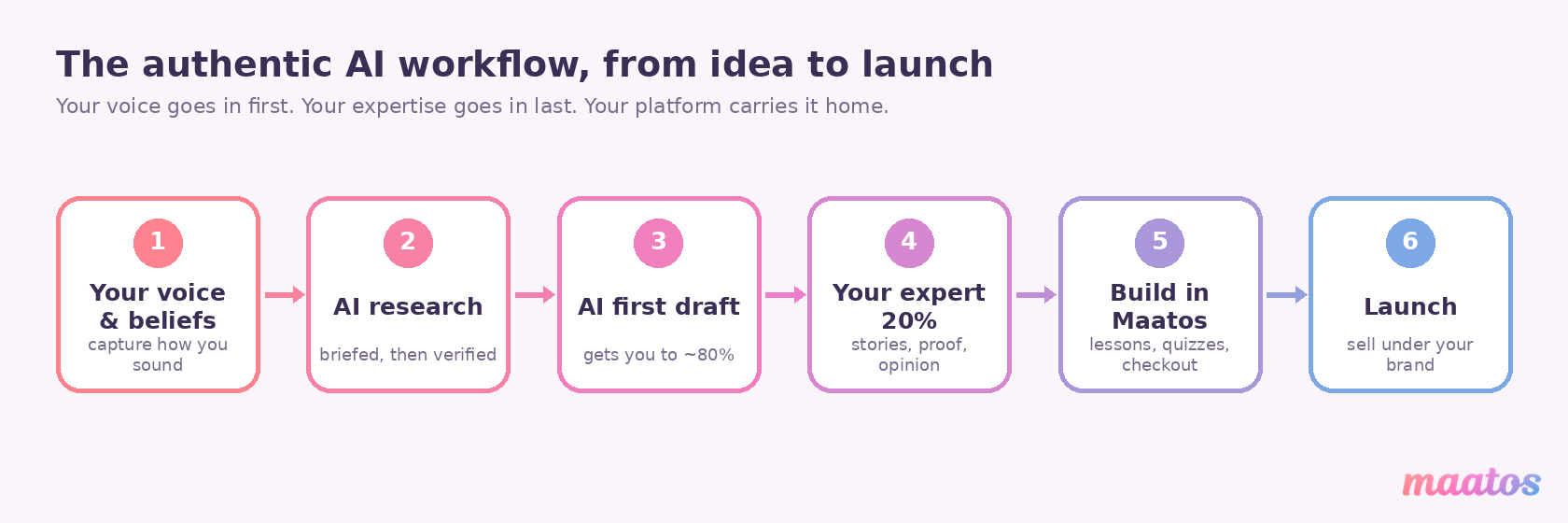
Here’s the whole thing as one repeatable loop you can run for a single lesson or a full course. Start with your foundations — the voice note and belief list you wrote once and reuse forever. Plan with the matrix, crossing hooks and beliefs into a set of lessons that are yours by design. Research with a briefed assistant, then verify what it finds. Draft with a context-rich prompt that carries your audience, angle and voice, and treat that draft as roughly 80% done. Add the 20% only you can add — the story, the proof, the strong opinion, the correction — because that 20% is the entire reason someone chooses your course over a free video. Edit to protect your voice, not to flatten it. Then build and sell it on your own platform, where the drag-and-drop builder, quizzes, certificates and Stripe/Mollie checkout turn a folder of good content into a course people can actually buy.
Run that loop a few times and it stops feeling like a checklist and starts feeling like how you work. The AI gets faster at sounding like you; you get faster at spotting where to add the human layer. That’s the real promise here — not content on autopilot, but you, doing your best teaching, at a pace that doesn’t burn you out.
Frequently asked questions
Will AI make my course sound generic?
Only if you let it write cold. Generic output comes from generic prompts — a broad request with nothing of you in it. Train the tool on your voice and beliefs first, brief it with real context, and add your own stories and corrections to the draft, and the result reads like you rather than like the average of the internet. The AI handles speed; you supply the substance that makes it yours.
Does Maatos have AI features built in?
Maatos is where you build, host and sell your course — a drag-and-drop builder, multimedia lessons, quizzes and certificates, a forum, student management, and Stripe and Mollie payments with built-in e-commerce. The AI drafting in this guide happens in your own tools (ChatGPT, Claude, a research assistant), and the finished, human-checked material goes into Maatos. Keeping the drafting and the platform separate is deliberate: it stops you outsourcing your judgement to a tool. You can try the platform on a free trial.
How do I train AI on my voice without technical skills?
You don’t need to fine-tune a model or write code. Gather a few things you’ve already written, note how they sound, and paste that “how I sound” summary — plus two or three sample paragraphs — into whatever AI tool you use, asking it to match that register. Add a short list of what you believe about your subject. That context alone gets you most of the way; a couple of rounds of feedback on each draft does the rest.
Is it okay to use AI-written content in a paid course?
Yes, as long as you stand behind every word. Use AI for speed — outlines, first drafts, quiz ideas, summaries — then verify the facts, add your own expertise and examples, and edit it into your voice. What you’re selling is your judgement and experience, which AI can’t supply; it’s simply drafting faster. Never publish an unverified AI claim, and never let a tool invent a statistic, quote or testimonial.
How much time does an AI workflow actually save?
Most of the saving comes from never starting from a blank page and from cutting research and admin time, not from shipping the AI’s first draft. Expect the drafting and planning stages to move considerably faster; the editing and the human layer still take real time, and should. Treat AI as the tool that gets you to a solid 80% quickly so you can spend your hours on the 20% that sells the course.
Which AI tool should I use for this?
The workflow matters more than the brand of tool, and it works with whatever you already like — a general assistant such as ChatGPT or Claude for drafting and editing, plus whatever you use for notes and files. Pick one you’ll actually open every day rather than chasing the newest release. What separates good output from generic output isn’t the model; it’s whether you’ve fed it your voice, your beliefs and real context before asking it to write. A modest tool with a strong brief beats a cutting-edge one with a lazy prompt every time.
What’s the single most important step?
Capturing your voice and beliefs up front. It’s the one input every other step depends on — research briefs, prompts, editing, planning all lean on it. Spend the first hour there and everything downstream comes back closer to finished. Skip it and you’re back to fighting generic output one prompt at a time.
Your next step
You don’t need a bigger tool stack to get started — you need the order right: your voice first, the AI in the middle, your expertise last, and your own platform at the end to carry it to learners. Write your voice note today, cross a few hooks with a few beliefs, and draft one lesson the new way. When it’s ready to become a real course — with lessons, quizzes, certificates and a checkout under your own brand — start free on Maatos and build it somewhere you actually own. You bring the knowledge; the tools are the easy part.