

Every platform comparison you will read today is a table of ticks. Podia does online courses: tick. Maatos does online courses: tick. Both build you a website, both take payments, both give your students somewhere to log in. Ticks all the way down — and not one of them tells you the thing that actually decides this: what runs out first, and what it costs you when it does.
So here is the short version before the detail. Podia is an all-in-one creator storefront — courses, community, email marketing and a shop under one roof, billed in US dollars, with firm ceilings on how much you can put inside it. Maatos is your own branded course website with a full learning environment behind it, billed in euros excluding VAT, with your own Stripe or Mollie account collecting the money. Neither is the “better” product. They are two different bets, and the rest of this piece is about which bet suits the business you are actually building.
Everything below was checked against Podia’s own pricing page and help centre and against our own pricing and features pages on 15 September 2026. Platform pricing moves, so check the dates before you quote us back at yourself in a year.
What does Podia cost in 2026?
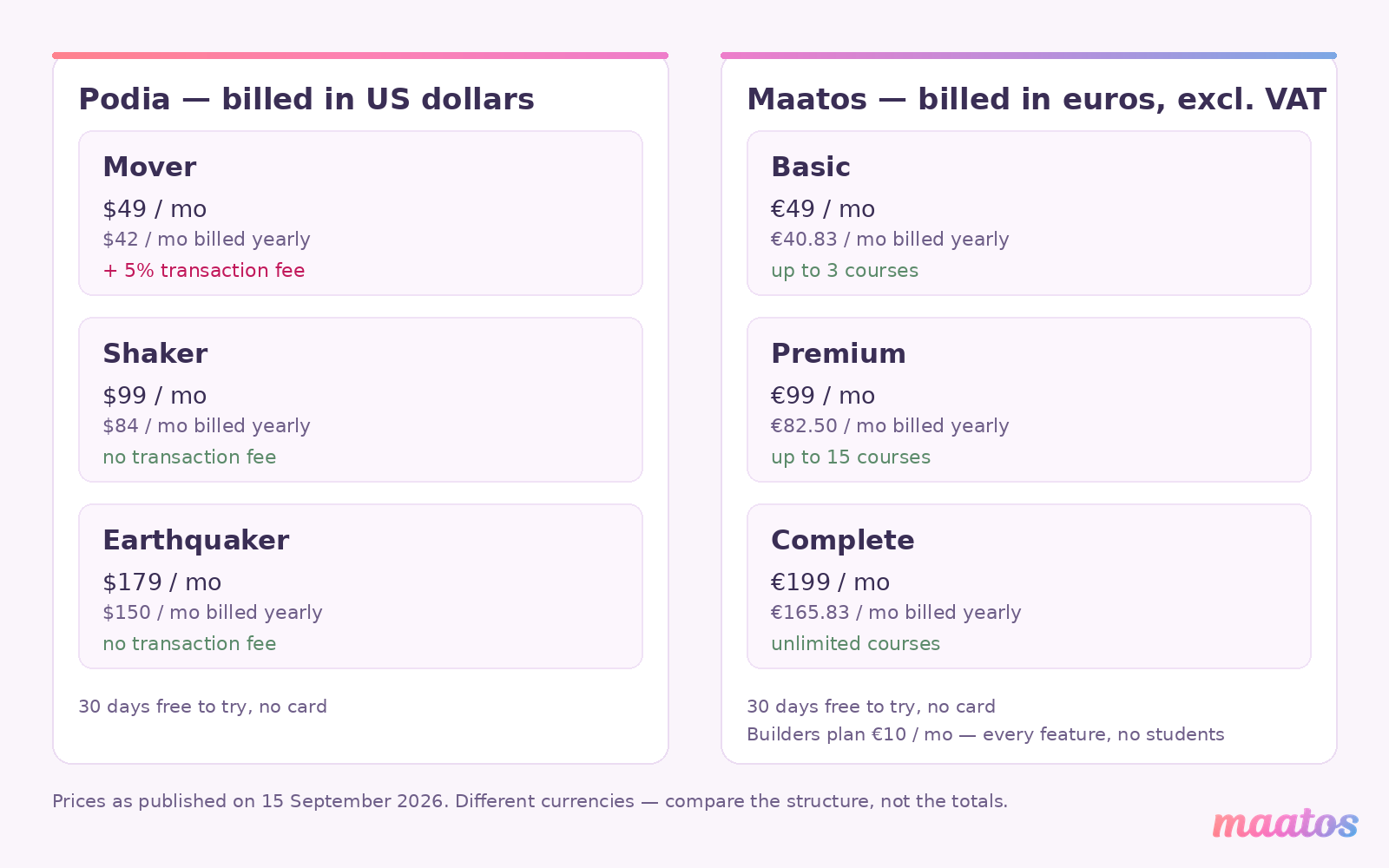
Podia has three plans. On monthly billing they are Mover at $49, Shaker at $99 and Earthquaker at $179. Pay for a year up front and those become $42, $84 and $150 a month — $504, $1,008 and $1,800 a year. Every plan includes unlimited customers and unlimited sales, a website builder, a blog, landing pages, a community, digital products and courses, and Podia’s own email marketing tool.
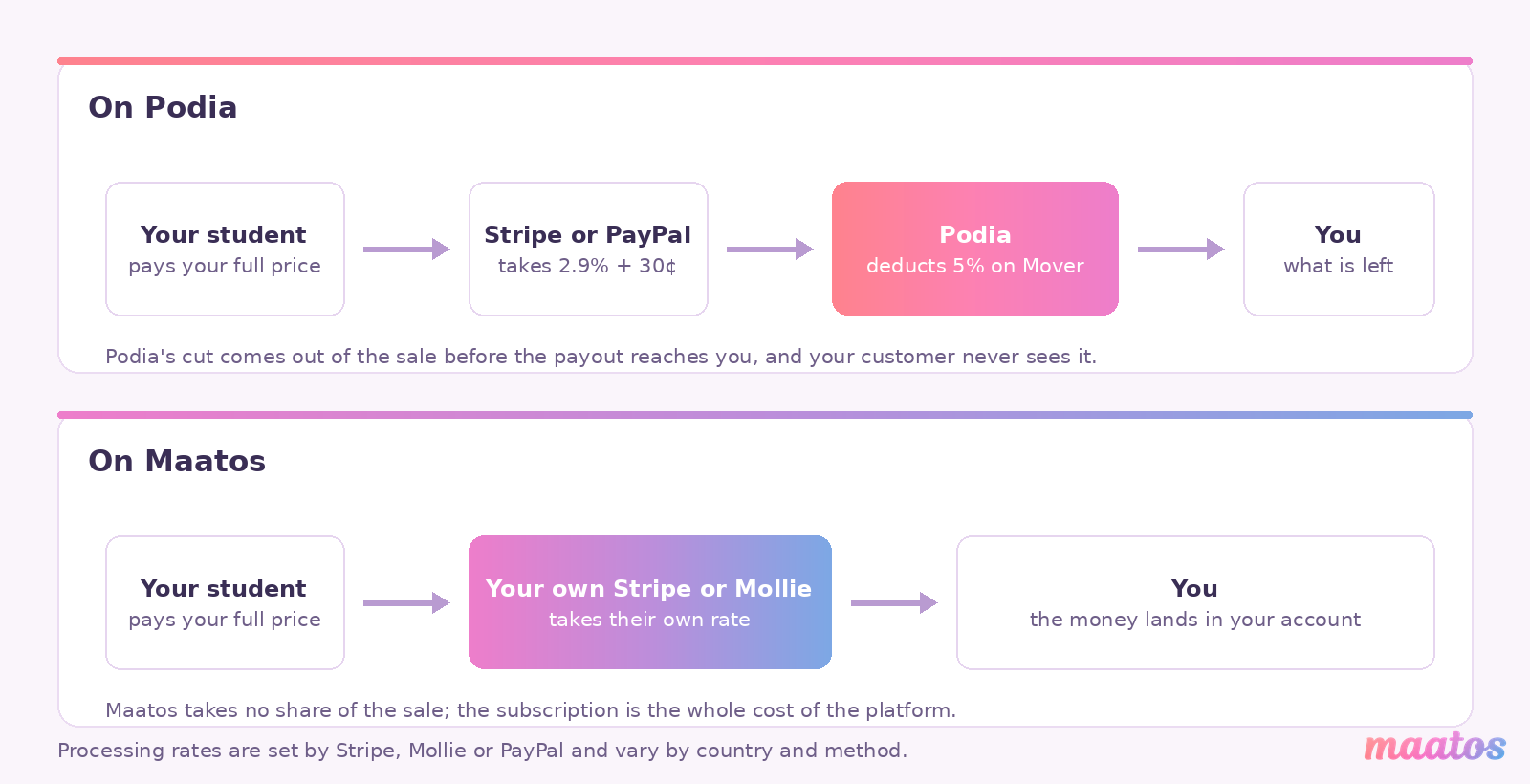
The one number that matters more than the price is on the cheapest plan: Mover carries a 5% transaction fee on every sale. Shaker and Earthquaker carry none. Podia is refreshingly plain about how that works — the customer pays your full price, Podia deducts its 5% from the sale before the money reaches you, and your payment processor takes its own cut on top. Podia’s help centre also confirms two things people get wrong: the 5% applies to the annual Mover plan as well as the monthly one, and your customers never see it on their invoice. Only you do, in your sales export.
On top of Podia’s cut sits the ordinary cost of moving money. Podia quotes Stripe and PayPal at 2.9% + 30¢, varying by location, and is clear that this goes to the processor rather than to Podia. That part you would pay on any platform, including ours, so leave it out of the comparison entirely — the only figure worth arguing about is the 5%.
When does Podia’s cheapest plan stop being the cheap one?
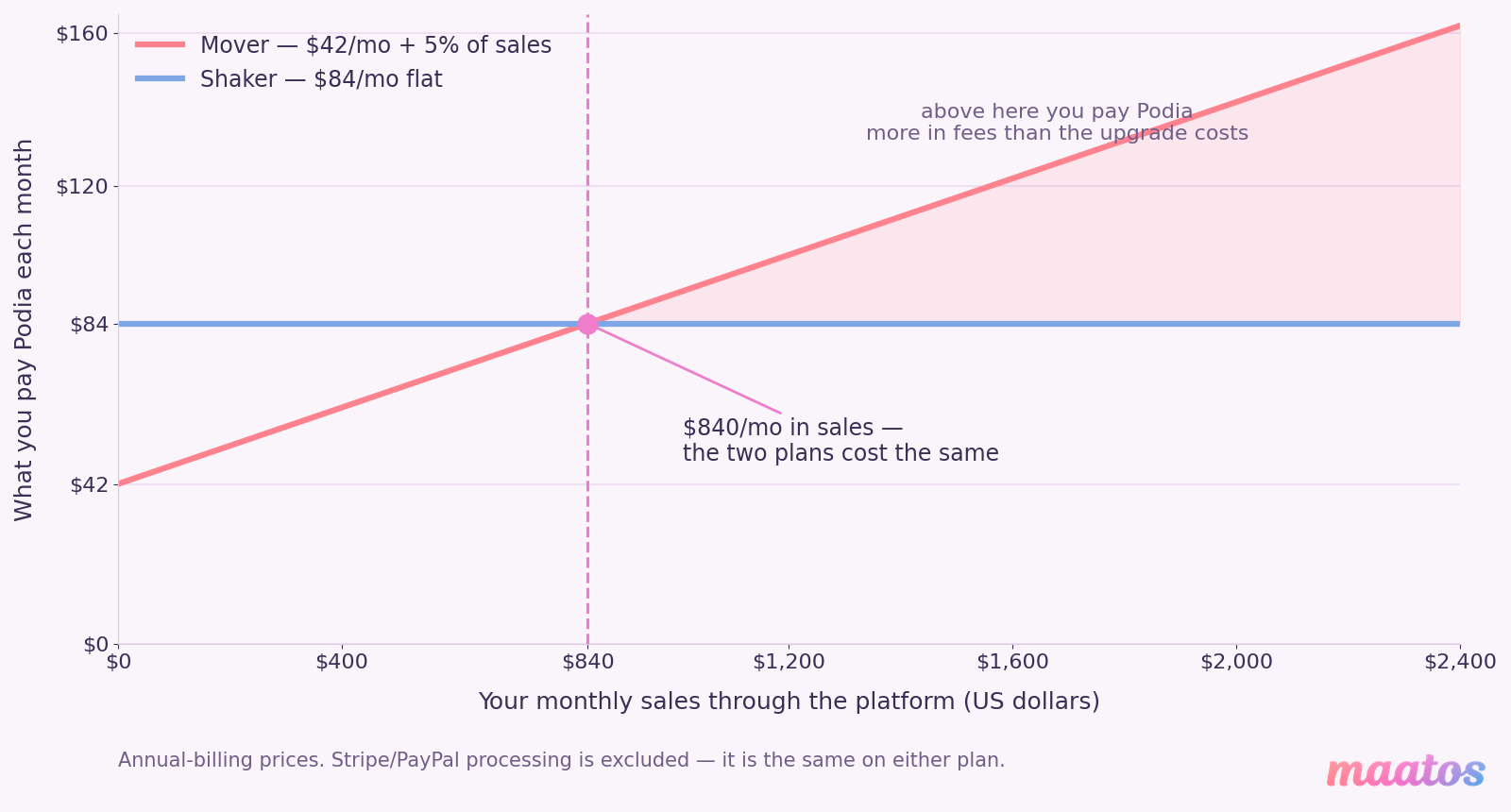
At roughly $840 a month in sales on annual billing, or $1,000 a month on monthly billing. Below that, Mover is genuinely the cheaper plan. Above it, you are paying Podia more in transaction fees than the upgrade would have cost you.
The maths is easy enough to do on the back of an envelope, which is exactly why it is odd that nobody does it. On annual billing Mover costs $42 a month plus 5% of whatever you sell, while Shaker costs a flat $84. The plans cost the same when 5% of your monthly sales equals $42, and 5% of $840 is $42. Put that over a year and it means Mover is the cheaper option only while you are selling under about $10,000 a year. Sell $30,000 in a year on Mover and you have handed over $1,500 in transaction fees on top of the $504 subscription — nearly a thousand dollars more than simply being on Shaker.
None of that makes Mover a trap. At $504 a year for fifty products and unlimited customers it is a lot of platform for the money, and if you are pre-launch or selling a handful of things a month it is the right call. It is just a plan with a shelf life, and the shelf life is shorter than most people assume. If you are weighing up revenue shares in general, we went through the whole arithmetic of platform commissions in our piece on keeping more of every course sale.
What does Maatos cost?
Maatos has three plans plus a build-only one, all quoted in euros excluding VAT. Basic is €49 a month, or €40.83 a month billed annually, and covers up to three courses sold as one-off payments. Premium is €99 a month, or €82.50 annually, and raises that to fifteen courses while adding subscriptions, payment in instalments, integration for live and in-person courses, an appointment calendar, pop-ups and domain setup included. Complete is €199 a month, or €165.83 annually, for unlimited courses plus the selling machinery — an affiliate system, sales funnels, optimised checkout pages, order bumps, upsells, custom thank-you pages and A/B testing.
There is also the Builders plan at €10 a month, which gives you every feature except students. You build, design and rehearse the whole thing at building-site rates and only move up when you are ready to let people in. Our pricing page puts no clock on it — you keep it as long as you need it.
Every plan includes unlimited video storage, no cap on the number of students and no cap on how much you sell, and every plan starts with thirty days free without a card. Beyond the subscription there is nothing else to pay us: you connect your own Stripe or Mollie account, pay their processing rates directly to them, and that is the lot.
We should be equally plain about where our own ceilings live, because “unlimited” is doing some work in that paragraph. Our fair-use policy treats roughly 200 lessons per course, including 200 or more videos, as reasonable. There is no hard cut-off if you go past it, but at that scale a higher plan keeps the site quick. And if a site passes about 5,000 active monthly users, we get in touch to talk about options rather than quietly throttling anything.
Which limits actually run out first?
On Podia, the limits that bite are products, videos and community spaces — and on everything except email subscribers, the only way past a ceiling is to upgrade the entire plan. On Maatos, the limit that bites is the number of courses, while video and students are uncapped.
Podia’s own plan-limits article is unusually direct about this: you have to stay inside your plan’s limits, because going over them is not possible. Mover gives you 50 products, 500 videos, 25 community spaces, no assistant seats and 100 email subscribers. Shaker gives you 150 products, 1,000 videos, 100 spaces, one assistant and 500 subscribers. Earthquaker lifts products, videos, spaces and assistants to unlimited and includes 1,000 subscribers.
Then comes the sentence worth reading twice. Podia does not sell individual limits à la carte — you cannot buy more videos, or more products, on their own. Email subscribers are the single exception: if your list outgrows the included tier you can add more on any plan. So of the five things Podia meters, four can only be raised by moving the whole account up a tier.
That has a sharp edge on the way back down, too. You cannot downgrade while you are over the target plan’s limits; you have to delete products or remove videos first. Subscribers again behave differently — drop your tier below your list size and the downgrade goes through, but email sending switches off until you are back inside it.
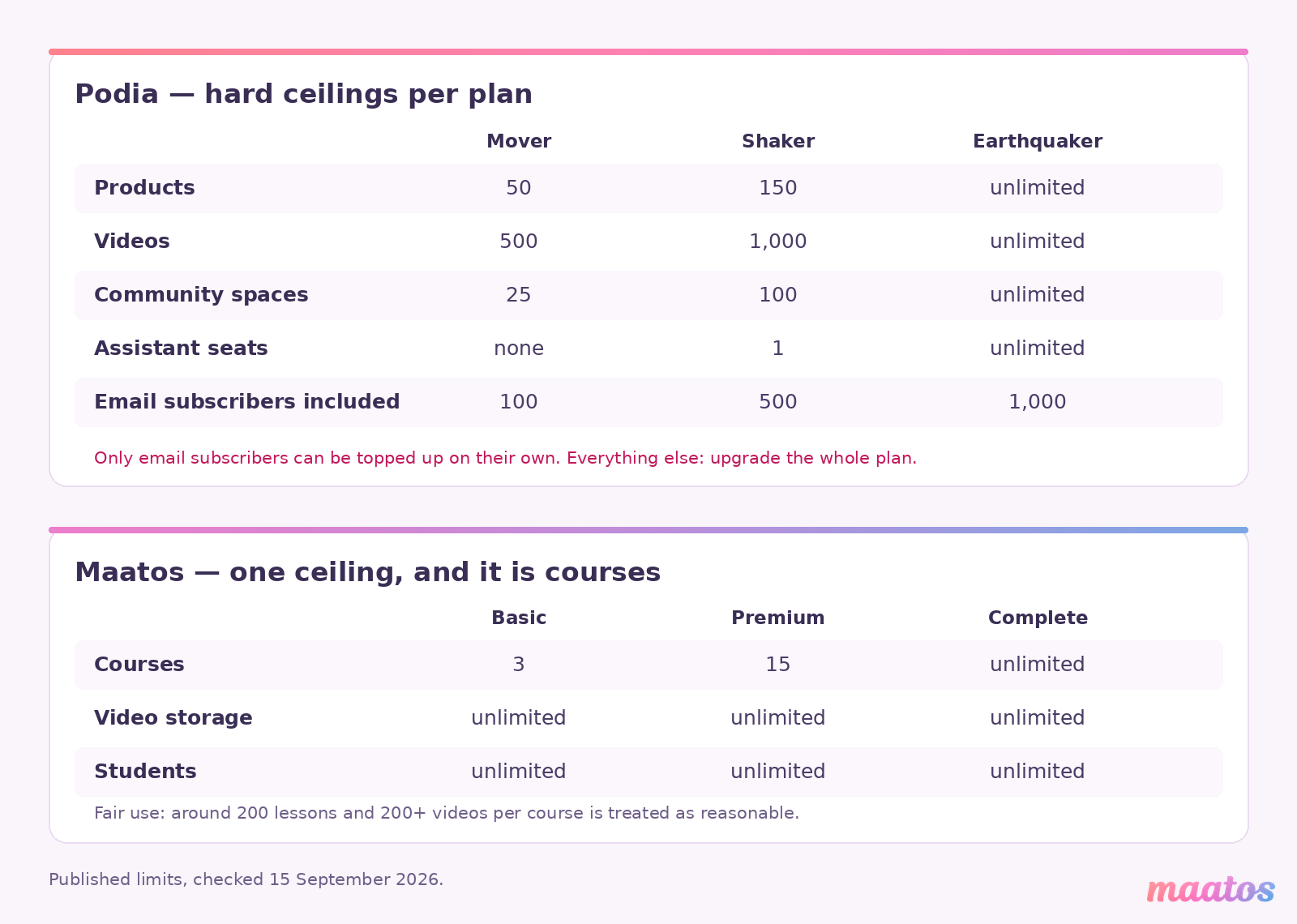
Maatos meters a different thing. We cap courses, not the material inside them: three on Basic, fifteen on Premium, unlimited on Complete. Video storage is uncapped on every plan, students are uncapped on every plan, and sales are uncapped on every plan. Whether that is better depends entirely on the shape of what you sell. Someone launching twenty separate small products will find Podia’s fifty-product allowance generous and our three-course Basic plan tight. A trainer with three deep video courses of around 200 lessons each sits comfortably inside Maatos Basic and is already a hundred videos over Podia’s Mover ceiling.
The honest way to use this section is to count your own catalogue before you look at either price. Count products, count videos, count how many separate things you will be selling in two years rather than today, and then see which ceiling you hit first. That is the number that decides your real monthly cost — not the headline on the pricing page.
What is actually different about the teaching side?
Podia bundles more kinds of selling into one account; Maatos goes deeper into one kind of teaching. Podia’s own feature list covers courses with drip lessons, quizzes, certificates and unlimited students, a community of topic-based spaces with group chats and DMs, live and in-person events, coaching bookings, digital downloads, a website with a blog, and email marketing with newsletters and automations. Maatos covers courses with video, audio and PDFs, quizzes, certificates, a forum, student management that shows you where people get stuck, a drag-and-drop builder for both the course and the website, and a built-in shop for selling things alongside the course.
Read those two lists next to each other and the shape of the decision appears. Podia’s list is wider. Ours is narrower and more specific to running an actual course: progress tracking per student rather than per sale, video served from a dedicated server that resists downloading, and — on Premium and above — hooks into the live and in-person side of teaching, with an appointment calendar for the sessions that happen off-screen.
There is one line on that list where Podia is straightforwardly ahead and it would be dishonest to bury it: email marketing. Podia has its own, in the same account, with campaigns and automations. Maatos does not. We integrate with Klaviyo, Mailchimp and ActiveCampaign and keep your student data in sync, but the email tool is yours to bring and yours to pay for.
Whether that counts as a point for Podia depends on the number we met earlier: the included list is 100 subscribers on Mover, 500 on Shaker and 1,000 on Earthquaker, with extra subscribers available to buy on any plan. Built-in email you have outgrown in your first good launch is not the same as built-in email. Run the numbers on your own list size before you treat it as a tiebreaker in either direction.
Whose brand do your students see?
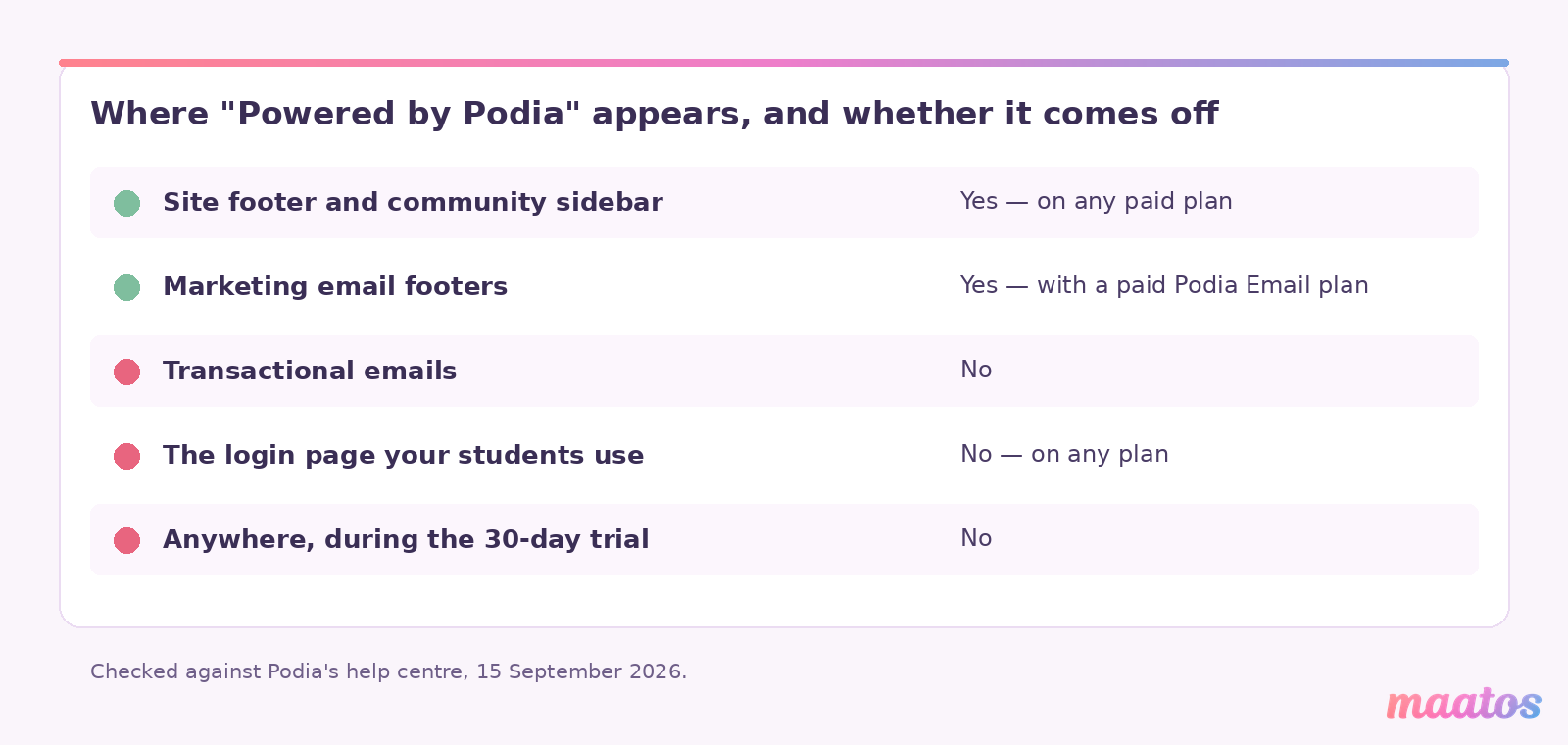
On Podia, the “Powered by Podia” label can be removed from your site footer and community sidebar on any paid plan, and from marketing email footers if you pay for a Podia Email plan — but it cannot be removed from transactional emails, and it can never be removed from the login page. On Maatos, the site runs on your own domain and the branding is yours to set: colours, logo, content and styling.
That login-page detail deserves its own paragraph, because it is the one page on the whole platform that every single student sees, every single time they come back. Podia’s help centre states plainly that the label cannot be removed there, and gives its reason: it helps customers recognise that they are signing in through Podia. That is a perfectly defensible product decision. It is also, if you are selling a premium programme under your own name, a small permanent asterisk on the most repeated moment in your student’s experience.
There is one more wrinkle worth knowing before you evaluate: you cannot remove Podia’s branding during the 30-day trial at all. So the white-label version of the platform is precisely the version you cannot see while deciding whether to buy it.
We are not going to pretend this is a knockout blow. Plenty of very good businesses run on Podia and their students do not care in the slightest. But it is the clearest expression of the underlying difference between the two products. Podia is a place you rent a storefront in. Maatos is a website that belongs to you and happens to have a learning environment inside it — which is the whole argument we made in moving your course onto your own platform and, from the other direction, in open source versus SaaS course platforms.
How does the money actually reach you?
On Podia, the customer pays through Stripe or PayPal, Podia deducts its transaction fee from the sale before the payout, and the processor takes its own cut. On Maatos, you connect your own Stripe or Mollie account and the money lands there directly; the only thing deducted is what Stripe or Mollie charge you.
The difference is not just the percentage. It is whose account the money arrives in, whose merchant relationship it is, and who you talk to when a payout is delayed or a chargeback lands. Owning the Stripe or Mollie account also means the payment methods are the ones you enable — cards, Apple Pay, Google Pay and the local methods your students actually reach for, which matters a great deal more in Europe than a US-built feature table tends to suggest. We wrote about the practical side of that when we covered offering payment plans on your own courses.
A quick word on currency, since this is a euro-versus-dollar comparison and it would be easy to fudge. Podia bills in US dollars. Maatos bills in euros excluding VAT, so the figure on our pricing page is the one before any VAT your own situation adds. We are deliberately not putting a converted side-by-side total in this article, because any exchange rate we printed today would be wrong by the time you read it. Compare the shapes — flat fee versus flat fee plus a revenue share, and which ceiling you hit first — and do the conversion yourself on the day you sign up.
What about VAT, invoices and where your data lives?
Maatos calculates VAT automatically and sends invoices to your customers without you touching anything, stores data on European servers, and provides the data-processing agreements you accept when you create your site. Podia handles sales tax across 230 countries and supports more than 20 currencies.
Both of those are real capabilities and we are not going to caricature Podia’s. If your audience is genuinely global and paying in many currencies, Podia’s breadth here is a strength. Where the two diverge is the European operating detail: European hosting, a data-processing agreement in the box, and automatic VAT-compliant invoicing under your own name rather than the platform’s. Maatos is based in the Netherlands, so if you are registered as a business outside the Netherlands we do not charge VAT on your subscription — though what you charge your students always depends on your own situation, and you remain the seller and the person responsible for getting that right. If you are still working that out, our selling courses category has the country-by-country detail.
What happens if you want to leave?
Both platforms make leaving a deliberate act, and both deserve to be read carefully before you commit. On Podia the friction is on the way down a tier: you cannot downgrade while you are over the smaller plan’s limits, so you delete products and videos first. On Maatos, cancelling ends access to your site; the environment goes into quarantine and is removed after a period, and your materials go with it.
That second one is us, and we would rather say it here than have you find it in a help article. Keep your own copies of your videos, your lesson text and your student list, somewhere that is not your course platform. That is good practice on any platform you do not own the servers for — which, to be clear, includes ours.
So which one should you choose?
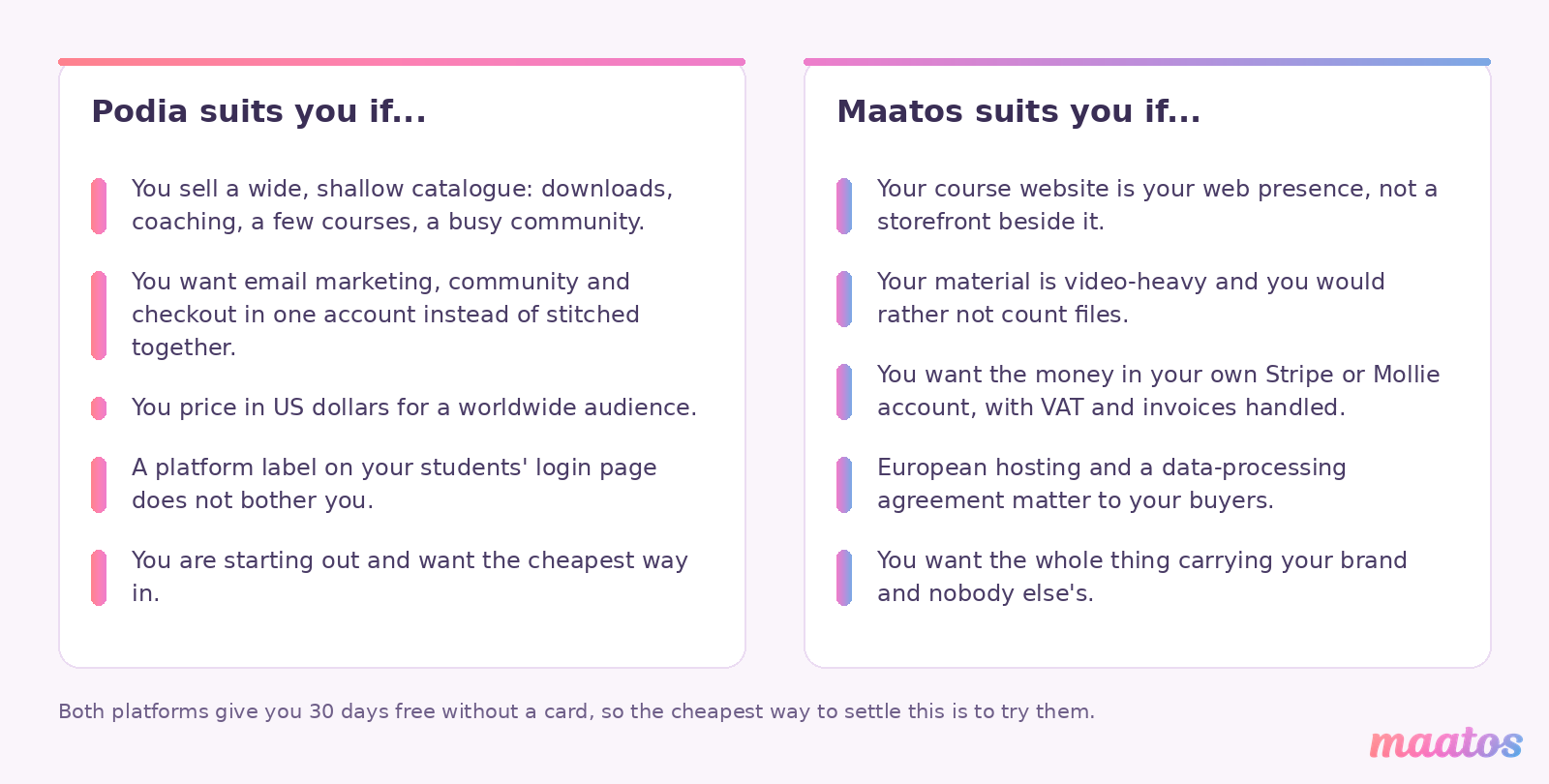
Choose Podia if you sell a wide, shallow catalogue — downloads, a coaching offer, a few courses, a community with lots of spaces — want email marketing, community and checkout in one account rather than stitched together, price in dollars for a global audience, and are relaxed about a platform label on the login page. It is a well-built, honestly priced product and the Mover plan is a genuinely cheap way to start.
Choose Maatos if the course website is your web presence rather than a storefront next to it, if your material is video-heavy and you would rather not count files, if you want the money arriving in your own Stripe or Mollie account with VAT and invoices handled, if European hosting and a data-processing agreement matter to you, and if you want the whole thing carrying your brand and nobody else’s. If you would rather not build it yourself at all, our done-for-you service exists for exactly that.
And if neither of those is you, the rest of the shelf is worth a look before you commit — we have written the same kind of honest comparison against Teachable, Kajabi, Thinkific and Skool, and the whole building your course website category sits behind them.
Frequently asked questions
Is Maatos or Podia cheaper?
It depends on your sales volume and your catalogue. Podia’s Mover plan is $42 a month on annual billing plus a 5% transaction fee; Maatos Basic is €40.83 a month excluding VAT with no revenue share. Podia’s Mover plan stops being cheaper than Podia’s own Shaker plan at about $840 a month in sales on annual billing. Because the two are quoted in different currencies, compare the structure — flat fee versus flat fee plus a percentage — rather than the raw numbers.
Does Podia charge transaction fees?
Yes, on the Mover plan only: 5% of every sale, deducted from the sale before it reaches you. Shaker and Earthquaker carry no Podia transaction fee. The 5% applies to annual Mover subscriptions as well as monthly ones, and it is invisible to your customers — it appears only in your own sales records. Stripe or PayPal charge their own fee on top, which Podia quotes at 2.9% + 30¢ depending on location.
Can you remove Podia branding from your course site?
Partly. On any paid Podia plan you can remove the “Powered by Podia” label from your site footer and community sidebar, and from marketing email footers if you pay for a Podia Email plan. You cannot remove it from transactional emails, you cannot remove it from the login page on any plan, and you cannot remove it at all during the 30-day trial.
Can you buy more storage or products on Podia without upgrading?
No, with one exception. Podia does not sell individual limits à la carte, so extra products, videos, community spaces or assistant seats all require moving up a plan. Email subscribers are the exception: you can add more subscribers on any plan as your list grows.
How many courses can you sell on Maatos?
Three on Basic, fifteen on Premium and unlimited on Complete. Video storage, student numbers and sales volume are uncapped on every plan, subject to a fair-use policy that treats around 200 lessons and 200-plus videos per course as reasonable.
Which platform is better for selling in Europe?
Maatos is built around European operating detail: your own Stripe or Mollie account, automatic VAT calculation and invoicing, European servers and a data-processing agreement. Podia supports sales tax in 230 countries and more than 20 currencies but bills you in US dollars. If your audience is worldwide, Podia’s breadth is a genuine strength; if your business is European, the operating detail usually matters more than the breadth.
Do both offer a free trial?
Yes. Podia offers 30 days free with no card required, and so does Maatos. One thing to know about Podia’s: you cannot remove Podia’s branding while you are on the trial, so the trial does not show you the white-labelled version of the product.
What happens to your course if you cancel?
On Maatos, cancelling ends access to your site, the environment is quarantined and then removed, and your materials are deleted with it — so keep your own backups of videos, lesson text and student data well in advance. On Podia, the equivalent friction is at downgrade time: you cannot move to a smaller plan while your account exceeds its limits, so you have to delete products or videos first.
Try it before you decide
Comparison articles, including this one, can only get you so far. The fastest way to know whether a platform fits the way you teach is to put one real lesson into it and see how it feels. Maatos is free for thirty days, no card needed, and if you are still in build mode afterwards the €10 Builders plan lets you keep shaping it until you are genuinely ready for students. Start your free trial and put your first module in — you will learn more in an afternoon than in any table of ticks.