


There’s a particular moment that catches out a lot of course creators. You’ve done the maths on a platform’s monthly fee, you’re comfortable with it, and then you get to the checkout section of the pricing page and find a percentage. Not the payment processor’s percentage — an extra one, charged by the platform, on money you’ve already earned.
That’s the part of the Maatos vs Kajabi comparison worth reading carefully. Kajabi is a mature, genuinely impressive all-in-one business platform for coaches and creators, and its published plans run from $143 to $499 a month depending on your plan and billing cycle. Maatos gives you your own branded course website, on your own domain, from €49 a month, with European payment methods and automatic VAT built in. They overlap on the obvious things — courses, checkout, certificates, a website builder — and they differ on almost everything that decides your monthly bill.
We make Maatos, so read this as us showing our working rather than pretending to be neutral. Every Kajabi figure below comes from Kajabi’s own pricing and help pages, checked on 18 August 2026, and we’ve said where they’re honestly better than us.
Maatos vs Kajabi, in one paragraph
Choose Kajabi if you want one system that runs your whole business — courses, coaching, communities, podcasts, email marketing, funnels, a branded mobile app and AI tools — and your budget can start around $143 a month, which is where Kajabi’s published plans begin. Choose Maatos if what you want is your own website, with your courses on it, at your own domain, with European payment methods and VAT invoices handled automatically, and you’d rather not pay a percentage of your sales to your software. Kajabi is a business operating system that includes a course tool. Maatos is your course website, and only that, done properly.
What is the real difference between Maatos and Kajabi?
The real difference is what you’re buying: Kajabi sells you a platform to run your business from, and Maatos sells you a website you own.
On Kajabi you build “products” — courses, coaching, memberships, podcasts, digital downloads — inside Kajabi’s system, and you market them with Kajabi’s email tool, Kajabi’s funnels and Kajabi’s landing pages. It’s coherent and it’s fast. Kajabi describes itself as replacing the five tools that don’t talk to each other, and for a lot of creators that’s an accurate description of what it does.
On Maatos you get a website: pages, a blog, a webshop and your courses, on your own domain, in your own branding, down to the sender name on the invoices your students receive. Nothing about it announces which software built it. The same argument sits behind our piece on the long-term benefits of owning your course website, and it’s the same trade-off we walked through in Maatos vs Teachable and, from a different angle, in Maatos vs Skool.
Neither answer is automatically right. If you sell coaching, run a podcast and send four newsletters a week, an all-in-one really does remove work from your day. If your business is a course and a website that ranks in Google, an all-in-one is a lot of machinery to rent. Our guide to open-source versus SaaS course platforms maps out that whole spectrum, and both Maatos and Kajabi sit on it — just at different points.
What do Maatos and Kajabi cost in 2026?
As of August 2026, Kajabi’s published plans run from $143 to $399 a month on annual billing ($179 to $499 if you pay monthly), and Maatos runs from €49 to €199 a month excluding VAT (€40.83 to €165.83 if you pay yearly).
Kajabi raised its prices on 13 January 2026 — the first change in ten years, by its own account — and reshaped its plans at the same time. The three tiers it now leads with are Basic at $143 a month billed annually or $179 month-to-month, Growth at $199 annually or $249 monthly, and Pro at $399 annually or $499 monthly. Annual billing saves 20%. One caveat on that $143 floor: a smaller Starter tier, with one product and 250 contacts, still has a live sign-up button in Kajabi’s own feature-comparison chart — but its price isn’t published alongside the other three, so treat $143 as the entry point Kajabi advertises rather than the cheapest door in.
Maatos runs three subscription plans in euros, excluding VAT, plus a build-only tier. Basic is €49 a month (€40.83 billed yearly) for up to three courses. Premium is €99 (€82.50 yearly) for up to fifteen courses and adds subscriptions, payments in instalments, a booking calendar, pop-ups and free setup of your own domain. Complete is €199 (€165.83 yearly) for unlimited courses, plus the affiliate system, sales funnels, optimised checkout pages, order bumps, A/B testing, upsells and custom thank-you pages. Every plan includes hosting, unlimited video storage and no cap on the number of students — you can use your own domain on any plan, with the setup fee waived from Premium upwards.
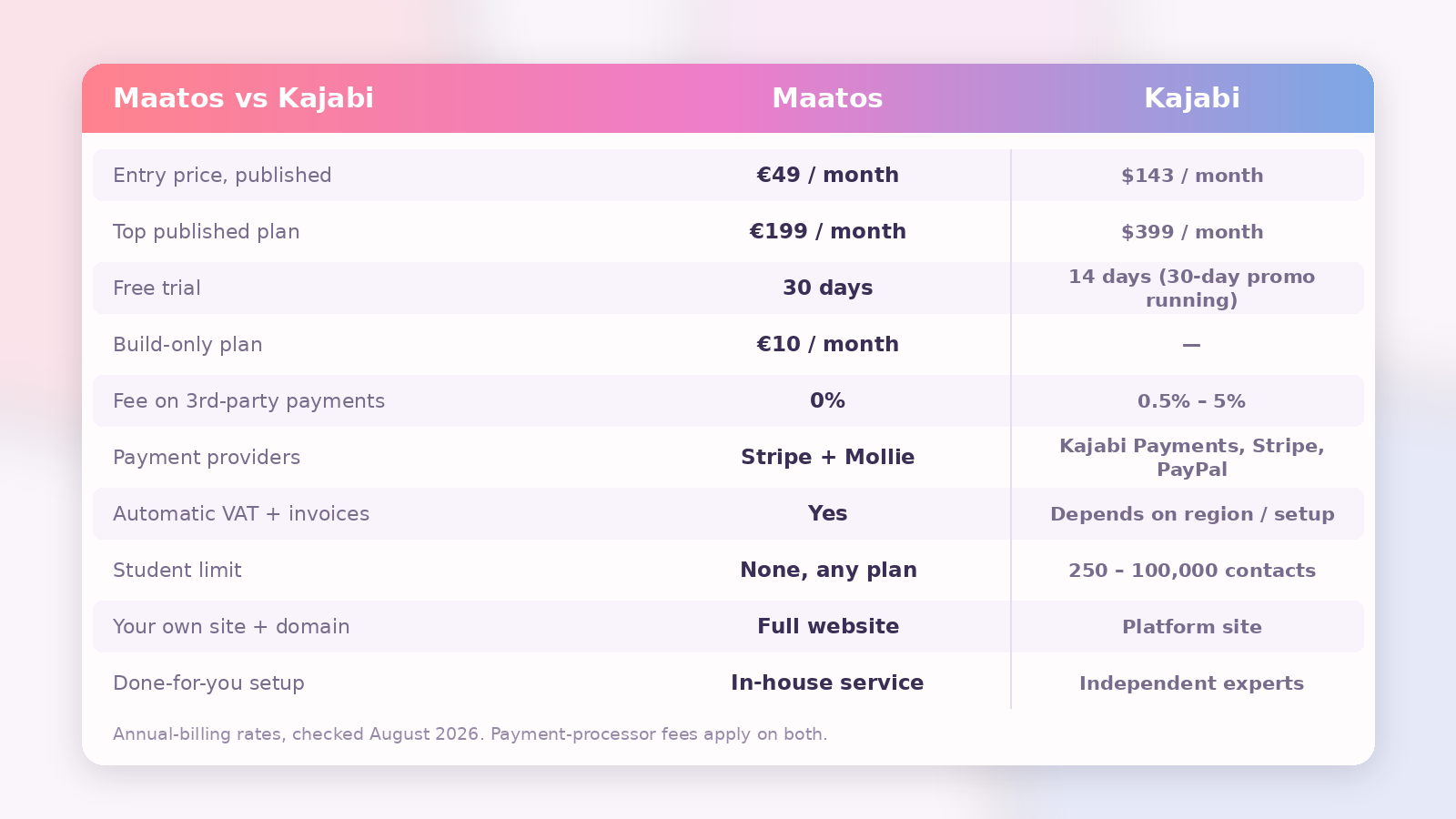
There’s one more line on the Maatos price list that doesn’t have a Kajabi equivalent, and it’s genuinely useful while you’re still building: the Builders plan at €10 a month, which gives you every feature except the ability to enrol students. Most first courses take longer to build than anyone plans for, and spending a tenner a month rather than a full subscription while you’re still recording lessons is a real difference to your launch budget.
Trials are closer than you might expect, and worth checking on the day. Maatos gives you 30 days free on every plan. Kajabi’s plan buttons say 14 days, but at the time of writing the same pricing page is also running a 30-day promotional trial — so look at what your own sign-up screen actually offers rather than trusting either of our marketing pages.
What is Kajabi’s third-party payment fee, and will it affect you?
Kajabi charges an extra percentage of every sale if you take payments through a third-party provider such as Stripe instead of through Kajabi Payments: 5% on Starter, 2% on Basic, 1% on Growth and 0.5% on Pro. Maatos charges 0% on every plan, on every provider.
This fee arrived with the January 2026 plan change, and it’s the first number to check rather than the last, because it’s the one that scales with your success rather than sitting still. On €2,000 of monthly course sales it costs €40 a month on Basic, €20 on Growth and €10 on Pro — and €100 on the unadvertised Starter tier. That’s on top of your subscription, and on top of whatever your payment processor charges you; the percentage is Kajabi’s cut for letting you use somebody else’s checkout.
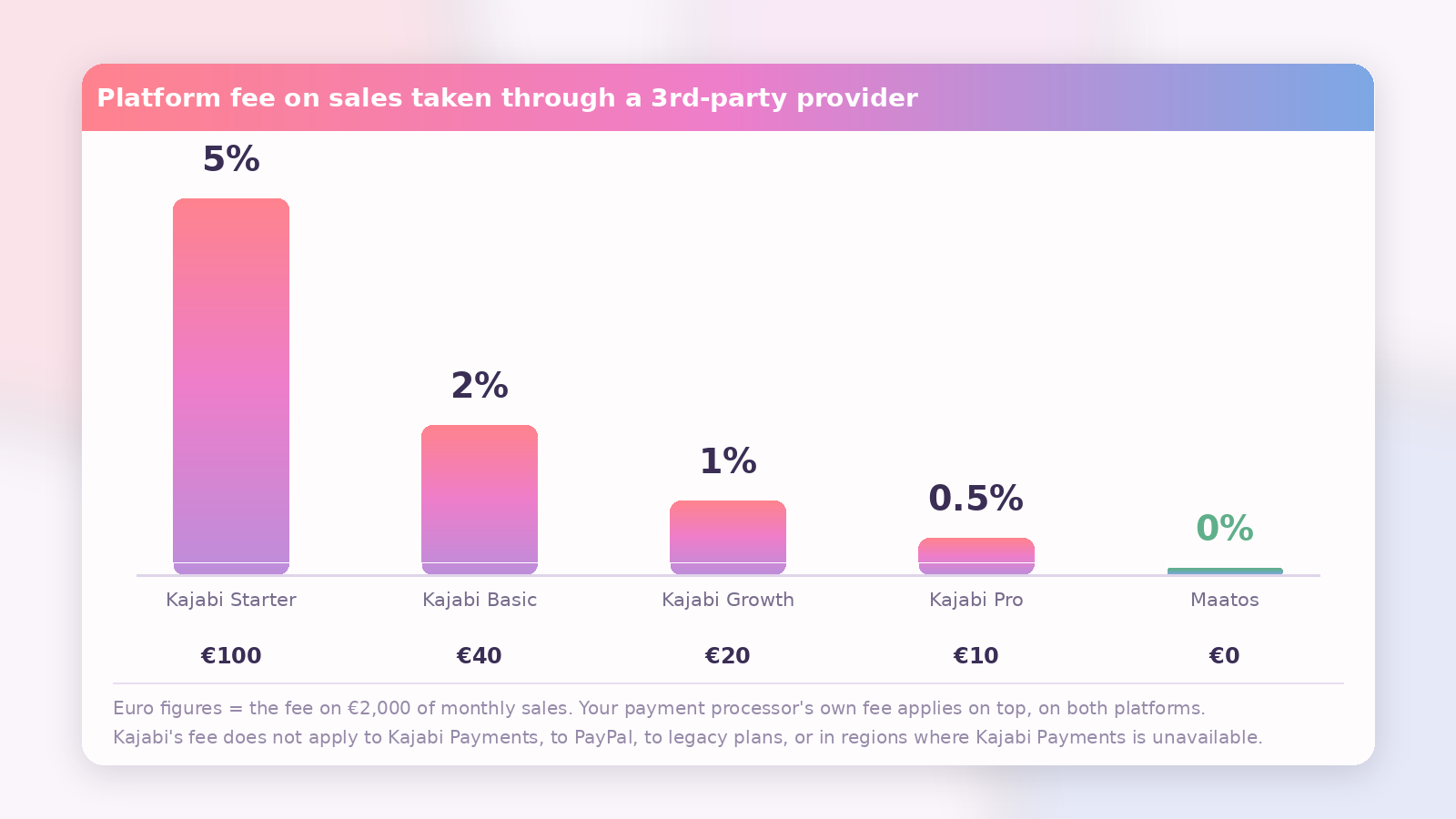
To be fair to Kajabi, the fee has real exemptions and they’re worth knowing before you panic. It doesn’t apply if you use Kajabi Payments. It doesn’t apply to PayPal transactions, on any plan or in any region. It doesn’t apply if you stay on a legacy plan rather than migrating to the new ones. And — this is the important one for European readers — it doesn’t apply at all in regions where Kajabi Payments isn’t available.
Which raises the obvious question, and it’s not a rhetorical one. Kajabi Payments is currently open to businesses registered in the United States, Canada, Australia, the United Arab Emirates, the United Kingdom and select European countries. So the honest answer for a European reader is: it depends, and it may change. If you’re registered in a country on that list, using Stripe costs you an extra 0.5% to 5%. If you’re in a country that isn’t on the list yet, the fee doesn’t touch you at all — until Kajabi Payments arrives, at which point it does. Kajabi says it’s actively expanding the list.
That conditionality is the point. The fee might cost you nothing, and it might cost you a percentage of every sale you make from next year, and which of those is true isn’t in your hands. It’s a strange line to leave undefined in a business budget, so find out where your country sits before you sign up, not after.
Maatos doesn’t have this conversation at all. You connect Stripe or Mollie, the money goes to your account, and we take nothing per sale on any plan. You pay your processor and that’s the end of it. We’ve written before about why a percentage model quietly becomes your largest software cost in our piece on how to stop paying platform fees, and Kajabi’s new fee is a textbook example of the pattern.
Which platform is better if you sell courses in Europe?
If your students are in Europe, the deciding factors are usually payment methods and VAT — and that’s where the two platforms diverge most sharply.
European buyers frequently don’t reach for a credit card. They reach for iDEAL in the Netherlands, Bancontact in Belgium, giropay or direct debit in Germany, Blik in Poland. Maatos integrates Stripe and Mollie, which between them cover Apple Pay, Google Pay and a long list of local methods depending on the buyer’s country. Kajabi supports Stripe and PayPal alongside Kajabi Payments, and Kajabi Payments adds wallets plus buy-now-pay-later options like Klarna and Afterpay — but the underlying question of whether your buyer’s preferred local method is at your checkout is one you should test against your own market rather than take from anyone’s comparison table.
VAT is the sharper edge. Selling a digital course to a consumer in another EU country means charging that country’s VAT rate and issuing a compliant invoice. Maatos calculates the VAT automatically and sends the invoice to the student without you doing anything, which is a feature we built precisely because our customers were drowning in it. Kajabi Payments does have sales-tax functionality, but how much of the EU VAT problem it solves depends on your region and your setup, and a healthy cottage industry of third-party tax tools exists to fill the gap for Kajabi sellers — which tells you something. Check Kajabi’s own help centre against your country before you assume it’s handled, and read our overview of how to handle VAT and sales tax on digital courses so you know what you’re looking for.
Kajabi also prices in dollars. If you earn in euros, your software bill moves with the exchange rate every month, which is a small thing until it isn’t.
How do the limits compare — courses, students and contacts?
Kajabi meters your audience and your product count; Maatos meters your course count and lets your audience grow for free.
Kajabi’s Basic plan allows 5 products and 2,500 contacts, Growth allows 50 products and 25,000 contacts, and Pro allows unlimited products and 100,000 contacts. Websites are capped too: one on Basic and Growth, three on Pro. Extra contacts are an add-on, and the price of another 5,000 of them went from $20 to $25 a month in the January change.
Maatos counts courses — three on Basic, fifteen on Premium, unlimited on Complete — and then mostly stops counting. There’s no student cap on any plan, no contact tier to outgrow, and video storage is unlimited. In fairness, “unlimited” isn’t literally infinite anywhere: past roughly 5,000 active monthly users we’ll get in touch about hosting, and there’s a fair-use guideline of around 200 lessons per course. Neither is a paywall, but you should know they exist.
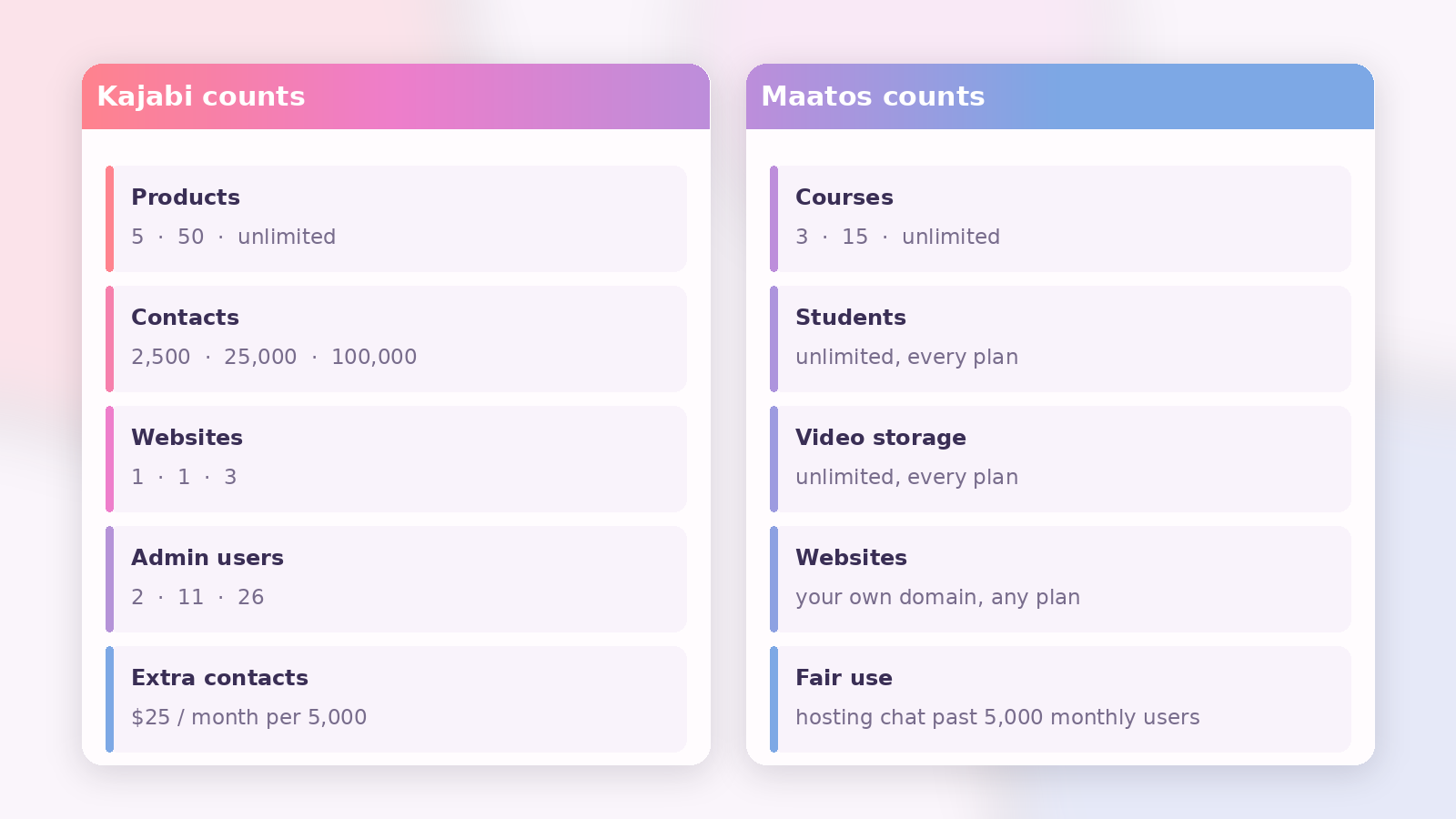
Practically, this is the difference between a bill that grows with your email list and a bill that grows with your catalogue. A creator with one flagship course and a list of several thousand people is climbing Kajabi’s contact tiers while sitting comfortably on our cheapest plan. A creator with thirty small courses and three hundred students is the reverse. Work out which shape your business is before you compare headline prices, because the headline price is rarely the price you end up paying.
What does Kajabi do that Maatos doesn’t?
Kajabi does considerably more than Maatos outside the course itself, and pretending otherwise would be silly.
Kajabi includes its own email marketing with unlimited marketing emails on every plan, funnels and automations, a contact CRM, communities and access groups, podcast hosting, coaching products, digital downloads, memberships, a suite of AI tools, an ad network, and a branded mobile app that comes with the Pro plan and is available as a paid add-on below it — Kajabi lists it at a $199-a-month value. If you want all of that under one login, Kajabi genuinely delivers it and Maatos genuinely doesn’t.
Maatos has no built-in email marketing tool — it connects to Klaviyo, Mailchimp or ActiveCampaign and keeps your student data in sync, which many people prefer but which is still one more subscription and one more login. Maatos has no branded mobile app, no podcast hosting, no AI writing features and no ad network. It has a forum for your students rather than a full community product. If those things are central to how you sell, Kajabi is the better tool and you should buy it.
What does Maatos do that Kajabi doesn’t?
Maatos gives you a complete website you own, European payment and tax handling, and no cut of your revenue — and its entry plan costs a good deal less than Kajabi’s, in whichever currency you do the sum.
Concretely: a full site with pages, a blog and a webshop rather than a set of landing pages attached to a course; your own domain and branding throughout; Stripe and Mollie, so your Dutch and Belgian buyers see the checkout they expect; automatic VAT calculation and invoicing done for you; a Yoast SEO integration so your course pages can actually compete in search; a €10-a-month build-only plan while you’re still writing; a full 30-day trial; and 0% platform fees regardless of how you take payment.
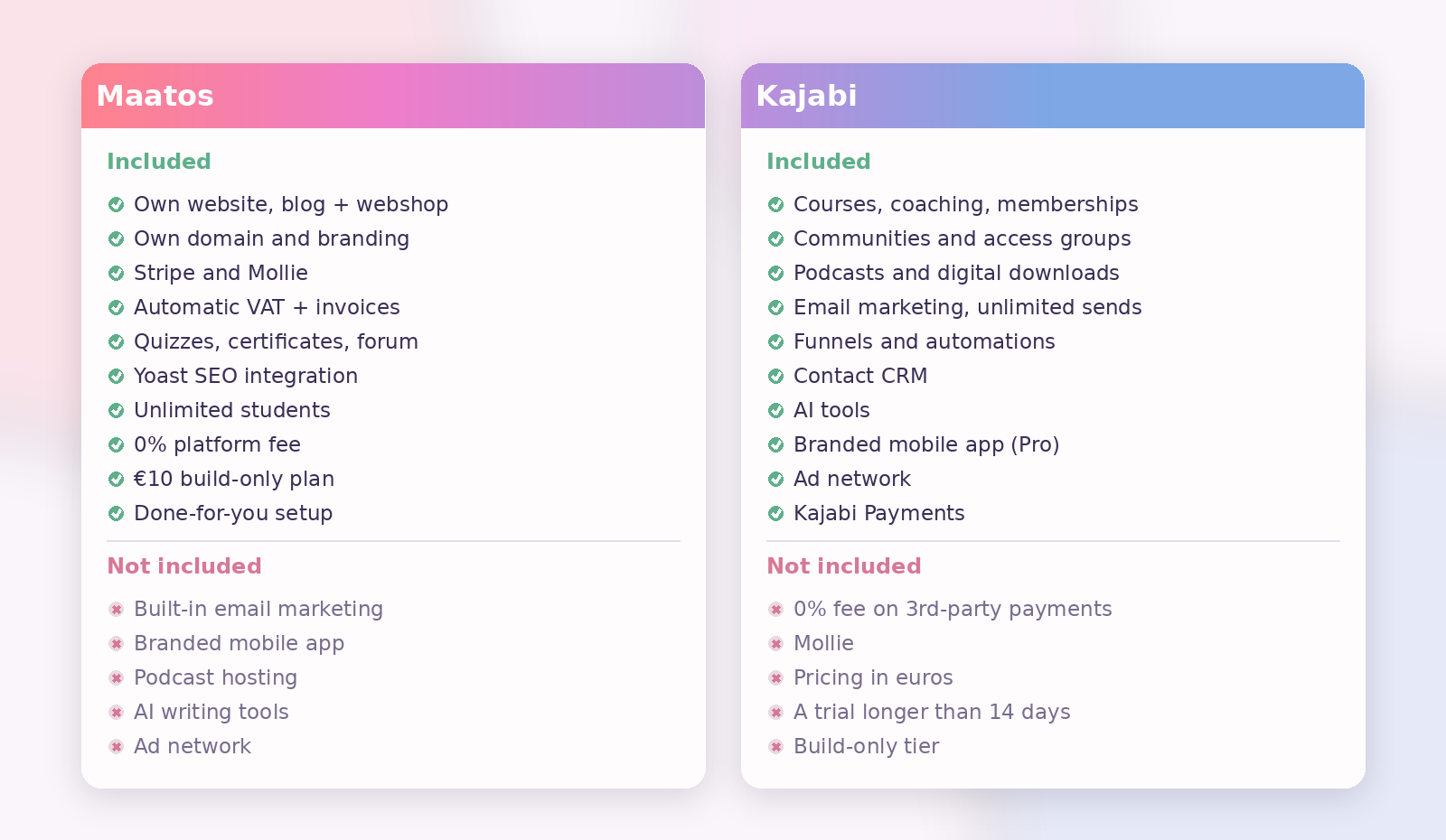
There’s also a difference in how you get set up. Maatos will build the thing for you through our done-for-you service if you’d rather spend your weekends recording lessons than choosing fonts. Kajabi’s equivalent is a marketplace of independent Kajabi experts you hire yourself.
Who should choose Kajabi?
Choose Kajabi if your business is broader than a course and you want one system running all of it.
You’re a good fit if you sell coaching or memberships alongside courses, if your email list is a serious asset you want to run natively, if you want funnels and automations without wiring tools together, if a branded mobile app matters to your students, and if your business is registered outside the regions where the third-party payment fee applies — or you’re happy to use Kajabi Payments and never think about it. You’ll also want a budget that starts at $143 a month and a US-dollar bill you’re comfortable with.
Who should choose Maatos?
Choose Maatos if what you actually need is your own course website, and you’d like to keep the money.
You’re a good fit if your business is one to fifteen courses rather than a dozen product types, if your students are in Europe and expect local payment methods and proper VAT invoices, if you want the site to be genuinely yours — your domain, your branding, your search presence, your blog — and if paying a percentage of every sale to your software feels wrong to you. You’re also a good fit if you’re not finished building yet and the €10 Builders plan means you can take another two months over it. Our guide to moving an online course to your own platform covers what that shift looks like in practice, and the rest of the Build Course Website category goes deeper on the pieces.
Can you move from Kajabi to Maatos?
Yes, and the work is mostly in your content rather than in the technology.
Your videos, PDFs and lesson text come out of Kajabi and go into the Maatos course builder — tedious rather than difficult, and the part most people over-worry about. Your student list exports as a CSV. Your payments move when you connect your own Stripe or Mollie account, though active subscriptions and instalment plans are the genuinely fiddly part: existing recurring payments generally have to be migrated or restarted rather than transferred, so plan that around a natural renewal date and tell your students before you do it, not after. Your pages need rebuilding, which is a good moment to fix the ones that never converted anyway.
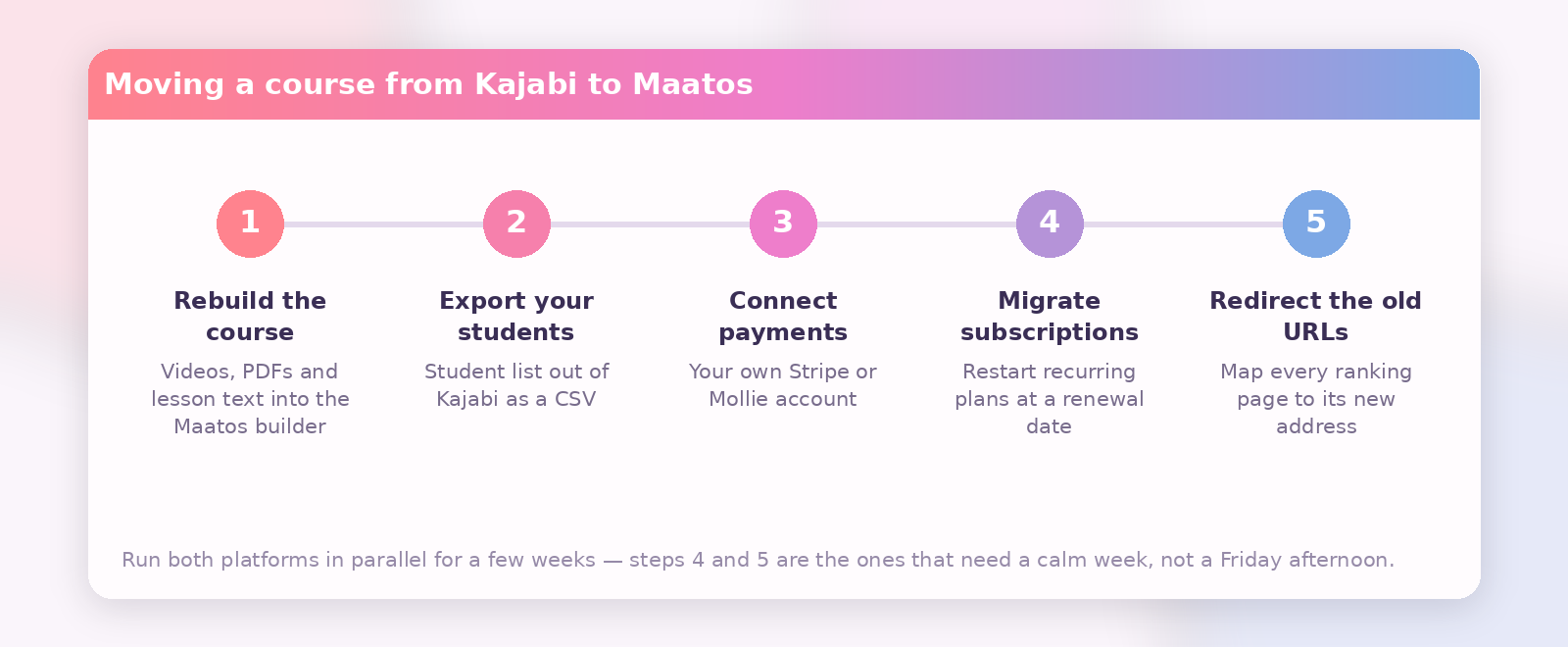
The two things worth doing carefully are redirects and timing. If your Kajabi site ranks for anything, map the old URLs to the new ones so you don’t lose it. And run both in parallel for a few weeks rather than switching over on a Friday afternoon.
Frequently asked questions
Is Maatos cheaper than Kajabi?
Yes, at the entry point and at the top. Maatos starts at €49 a month excluding VAT against the $143 a month where Kajabi’s published plans begin, and Maatos’s most expensive plan, €199, sits well below Kajabi’s Pro at $399. Maatos also charges no platform percentage on your sales, while Kajabi charges 0.5% to 5% if you take payments through a third-party provider in a region where Kajabi Payments is available. Exchange rates move, so run the sum in your own currency on the day you decide.
How much does Kajabi cost in 2026?
Kajabi’s published plans are Basic at $143 a month billed annually or $179 monthly, Growth at $199 annually or $249 monthly, and Pro at $399 annually or $499 monthly, as listed on Kajabi’s pricing page in August 2026. A smaller Starter tier, limited to one product and 250 contacts, is still reachable from Kajabi’s feature-comparison chart but has no published price. Prices rose on 13 January 2026, Kajabi’s first increase in ten years, so check the current page before you budget.
Does Kajabi charge transaction fees?
Kajabi charges no platform fee on sales taken through Kajabi Payments. It charges an additional 5% on Starter, 2% on Basic, 1% on Growth and 0.5% on Pro for sales taken through a third-party provider such as Stripe, in regions where Kajabi Payments is available. PayPal transactions and legacy plans are excluded.
Does Kajabi work in Europe?
Yes, but with caveats. Kajabi Payments is available to businesses registered in the United States, Canada, Australia, the United Arab Emirates, the United Kingdom and select European countries. Elsewhere in Europe you’d use Stripe or PayPal. European VAT handling depends on your region and setup, and many EU sellers add a third-party tax tool, so check Kajabi’s help centre against your own country first.
Is Maatos a good Kajabi alternative?
It’s a good alternative if you want a course website you own rather than an all-in-one business platform. Maatos covers courses, quizzes, certificates, a forum, a webshop, payments and VAT on your own domain, with no platform fee. It doesn’t replace Kajabi’s email marketing, funnels, podcasts, mobile app or AI tools — you’d keep or add separate tools for those.
Can I try both before deciding?
Yes, and you should. Maatos offers a 30-day free trial on every plan. Kajabi’s plan buttons advertise 14 days, though it also runs 30-day promotions — including one at the time of writing — so check what your own sign-up screen offers. Building the same course outline in both for an afternoon tells you more than any comparison article, including this one.
Which is better for SEO?
Maatos gives you more to work with, because you’re publishing a full website — pages, a blog, course pages — on your own domain, with a Yoast SEO integration. Kajabi’s website builder and blog are perfectly capable, but your content sits inside a platform-shaped site rather than a site you’ve designed around search. If organic traffic is how you plan to find students, that difference compounds.
Try it before you commit to either
The honest test for a platform isn’t a comparison table — it’s building your actual first module in it and seeing whether you enjoy the hour. Maatos gives you 30 days to do exactly that, and €10 a month afterwards if you’re still building and not yet selling, so nothing pressures you into launching before the course is good. Start your free trial and put a real lesson in it; if you’d rather we built the site for you while you record, tell us what you’re making and we’ll take it from there.