
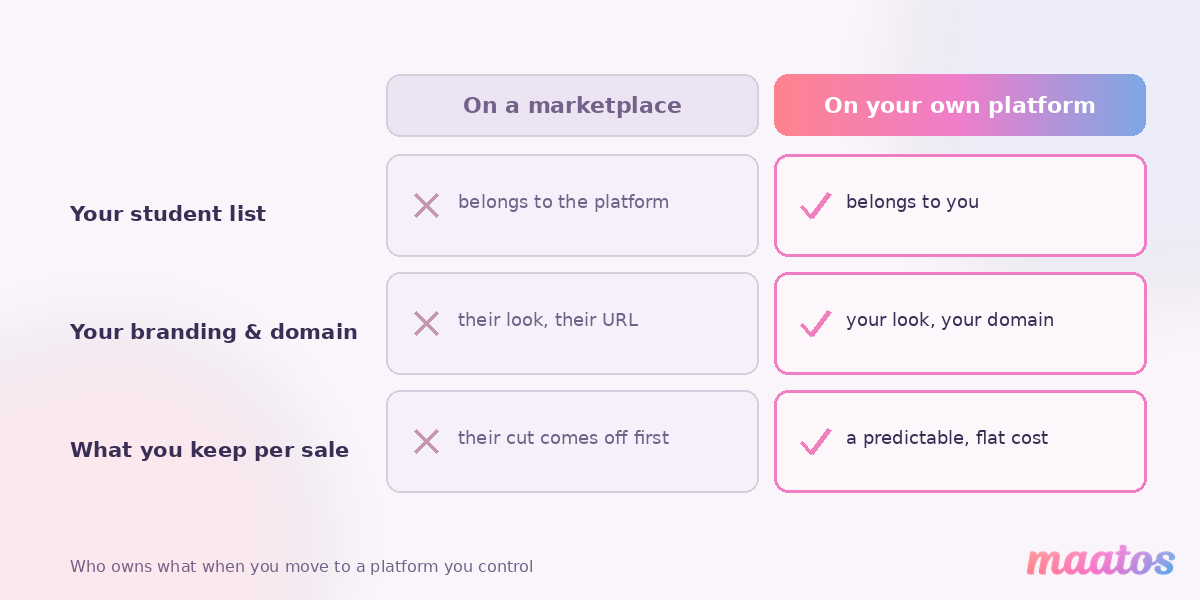
You didn’t set out to build someone else’s business. But if your course lives on a marketplace or a rented platform, that’s quietly what’s happened. The platform holds your students’ email addresses, decides what your page looks like, and takes a cut of every sale you worked hard to earn.
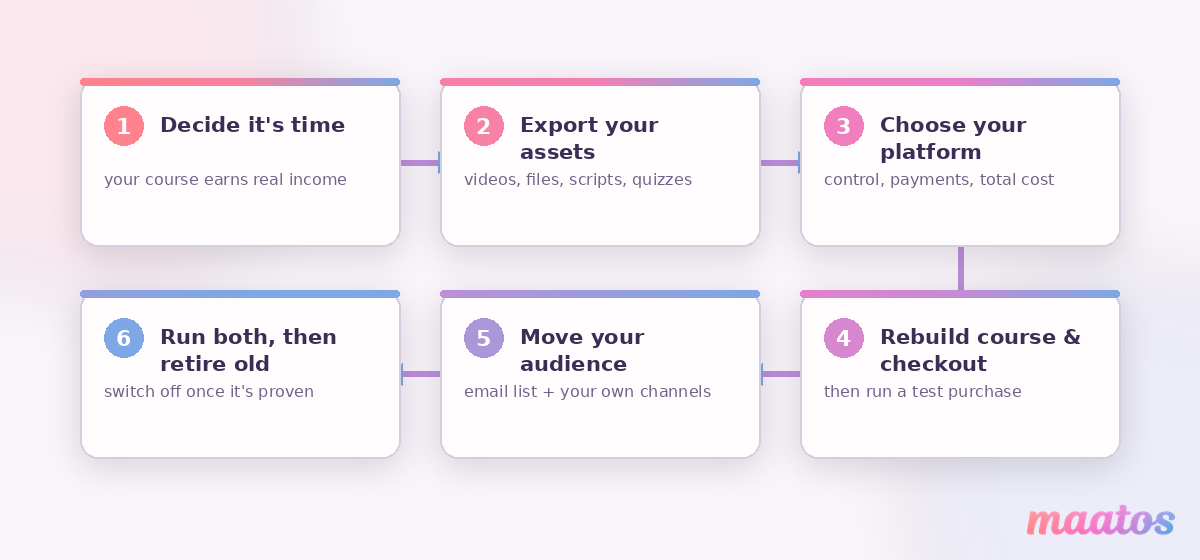
Moving your course to a platform you own fixes all three — and it’s more doable than it looks. In short: you export what’s yours, pick a platform you control, rebuild the course and its checkout, then move your audience across and retire the old listing in the right order so you don’t lose momentum. This guide walks you through it calmly, step by step, so you keep your students and your income while you switch.
Should you move your course off a marketplace at all?
Move when you’re serious about this being a business, not a side listing. The moment your course earns real income, or you want to build a brand, an email list and repeat customers, a marketplace starts costing you more than it gives. You give up the platform’s built-in browse traffic — that’s the honest trade — but you gain the three things that actually compound: you own the customer relationship, you own the look and feel, and you keep far more of every sale.
The maths usually settles it. On a marketplace or a fee-heavy hosted platform, a chunk of each sale disappears before it reaches you, and the “free” discovery traffic often comes with steep discounting you don’t control. We’ve made the full case for that in why paying platform fees quietly caps your income and the long-term benefits of owning your course website. If you’re still weighing it up, read those first — this piece assumes you’ve decided to move and want to do it well.
One reassurance before we start: you don’t have to choose between “marketplace” and “my own site” forever. Plenty of creators keep a cheap intro course on a marketplace as a shop window and sell everything serious from their own platform. Moving doesn’t mean burning the old place down on day one.
What do you need to export before you leave?
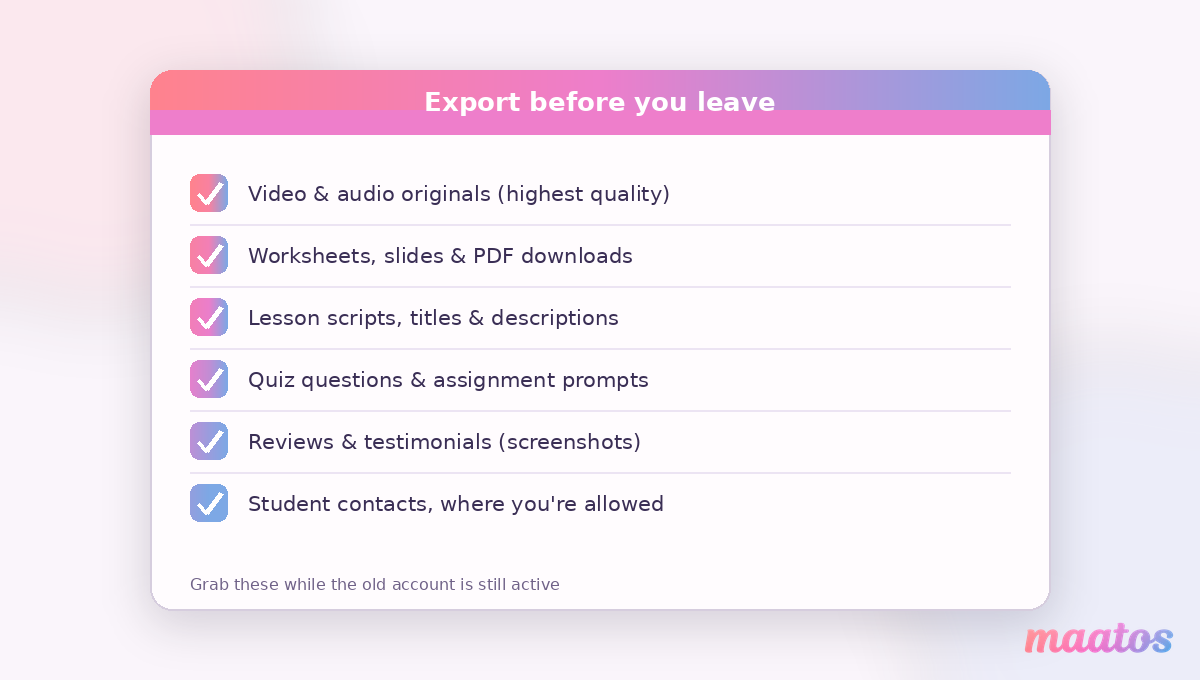
Get your assets out first — while you still have full access to the old account. This is the step people skip and regret, because access can change the moment you cancel a plan.
Your video and audio files are the priority. If you uploaded them yourself, you should have the originals; if you edited inside the platform or only have the streamed versions, download the highest-quality copies you can while the account is live. Do the same for every worksheet, slide deck, PDF, template and downloadable your students receive. Then save the words: your lesson scripts, module titles, course description, and — this is gold — your quiz questions and any assignment prompts, because rewriting those from scratch is a genuine slog.
Two things are worth grabbing even though platforms make them awkward. Your reviews and testimonials are social proof you earned; screenshot them so you can feature them on your new sales page. And your student list matters most of all — more on that below, because it’s the one asset marketplaces guard the hardest.
How do you choose the platform you’ll move to?
Pick the platform on control, payments and total cost — not on whichever name you recognise. Since the whole point of moving is ownership, judge each option by how much of your business it actually hands to you: your own branded domain, your customer data, your checkout, and pricing that doesn’t rise with every sale.
There are broadly three routes. A hosted, all-in-one platform you own the presence on (your branding, your domain, your students) is the fastest path for most creators. A fully self-built stack — open-source LMS, your own hosting, plugins you maintain — gives maximum control but hands you the maintenance bill in time. And somewhere in between sit the marketplace-style communities. We compare the trade-offs honestly in open-source vs SaaS course platforms, and if you’re coming from a hosted competitor, Maatos vs Teachable lays the differences out side by side. If you’d rather build the whole thing yourself, how to build an online course platform from scratch is the deeper technical route.
Whatever you choose, insist on three things: a domain and branding that are unmistakably yours, direct access to your customers’ details, and a payment setup that charges you predictable costs rather than a percentage of your success. Maatos is built around exactly that — a fully branded platform on your own domain, with Stripe and Mollie payments and VAT calculated and invoiced automatically so the admin doesn’t land back on your plate.
How do you rebuild the course on your new platform?
Rebuild in the order students experience it, not the order you happen to have the files. Start with the spine — modules and lessons in sequence — then drop in the videos, then attach the worksheets, quizzes and any certificate at the end. Building front-to-back means you catch gaps the way a learner would, and you’ll spot the lesson whose file never downloaded before a paying student does.
This is also your chance to fix what the old platform wouldn’t let you. Rename the vague lessons. Split the 40-minute monster into two. Add the checkpoint quiz you always wanted. On your own platform you’re not fighting a rigid template — with a drag-and-drop editor you arrange the multimedia, quizzes, certificates and student management the way your course actually needs, no code required.
Set up the money side deliberately, because this is where migrations wobble. Recreate your pricing and, if you ran payment plans or coupons, rebuild them. Connect your payment provider, then run a real test purchase end to end — buy your own course, confirm the receipt and invoice arrive, and check the student lands in the right first lesson. It feels silly to pay yourself; it’s far less silly than discovering a broken checkout from an angry customer email.
How do you move your students across without losing them?
Re-earn the audience you can’t directly export — most marketplaces never give you student emails. That’s the uncomfortable truth of leaving: on many platforms your buyers are the platform’s contacts, not yours, so you can’t simply upload a list and email everyone “we’ve moved”. You work with what you’re allowed.
If you do own an email list — from a lead magnet, a newsletter, or a platform that does share contacts — this part is simple: tell them clearly, give them the new link, and make the first visit effortless. Where you can’t email past buyers directly, use the channels you do control. Post the move to any community, group or social following you’ve built. Add a note in the old course’s description and any lessons you can still edit, pointing to your new home. And going forward, capture emails yourself with a free resource so you never rent your audience again — a simple lead magnet is the easiest way to start owning that list.
Frame the move as an upgrade, because for students it genuinely is: a cleaner experience, direct access to you, and often new material. People don’t follow a migration; they follow a better place to learn.
When do you switch off the old course?
Keep both live in parallel, then retire the old one once the new platform is proven. Don’t cancel anything the day your new site goes up. Run them side by side for a few weeks: point new buyers to your platform, keep serving existing students wherever they already are, and watch for anything broken. Only when purchases, logins, emails and video playback have all worked for real customers do you wind the old listing down.
When you do retire it, be tidy. Stop taking new sales there, update the old description to point to your platform, and honour any access you promised existing students until it lapses. If the marketplace lets you keep a single low-priced intro course as a discovery funnel, that can be worth leaving up on purpose — a shop window that sends motivated learners to the home you now own.
What are the most common mistakes when moving a course?
The migrations that go wrong nearly always trip on the same handful of things. Cancelling the old plan before downloading the files is the classic — access vanishes and the originals go with it. Skipping the test purchase is the next, because a silently broken checkout costs sales you never even see. Trying to move everyone in a single dramatic weekend causes needless panic; a staged switch is calmer and safer. And treating the move as a like-for-like copy is a missed opportunity — you’re rebuilding anyway, so improve the weak lessons while you’re in there.
The deepest mistake is leaving without a plan to own your audience next time. If you jump from one platform that keeps your customers to another that does the same, you’ve changed the logo and kept the cage. The whole point is to end up owning the relationship — which is exactly what building on your own course website is for.
Frequently asked questions
Can I transfer my course directly from Udemy, Teachable or Skool to my own platform?
There’s no one-click transfer between platforms. You move a course by exporting your own content — videos, worksheets, quiz questions, descriptions — and rebuilding it on the new platform. It’s manual, but it’s also your chance to improve the course as you go.
Will I lose my students if I move platforms?
You keep the students you can reach. If you own an email list you can invite everyone across in a day. Where a marketplace never gave you student emails, you re-earn that audience through the channels you control — your community, social following and a lead magnet — and you stop renting your audience from then on.
Do I have to take my course offline while I switch?
No. Keep the old course live and serving students while you build and test the new one, then retire the old listing only once real purchases and logins have worked on your platform. Running both in parallel for a few weeks is the safe way.
How do payments and VAT work once I’m on my own platform?
You connect your own payment provider and receive the money directly, rather than waiting for a marketplace payout minus its cut. On Maatos that’s Stripe or Mollie, with VAT calculated automatically and invoices sent to your customers, so the tax admin doesn’t become your new part-time job.
How long does it take to move a course?
For a single course, most creators do the hands-on rebuild in a few days to a couple of weekends, depending on how many lessons and downloads there are. The slowest parts are re-uploading video and testing the checkout — not the platform setup itself.
What if I don’t want to rebuild it myself?
Then don’t. If your time is better spent teaching than dragging files around, our Done-for-You Service sets up your branded Maatos site — design, integrations and all — and hands it back ready to run, with a walkthrough so you can manage it yourself afterwards.
Moving platforms feels like a big leap, but it’s really just a careful sequence: get your work out, pick a home you own, rebuild it a little better, and bring your people with you. When you’re ready to see how it feels to run a course on a platform that’s actually yours, start free and build it out at your own pace — and if you’d rather we set the whole thing up for you, let our team build it for you.