


There is a line in Thinkific’s plan comparison that almost nobody reads, and it is the one most likely to stop your business: Course Video Bandwidth — 100 GB/mo. Not storage. Watching. That is how much video your students are collectively allowed to stream in a month on the entry plan.
If you are weighing Maatos against Thinkific, that line tells you more than the headline price does. Thinkific hosts a course school for you, meters what your students consume, and by default processes the money. Maatos gives you your own course website on your own domain, connects it to your own Stripe or Mollie account, and takes no percentage of your sales — but limits how many courses you can publish on the lower plans. Which trade suits you depends on how much video you have, where your buyers are, and whether you want a website or a school.
Everything below was checked against both companies’ own pages on 8 September 2026. Prices move. The reasoning shouldn’t. (If Thinkific isn’t the platform you’re actually weighing us against, we have run the same exercise for Teachable and Kajabi.)
What is the actual difference between Maatos and Thinkific?
Thinkific sells you a place to teach; Maatos sells you a place to teach that is also your website.
Thinkific is a Canadian platform that has been running since 2012, and it is big — its own pricing page says customers have earned $4.23 billion on it and reached 214 million learners. You build courses, communities, landing pages and a school site inside Thinkific’s builder, and their checkout, TCommerce, handles the money. It is a complete, polished, well-supported product, and it is also a place you rent. Your school lives inside their system, on their plan tiers, measured by their meters.
Maatos, running since 2019 and based in the Netherlands, starts from the other end. You get a full website with a learning environment inside it, hosting included, on your own domain from day one — Yoast is built in, so your course pages are meant to rank in search rather than sit behind a login. You connect your own Stripe or Mollie account, so students pay you directly and Maatos never sits between you and the money. If you have read our piece on moving a course to your own platform, this is the same argument with a price tag attached.
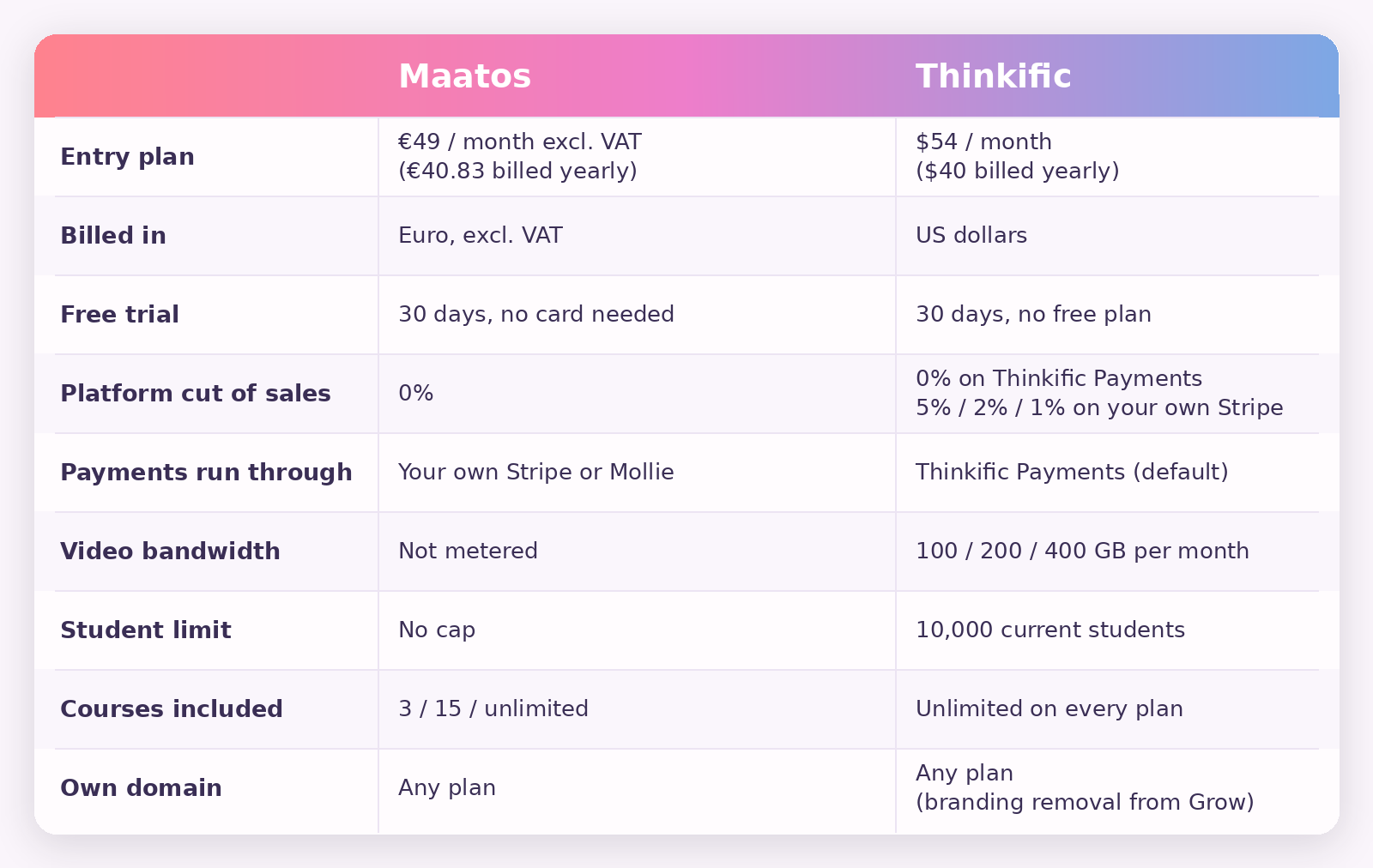
What does each one cost in 2026?
Thinkific starts at $54 a month billed monthly, or $40 a month billed annually. Maatos starts at €49 a month excluding VAT, or €40.83 billed annually.
Thinkific’s three self-serve plans are Basic at $54 monthly ($40 annually), Start at $109 ($82) and Grow at $219 ($164), with an enterprise Plus tier priced by conversation. Every self-serve plan gets unlimited published courses and up to 10,000 current students; on Plus that figure is custom. Certificates, payment plans, memberships and product bundles are not on Basic — they start at Start. Removing Thinkific’s branding from your site takes Grow. So does PayPal, API access and phone support. Basic gives you one administrator; Start gives you two.
Maatos runs Basic at €49 excluding VAT (€40.83 billed annually) for up to three courses, Premium at €99 (€82.50) for up to fifteen, and Complete at €199 (€165.83) for unlimited courses — the full breakdown lives on our pricing page. Subscriptions, instalments, an appointment calendar and integration for live or in-person sessions start at Premium; the affiliate system, sales funnels, order bumps, upsells, A/B testing and custom thank-you pages start at Complete. Every plan includes hosting, unlimited video storage and no cap on students.
Two smaller differences are worth more than they look. The first is currency: Thinkific bills in dollars, so if you earn in euros or pounds your fixed platform cost drifts with the exchange rate every month, while Maatos bills in euros and, if your business is registered outside the Netherlands, doesn’t charge VAT on the invoice at all (inside the EU you still self-account for it under the reverse charge). The second is the Builders plan — €10 a month for everything except having students, so you can build for as long as you need without paying a full subscription to do it. Thinkific has no equivalent; once your trial ends you are on a full plan whether your course is finished or not.
Both give you 30 days free, neither has a free tier below that, and neither asks you to commit anything to start. That is a tie, and anyone selling you a “30 days versus 14” comparison here is quoting an old page.
What does Thinkific take out of each sale?
On Thinkific you pay a card fee plus a stack of surcharges, and if you would rather use your own Stripe account you pay Thinkific a platform fee on top — 5% on Basic, 2% on Start, 1% on Grow.
Start with their own processor, Thinkific Payments, because that is the default and the cheaper route. For a business in the euro area the card fee is 1.7% plus €0.25 on European Economic Area cards; in the UK it is 1.7% plus £0.20, and in the United States 2.9% plus $0.30. Those are competitive rates, roughly what you would pay a processor directly. Then come the additions, each documented on Thinkific’s own fees page: plus 1.55% if the buyer pays with a card issued outside the EEA, plus 2% (for most euro-area businesses) if a currency conversion is needed, plus 0.7% on anything sold as a subscription or a payment plan, plus 0.4% if you invoice through them, and plus 0.5% on every non-zero transaction where the buyer sits in the US, Canada, the UK or the EU and their tax solution is switched on — which, as their own page spells out, applies even when the rate it works out is 0%. Bank redirects such as iDEAL and Bancontact run at 3.9% plus €0.25, and buy-now-pay-later at 6.5% plus €0.25.
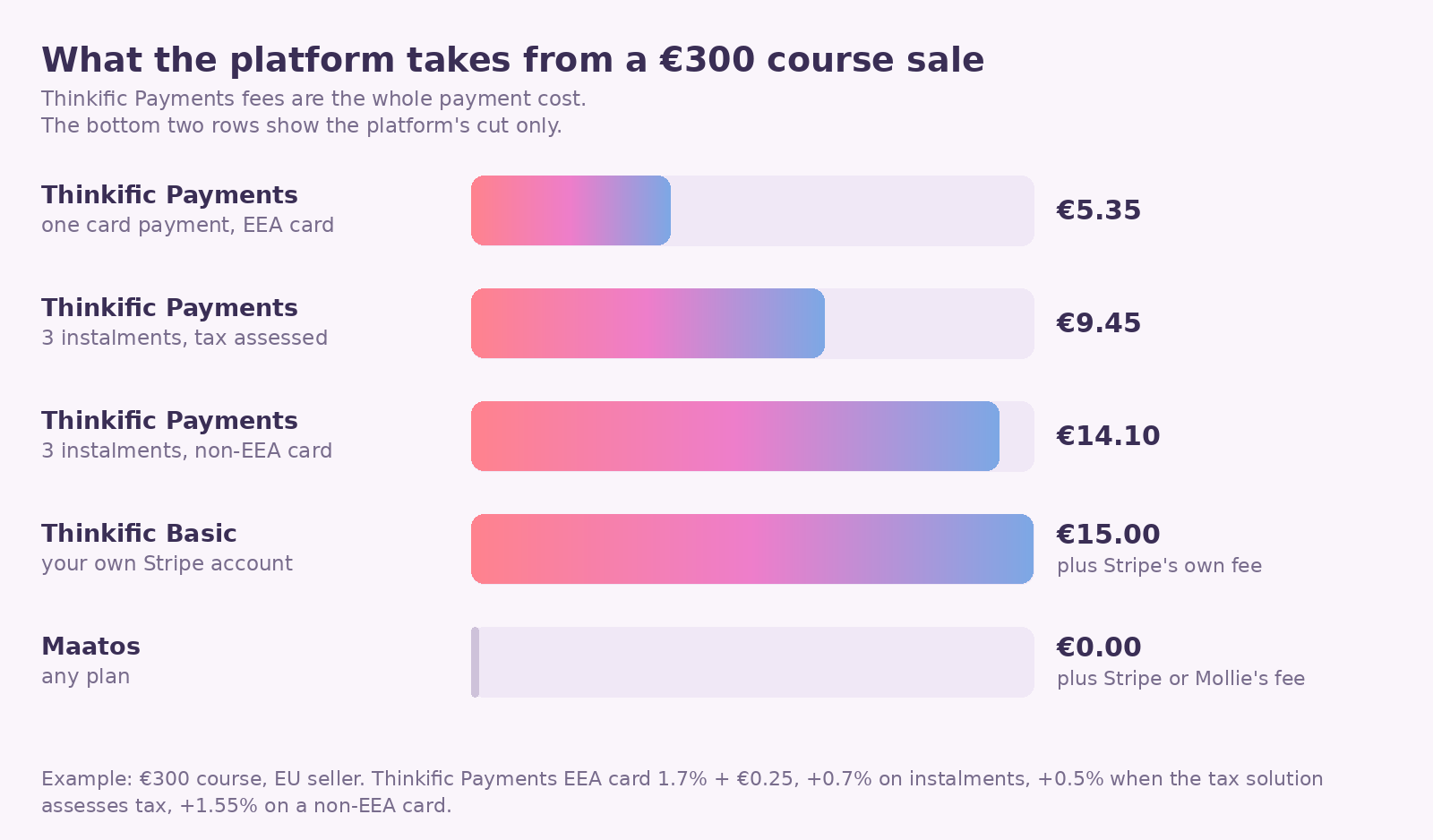
Stack those the way a real sale stacks them. Say you sell a €300 course to a student in another EU country, in three monthly instalments, with the tax solution switched on. Each €100 payment carries 1.7% + 0.7% + 0.5%, so 2.9% plus €0.25 — €3.15 — and across the three payments you have handed over €9.45, or 3.15% of the sale. If that student’s card was issued outside the EEA, add 1.55% and the total becomes €14.10, or 4.7%. Paid in one go through Klarna instead it is €19.75, or 6.6% — buy-now-pay-later and bank redirects can’t be combined with a payment plan at all, which is worth knowing before you build an offer around instalments.
None of that is a scandal, and it is worth being precise about which part of it is Thinkific’s. The 1.7% plus €0.25 is ordinary card processing that you would pay Stripe or Mollie anyway; the surcharges on top — the instalment fee, the tax fee, the conversion fee — are the part that is particular to selling here. In the three-instalment example, roughly €3.60 of that €9.45 is Thinkific-specific. The point is narrower than “they take a cut”: on Thinkific your platform bill and your payment bill are the same bill, and the second one grows with your revenue.
The third-party gateway fee is the sharper edge. If you keep your own Stripe account instead of moving to Thinkific Payments, Thinkific charges 5% on Basic, 2% on Start and 1% on Grow of every transaction — a fee they introduced in the US, Canada and the UK in July 2024 and extended to EU creators that November. On a €300 sale from a Basic plan that is €15 to Thinkific before Stripe has taken its own cut. Two details soften it: the fee stops after your first $1 million of sales in a calendar year, and it does not apply on the Plus tier, or if Thinkific Payments is not available in your country. (Their fee table also lists an Expand tier at 0.5% that does not appear on the public pricing page.)
What does Maatos take out of each sale?
Nothing. Maatos charges the subscription and no percentage of your revenue.
You connect Stripe or Mollie yourself, your students pay by card, Apple Pay, Google Pay or whichever local methods their country uses, and the money lands in your account. Whatever the processor charges, you pay to the processor, at their published rate, with no platform layer sitting on top of it. Maatos’s own pricing FAQ is blunt about this: the transaction fees you pay go to Stripe or Mollie, and you can use the platform “without incurring any additional costs beyond your subscription”.
VAT is calculated automatically and invoices go out without you touching them — but read the same FAQ carefully, because it is honest about the limit of that. You are the seller of the courses, so knowing what to charge and remitting it remains yours. Maatos gives you the configuration and clear overviews; it does not become your tax agent. If that distinction is new to you, our guide to handling VAT and sales tax on digital courses is the place to start, and it is worth reading before you price anything.
What you give up in exchange is the convenience layer. Maatos builds no buy-now-pay-later of its own — whether your students are offered Klarna depends on what you have switched on in your Stripe or Mollie account — and there is no service that registers and remits tax on your behalf. If you sell heavily into the United States and dread state-level sales tax, that is a real point for Thinkific, and their solution costs 0.5% per qualifying transaction.
The limit nobody mentions: how much video can your students actually watch?
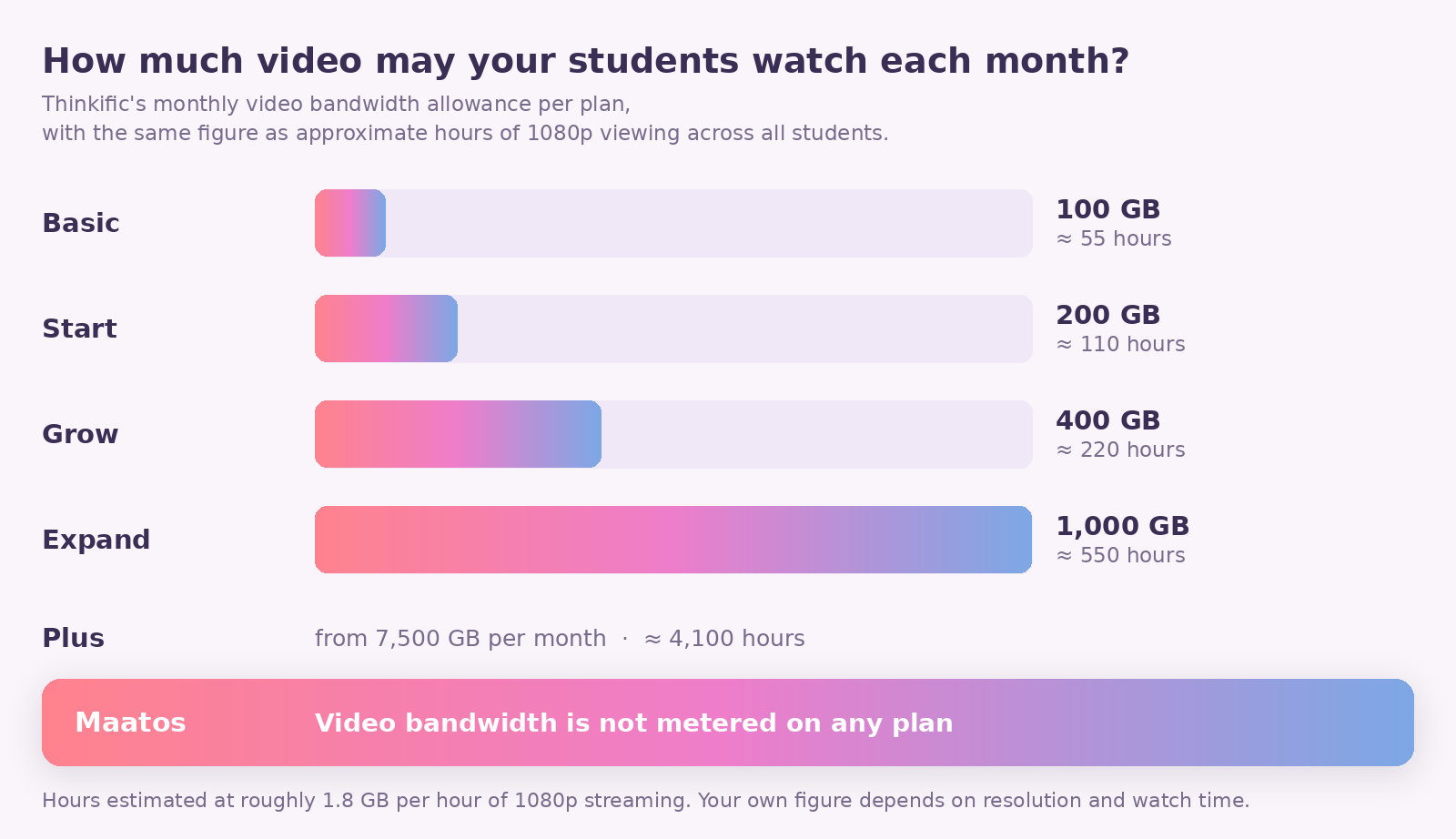
Every Thinkific plan meters video streaming — 100 GB a month on Basic, 200 GB on Start, 400 GB on Grow — and Maatos does not meter it at all.
This is not storage, which is the number platforms usually advertise. It is consumption: the data used when your students watch. Thinkific’s help centre spells out the ladder, including 1,000 GB on Expand and 7,500 GB on the entry Plus tier.
Translate it into hours, because gigabytes mean nothing until you do. Take a conservative 4 Mbps for a 1080p lesson and you get about 1.8 GB an hour; at 720p you are nearer 1.1 GB. So 100 GB is roughly 55 hours of viewing a month at 1080p, or about 90 hours at 720p — and that is 55 hours across everybody, not per student. Be honest with yourself about the bitrate, though: a higher-quality 1080p master delivered at 5 or 6 Mbps eats half as much again, which would put Basic nearer 40 hours.
Now put a course in it. A six-hour video course, ten students working through it in the same month at 1080p, is around 108 GB. That is the Basic plan gone, at ten students — and at a heavier bitrate, at six or seven. Start’s 200 GB covers roughly eighteen people finishing that course in a month; Grow’s 400 GB covers about thirty-seven. Rewatching counts, and so does anything anyone watches inside a community, including video your students post there. Your real numbers will differ, but the order of magnitude is the point: the plan you would have picked on price is often not the plan your library can live on.
What happens when you go over is the part worth knowing before you commit. Thinkific notifies you in the admin and by email and gives you up to 60 days to act. If nothing changes, the account “may move into a restricted state”: your students keep access to their courses, but your admin is, in their words, temporarily paused until the account is back in line. Your teaching keeps running and your ability to run it stops.
Maatos handles this differently by not counting it. Every plan includes unlimited video storage, no student cap and hosting, with videos served from a dedicated video server protected against downloading. There are two honest caveats, both published on the pricing page: a fair-use guideline of around 200 lessons per course, and a note that Maatos will get in touch above roughly 5,000 active monthly users to discuss the setup. That is a conversation about your growth rather than a meter that pauses your dashboard, but it is not literally infinite, and you should hear it as what it is.
Where does Maatos cap you instead?
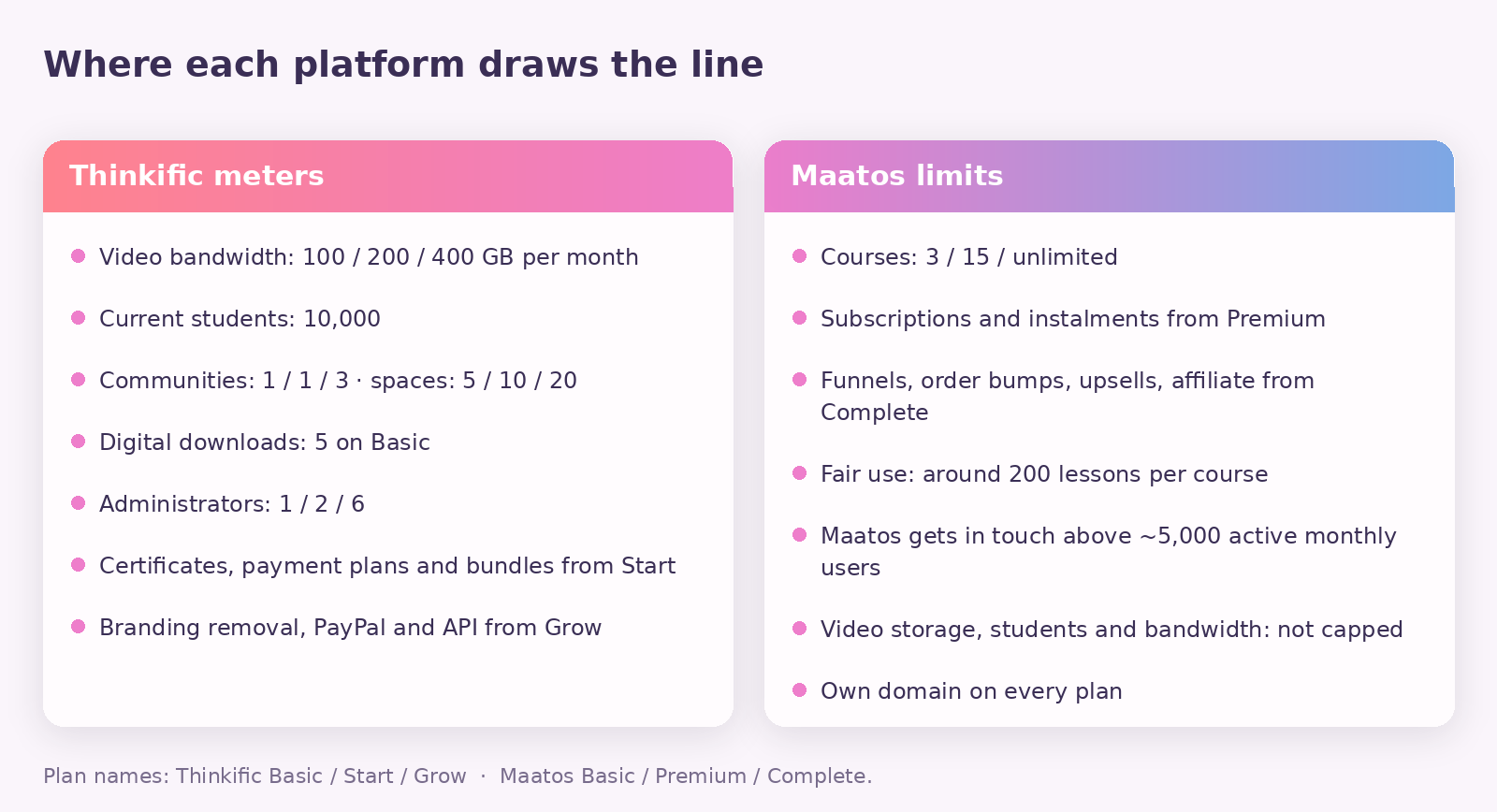
Maatos limits courses rather than students or viewing: three on Basic, fifteen on Premium, unlimited on Complete. Thinkific gives unlimited published courses on every plan, including the cheapest one.
This is the clearest place Thinkific wins on paper, and it is not close. If your model is a wide library of short courses — twenty €19 mini-courses rather than three €400 flagships — Thinkific’s Basic plan will hold all of them and Maatos’s Basic plan will hold three. That is a genuine reason to choose Thinkific, and anyone comparing the two without saying so is not comparing them.
Both platforms also gate features by tier, which is where a comparison of headline prices quietly falls apart. On Maatos, selling anything as a subscription or in instalments needs Premium, and funnels, order bumps, upsells and the affiliate system need Complete. On Thinkific, certificates, payment plans, memberships and bundles all need Start, removing Thinkific’s branding needs Grow, and so do PayPal, the API and phone support. Work out which tier actually holds your business model before you compare two numbers on two homepages.
Which one fits a European course business better?
If most of your students are in Europe, the deciding differences are currency, VAT and where your data sits — not features.
Credit where it is due first: Thinkific Payments is genuinely available across Europe. Their supported-countries list covers the EU, the UK, Switzerland and Norway, and the EEA card rate of 1.7% plus €0.25 is a good rate. The old complaint that American course platforms leave European creators stranded on payments does not apply here.
The friction is elsewhere, and it is mostly about price rather than availability. Your subscription is billed in dollars, so a fixed cost becomes a variable one and a bad quarter for the euro is a bad quarter for your overheads. Their tax solution is a paid add-on at 0.5% of every qualifying transaction. And the European payment methods people actually use are supported but expensive: TCommerce does offer iDEAL, Bancontact, EPS, Przelewy24 and Sofort, at 3.9% plus €0.25 per transaction, and none of them can be used for instalments or subscriptions. Connect Mollie yourself and you pay Mollie’s own published rate for iDEAL instead, whatever it happens to be that year. Maatos runs on Mollie as well as Stripe precisely so you can pick, prices in euros excluding VAT, calculates VAT and sends invoices automatically, and stores data on European servers with the processing agreements in place.
If you want the fuller version of that argument, we set it out in open source versus SaaS course platforms and in the case for owning your course website long term. The rest of the Build Course Website hub covers the practical side.
What does Thinkific do that Maatos doesn’t?
Quite a lot, and pretending otherwise would waste your time.
Communities are a real product on Thinkific — spaces, live events, learner profiles, and paid memberships from the Start plan up — where Maatos gives you a forum. A forum is fine for questions between lessons; it is not a place people hang out. Thinkific also builds in email automation and landing pages, while Maatos expects you to connect Klaviyo, Mailchimp or ActiveCampaign and keeps your student data in sync with them. Thinkific has AI tools for outlines and quizzes, a branded iOS and Android app as a $199-a-month add-on, SCORM support on Plus, group orders and B2B invoicing from Grow, an API and webhooks from Grow, and an expert marketplace and app store around all of it.
If your plan depends on a mobile app, on SCORM packages, on selling seats to corporate buyers, or on running your whole email programme inside the same tool, Thinkific is the more complete product and you should choose it. What you are trading for that completeness is the metering, the percentage and the fact that your school is a tenant.
So which should you actually choose?
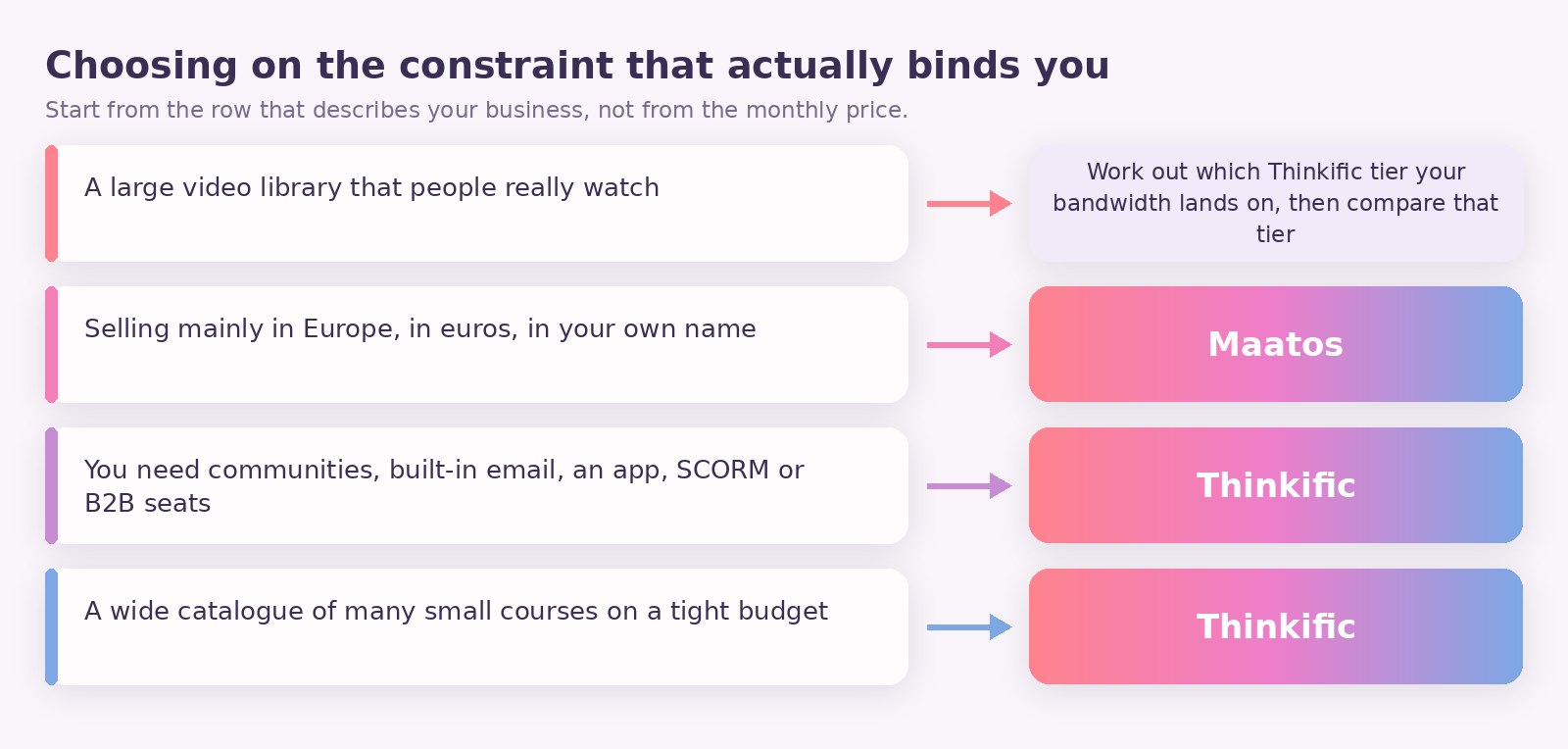
Choose on the constraint that binds you, not the price that attracts you.
If you teach with a lot of video and expect people to watch it, the bandwidth meter decides it before anything else does — run the arithmetic on your own library and see which Thinkific tier you would actually land on, then compare that tier with Maatos rather than comparing entry plans. If you sell mainly in Europe, want the payment relationship in your own name, and care that your course pages are findable in search, Maatos is built for that. If you need communities, built-in email, an app, SCORM or corporate seat sales, take Thinkific and don’t look back. And if you are publishing a wide catalogue of small courses on a tight budget, Thinkific’s unlimited courses on the cheapest plan is a real advantage that Maatos does not match until Complete.
The one thing worth avoiding is choosing on the monthly figure alone. On Maatos that figure really is most of what you pay. On Thinkific it is the beginning of the bill, and the rest of it scales with how well you do.
How do you move a course from Thinkific to Maatos?
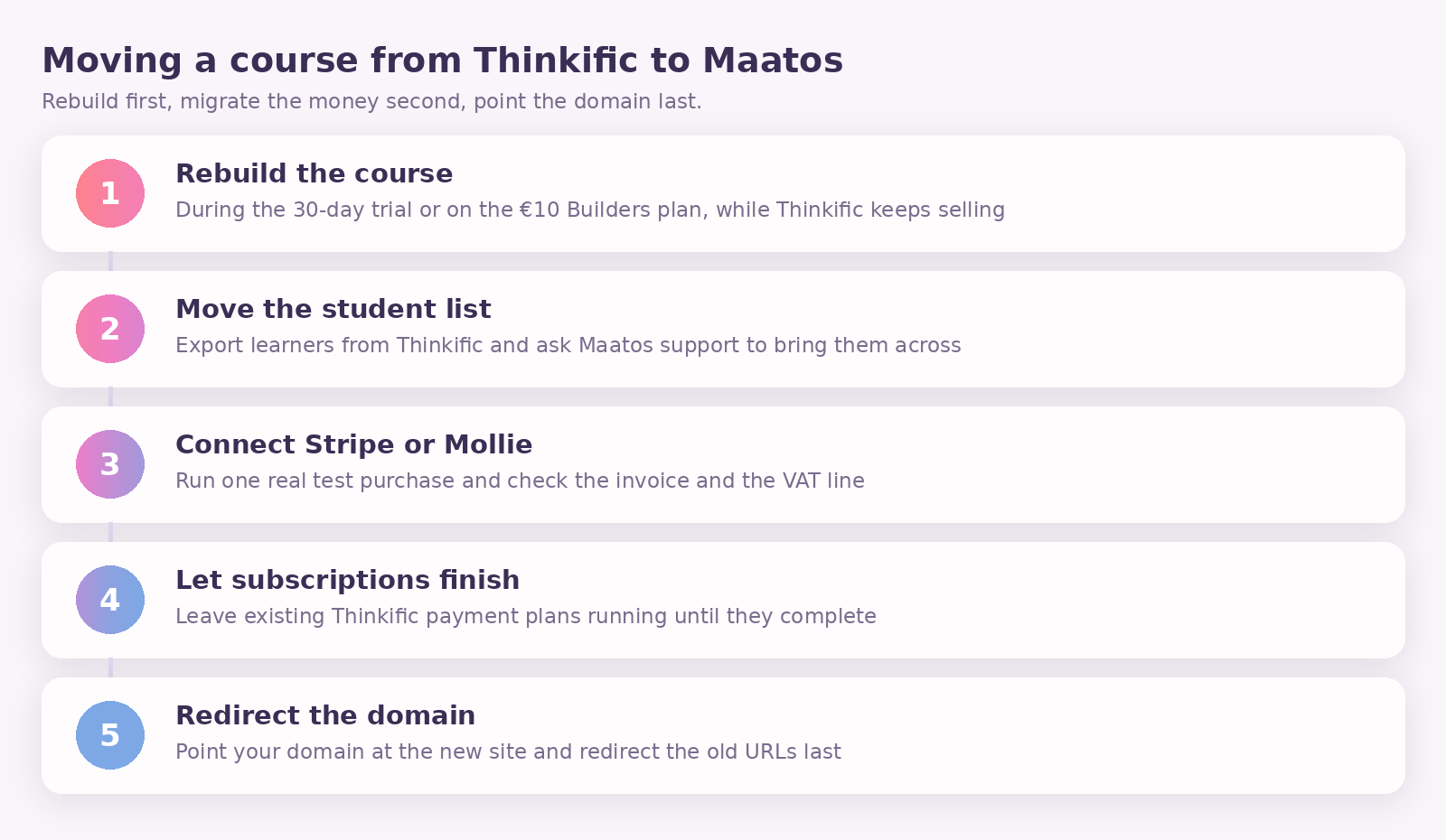
Rebuild first, migrate the money second, and point the domain last.
Start by building the course again in Maatos while your Thinkific school is still running — the 30-day trial, or the €10 Builders plan if you need longer, exists for exactly this, and you keep selling in the meantime. Upload from your own master video files rather than trying to pull the compressed versions back out of a platform, which is the argument for keeping your originals somewhere you control; our notes on course video and audio quality explain why the masters matter.
Then move the students. Export your learner list from Thinkific and ask Maatos support to help bring it across, because doing it by hand is how people lose people. Connect Stripe or Mollie next and test a real purchase end to end, including the invoice and the VAT line, before you tell anyone. Leave any existing Thinkific subscriptions and payment plans running where they are until they complete naturally — cancelling mid-cycle breaks a promise your students already paid for. Only when all of that is working do you point your domain at the new site and redirect the old URLs, so nobody lands on a page that used to be a course.
Frequently asked questions
Is Maatos cheaper than Thinkific?
At the entry level they are close — €49 a month excluding VAT against $54 billed monthly — but the total differs because Thinkific’s payment stack grows with your sales and Maatos’s does not. Take €40,000 of annual revenue sold as €300 courses in three instalments with tax assessed: that is 400 payments at 2.9% plus €0.25, about €1,260 a year in payment fees on top of the subscription. Roughly €480 of that is the instalment and tax surcharges, which is the part you would not pay if you were simply running a card through your own processor.
Does Thinkific really limit how much video my students can watch?
Yes. Thinkific’s help centre publishes a monthly video bandwidth allowance for every plan: 100 GB on Basic, 200 GB on Start, 400 GB on Grow, 1,000 GB on Expand and 7,500 GB on the entry Plus tier. At a conservative 1.8 GB an hour for 1080p, 100 GB is about 55 hours of viewing a month across all of your students combined — less if your video is encoded at a higher bitrate.
What happens if I go over Thinkific’s bandwidth limit?
Thinkific notifies you in your admin dashboard and by email and gives you up to 60 days to act. If your usage stays above the plan, the account can move into a restricted state: students keep access to their courses, but your Thinkific admin is temporarily paused until the account is brought back in line.
Does Thinkific charge a fee if I use my own Stripe account?
Yes. Thinkific charges a third-party payment gateway fee of 5% on Basic, 2% on Start and 1% on Grow for transactions processed through Stripe, in the US, Canada, the UK and the EU. It does not apply on Thinkific Payments, does not apply on Plus, and stops after your first $1 million of sales in a calendar year.
Can I use my own domain on the cheapest plan?
On both, yes. Maatos allows your own domain on any plan, with setup included on Premium and Complete and a one-off fee on Basic. Thinkific includes a custom domain from Basic too — but removing Thinkific’s branding from the site takes the Grow plan.
How many courses can I publish on Maatos?
Three on Basic, fifteen on Premium, unlimited on Complete. Thinkific allows unlimited published courses on every plan, so a large catalogue of small courses is the case where Thinkific’s entry plan is more generous.
Does Maatos handle VAT for me?
Maatos calculates VAT and sends invoices to your customers automatically, and doesn’t charge VAT on your own subscription invoice if your business is registered outside the Netherlands. You remain the seller, so what you must charge and remit to your customers is still your responsibility. Thinkific offers a sales tax and VAT solution that assesses tax at checkout for 0.5% of each qualifying transaction — charged, per their fees page, even when the calculated rate turns out to be zero.
Can I try both before deciding?
Both offer 30 days free with no commitment to start. The useful test is not clicking around the builder — it is uploading two real lessons, setting a real price, and putting a real card through the checkout on each. You learn more from one test purchase than from a week of feature lists.
What happens to my content if I leave?
On Maatos, cancelling ends access to your site; the environment goes into quarantine and is then removed, so back up your materials before you cancel. That is true in some form of every hosted platform, which is the reason to keep your master video files and course text somewhere you own regardless of who you host with.
Still deciding? The cheapest way to settle it is to build the thing. Start your 30 days free — no card needed — put two real lessons and one real price into a Maatos site, and run a test purchase through your own Stripe or Mollie account to see the money and the invoice arrive. If you would rather someone else did the building, our done-for-you service sets the site up in your design, and you can always get in touch with the numbers from your own library and we will tell you honestly which plan they fit.