


If you are looking at Teachable alternatives, the course player is probably not the problem. More likely it is the 7.5% Teachable takes from every sale on its cheapest plan, the extra fees that pile up when you sell outside the US, or a school that feels like it lives in someone else’s building. If that sounds familiar, there are good alternatives, and the right one depends on a single question: do you want your own website, a community or a sales funnel?
We are not neutral here. Maatos is one of the alternatives, it is our product, and we put it first. What we can do is check our own claims harder than anyone else’s, give every competitor the credit it earns, and tell you where they beat us. Every price below comes from the vendor’s own pricing page and help centre, read on 10 November 2026, in the currency the vendor publishes. Prices change often in this market, so check the date before you quote any of it.
Why do creators look for a Teachable alternative?
Usually for three reasons: the transaction fee on the entry plan, the extra costs that come with selling outside the US, and how much of the school really feels like yours.
The fee is the easy one to see. On 10 November 2026, Teachable’s pricing page listed Starter at $39 a month ($29 billed yearly) with a 7.5% transaction fee. Builder at $89 ($69 yearly) and Growth at $189 ($139 yearly) drop that fee to 0%, but only “when you use Teachable Payments”, in Teachable’s own words. On top of that come the card fees everyone pays somewhere: 2.9% + 30¢ for a US card and 3.9% + 30¢ for an international one on Teachable’s page. For a seller in Europe, most of those cards count as international, so the 3.9% rate is the one to budget for.
The second reason is quieter. Teachable’s help centre describes the default Standard payments bundle as including “additional fees for tax handling and recurring transactions”, with an optional “Go Global” bundle at 2.8% that waives them. We could not find the size of those fees on a public page, so ask before you pick a plan.
The third is about your brand. On Teachable’s pricing page, removing Teachable branding is a Growth plan feature, and its help centre says there is no native way to export a course as a single unit: your student list and sales come out as CSV files, course files one at a time.
Now the credit, because Teachable earns it. It is a mature, well-supported product with student apps for iOS and Android, a 30-day money-back guarantee, and, on its optional Go Global bundle (2.8% per sale), what it calls “35+ local payment methods”, iDEAL and Klarna among them. On 10 November 2026 its pricing page also ran a “3 months for the price of 1” offer and a pop-up extending the 7-day trial to 30 days. And on VAT it does more than most of the alternatives below, ours included: on Teachable Payments it “automatically calculates, collects, and remits VAT based on the student’s location”, according to its tax article. If you want the full head-to-head, we wrote one: Maatos vs Teachable.
What should you look for if you sell from Europe?
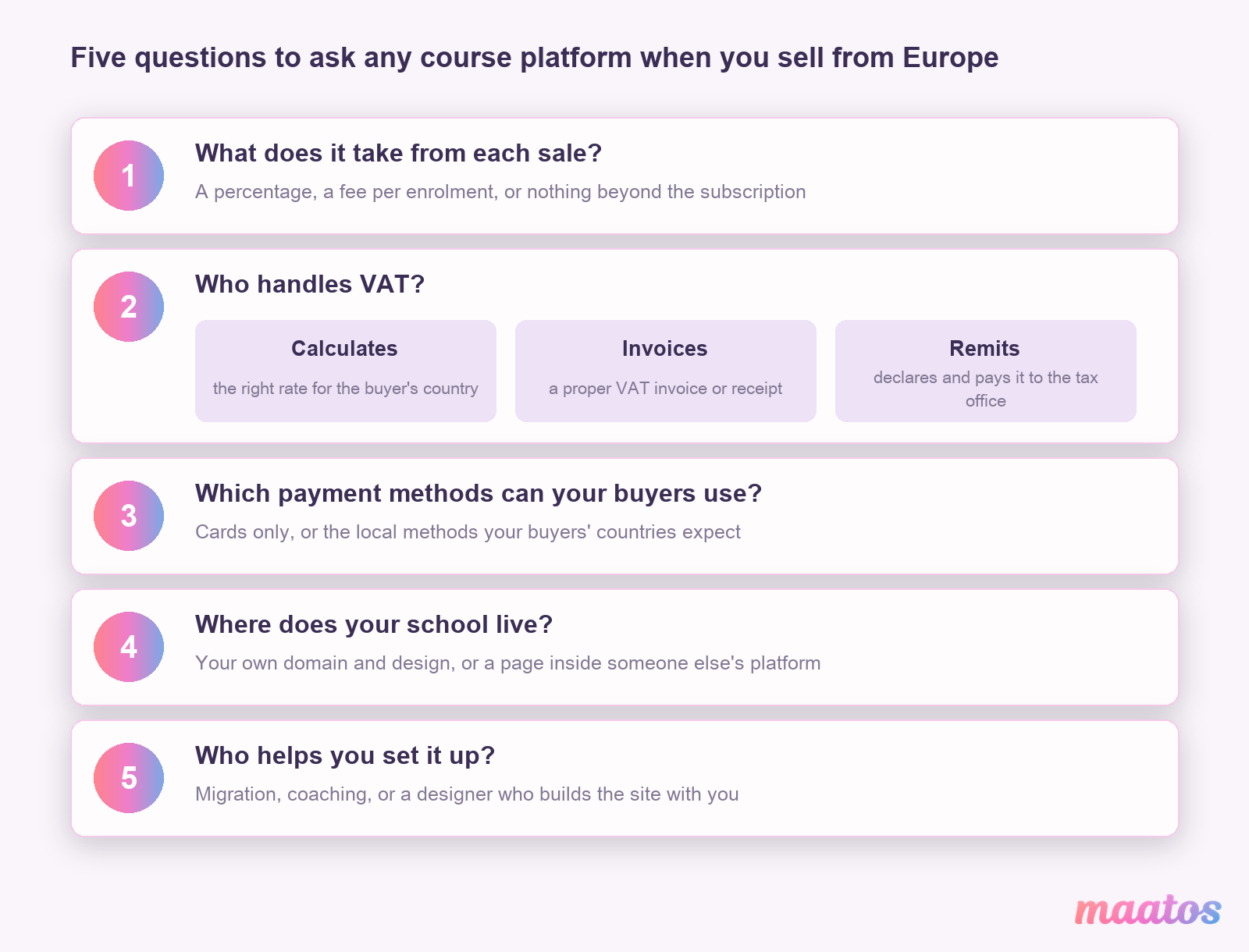
Five things: what the platform takes from each sale, who handles VAT, which payment methods your buyers can use, where your school lives, and how much help you get with the set-up. The monthly price is only one of those lines.
The fee on sales is the first line to read. A percentage looks small on a pricing page and large on a year of sales. A fixed subscription with no cut grows more slowly than your revenue does, while a percentage fee grows with it.
VAT is where most comparisons get vague, so here are the three jobs, kept apart. Calculating means the checkout works out the right rate for the buyer’s country. Invoicing means the buyer gets a proper VAT invoice or receipt. Remitting means someone declares the VAT and pays it to the tax authority, through the EU’s One-Stop Shop or a national return. A platform that calculates and invoices still leaves the remitting to you. A platform that remits, usually as merchant of record, takes the whole job. Our guide to VAT on online courses in the EU explains when each one applies to you.
Payment methods matter more in Europe than in the US, because many buyers here do not reach for a credit card first. Ask which local methods your buyers’ countries expect and whether the platform’s checkout offers them.
Where your school lives decides what a returning student sees: your own domain and your own design, or a page that is clearly part of someone else’s platform.
And set-up help is worth more than it sounds if your evenings are already full. Some platforms offer migration, some coaching, some will design the site with you.
Seven Teachable alternatives, checked for European sellers
Here they are, starting with ours, each with what it does well, where it falls short and who it suits. Every figure is the vendor’s own, from 10 November 2026.
Maatos (yes, that’s us)
Maatos gives you your own branded course website with a full learning environment behind it, on your own domain. Plans are €49, €99 and €199 a month excluding VAT (€40.83, €82.50 and €165.83 a month billed yearly) for up to 3 courses, up to 15 courses and unlimited courses. Every plan includes unlimited students, unlimited video storage (under a fair-use policy) and no limit on sales, and our pricing FAQ says you can use Maatos without any costs beyond the subscription; custom work and third-party tools are extra, and on Basic connecting your own domain has a one-time set-up fee of €60. Buyers pay through your own Stripe or Mollie account, by card, Apple Pay, Google Pay or a local payment method depending on their country, and Stripe or Mollie charge their own payment fees, paid to them directly. Every plan starts with 30 days free and no credit card.
On VAT, Maatos calculates it automatically and sends your buyer an invoice with every order, as our features page puts it. We do not remit it. Our pricing FAQ says you are the seller and responsible for the VAT you charge; declaring and paying it is your job, so Teachable and Skool do more for you here than we do. And while your domain, your student list and your prices are yours, the platform itself is a subscription: keep a backup of your course materials. The other things we lack: no marketplace that sends you buyers, a smaller ecosystem than the big US platforms, and no built-in email marketing (we connect to tools like Mailchimp, Klaviyo and ActiveCampaign).
What we do that most of this list does not: our designers can build the site with you through the Done-for-You Service, €499 excluding VAT one time. That was a reduced price on 10 November 2026; the page shows it struck through from €1,399.
Best for: course creators who want a site that looks like their own school, on their own domain, with the option of having it built with them.
Thinkific
Thinkific is one of the most complete course builders around, with unlimited published courses on every plan, communities, and a custom domain on every plan. On 10 November 2026 its pricing page listed Start at $109 a month ($82 billed yearly), Grow at $219 ($164) and Expand at $499 ($374). There is a 30-day free trial and no free plan.
On VAT it is thorough and transparent. With Thinkific Payments you can switch on its VAT solution for the UK, the EU and Switzerland: it calculates VAT for the countries where you have registered, includes it in the price and gives the student a VAT-compliant receipt. Its own help article on its Sales Tax and VAT Solution is just as clear on the limit: “you will remit VAT in the UK, the EU, and Switzerland yourself”, and every taxed transaction carries a 0.5% fee. Using Stripe or PayPal instead of Thinkific Payments adds a third-party gateway fee that varies by plan, for sellers in some countries.
Best for: creators with a large catalogue who want a mature course engine and are comfortable with a US-priced platform. Our Maatos vs Thinkific comparison goes deeper.
Podia
Podia keeps things simple: courses, downloads, coaching, live events, a community and email in one tidy dashboard, with a custom domain on every plan. On 10 November 2026 its pricing page listed Mover at $49 a month ($42 billed yearly), Shaker at $99 ($84) and Earthquaker at $179 ($150), with a 14-day trial and no card needed.
The catch is on the entry plan: “On the Mover plan, we charge a 5% transaction fee.” Shaker and Earthquaker have no Podia fee. For VAT, Podia collects tax at checkout for the jurisdictions where you have registered, with an EU OSS option, but its help centre says it “doesn’t file or remit your sales taxes for you.”
Best for: solo creators selling a mix of small digital products who value simplicity over a fully designed site. See Maatos vs Podia for the details.
LearnWorlds
LearnWorlds is the most training-minded platform on this list: interactive video, assessments and SCORM support for corporate-style learning. On 10 November 2026 its pricing page listed Starter at $49 a month ($44 billed yearly) with a $5 fee per enrolment, Pro Trainer at $99 ($79) and Learning Center at $299 ($249), with a 30-day trial. SCORM starts on Pro Trainer (20 packages).
For VAT, LearnWorlds relies on its built-in Quaderno or Stripe Tax integrations, according to its VAT overview; without one, you set a single fixed rate in your invoice settings. The overview does not say that LearnWorlds remits VAT for you, and it tells EU sellers they must charge VAT and pay it to the tax authorities.
Best for: training companies and coaches who need SCORM, interactive video or a learning-centre feel.
Systeme.io
Systeme.io is a marketing machine that also does courses: funnels, unlimited email, webinars and a checkout, all with 0% transaction fees. Its free plan covers 2,000 contacts, 1 course and 1 custom domain, and on 10 November 2026 its pricing page listed paid plans at $17, $47 and $97 a month, with two months free on yearly billing. Systeme.io now adds the VAT rate of the buyer’s country to digital products automatically, provided your order form asks for the country.
The limits to know: the free plan has “a lifetime sales revenue limit of $10,000 USD” per its help centre, plans grow with your contact list rather than your sales, and its VAT article does not say that Systeme.io remits the VAT for you. Payments run through your own Stripe or PayPal account. In its favour, Systeme.io offers a free migration of an existing business on qualifying plans.
Best for: funnel-first sellers of one or two products, and anyone testing an idea on a budget. We compared it with Maatos in Systeme.io vs Maatos.
Kajabi
Kajabi has the strongest all-in-one marketing suite here: pages, email, funnels, community and courses in one account, and it “does not take a revenue share as a platform”. On 10 November 2026 its pricing page listed Basic at $179 a month ($143 billed yearly), Growth at $249 ($199) and Pro at $499 ($399), with a 14-day free trial. Use a payment processor other than Kajabi Payments or PayPal and Kajabi adds 2% on Basic, 1% on Growth or 0.5% on Pro.
Kajabi’s sales tax feature calculates and collects tax, but in its own help article “it does not file or remit sales taxes on your behalf”. It needs Kajabi Payments, which the same article lists for “select European countries”, and it carries its own per-transaction fee. The article speaks of sales tax and does not mention EU VAT by name, so ask Kajabi how it works for your country.
Best for: established creators with a marketing-heavy business and the budget for it. More in Maatos vs Kajabi.
Skool
Skool is a community first: a feed, courses and live calls in one simple app, and it is very good at being exactly that. On 10 November 2026 its pricing page listed Hobby at $9 a month with a 10% transaction fee and Pro at $99 a month with 2.9%. Skool’s payments FAQ adds 30¢ per transaction on both, and 3.9% + 30¢ on Pro for sales above $900. Both plans can be tried for free, and yearly billing gives two months free.
On VAT, Skool goes further than anyone else here. Its VAT FAQ says plainly: “Skool is MoR”. It collects VAT from EU members on top of your price and remits it, so your payouts are net of tax. The trade-off is that your community lives on Skool, not on a website of your own, and the course tools are thinner than a dedicated course platform’s.
Best for: creators whose product is the community itself.
Teachable alternatives compared side by side
Read the table across one row at a time, never down a column of prices: the vendors publish in different currencies, so a dollar figure and a euro figure here are not a ranking. Each is the cheapest plan on monthly billing, and the payment provider’s own card fees come on top unless the platform says they are included.
| Platform | Cheapest plan, monthly | Fee on that plan | Calculates EU VAT | Remits EU VAT for you |
|---|---|---|---|---|
| Maatos | €49 excl. VAT | None | Yes, with an invoice per order | No |
| Teachable | $39 | 7.5% | Yes, on Teachable Payments | Yes, on Teachable Payments |
| Thinkific | $109 | None on Thinkific Payments | Yes, if you switch it on (0.5% fee) | No |
| Podia | $49 | 5% | Yes, where you are registered | No |
| LearnWorlds | $49 | $5 per enrolment | Through Quaderno or Stripe Tax | Not stated |
| Systeme.io | $0 (paid from $17) | 0% | Yes, if the order form asks for the country | Not stated |
| Kajabi | $179 | None on Kajabi Payments | Sales tax with Kajabi Payments (EU VAT not stated) | No |
| Skool | $9 | 10% + 30¢ | Yes, as merchant of record | Yes |
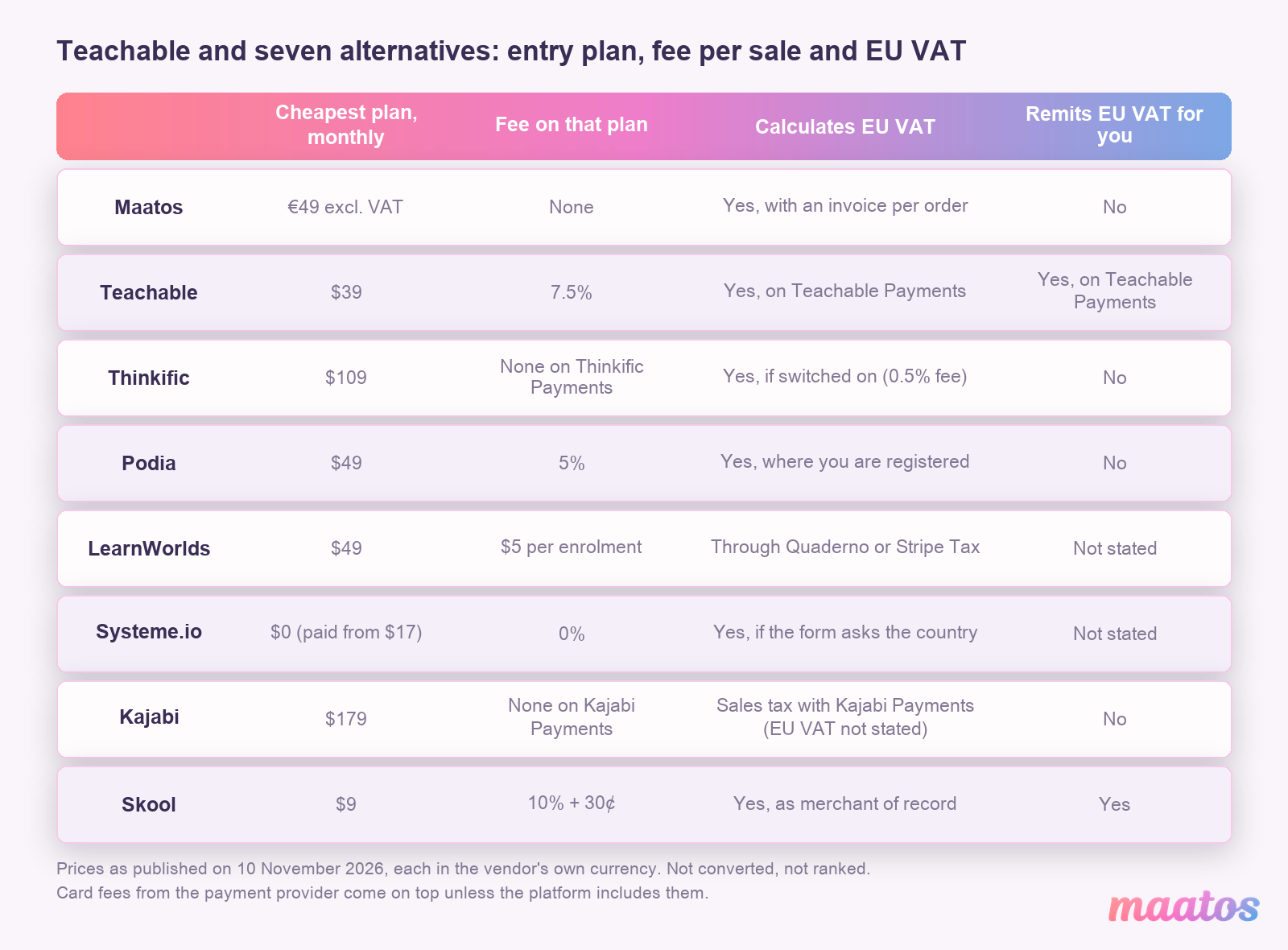
Two things stand out. Only Teachable and Skool say they take the VAT filing off your hands, and both do it inside their own payment system. And the platforms with no cut of your sales recover it elsewhere: through the subscription, through an extra fee on outside payment processors (Thinkific, Kajabi), or, for Systeme.io, through a price that follows your email list.
Which Teachable alternative fits your situation?
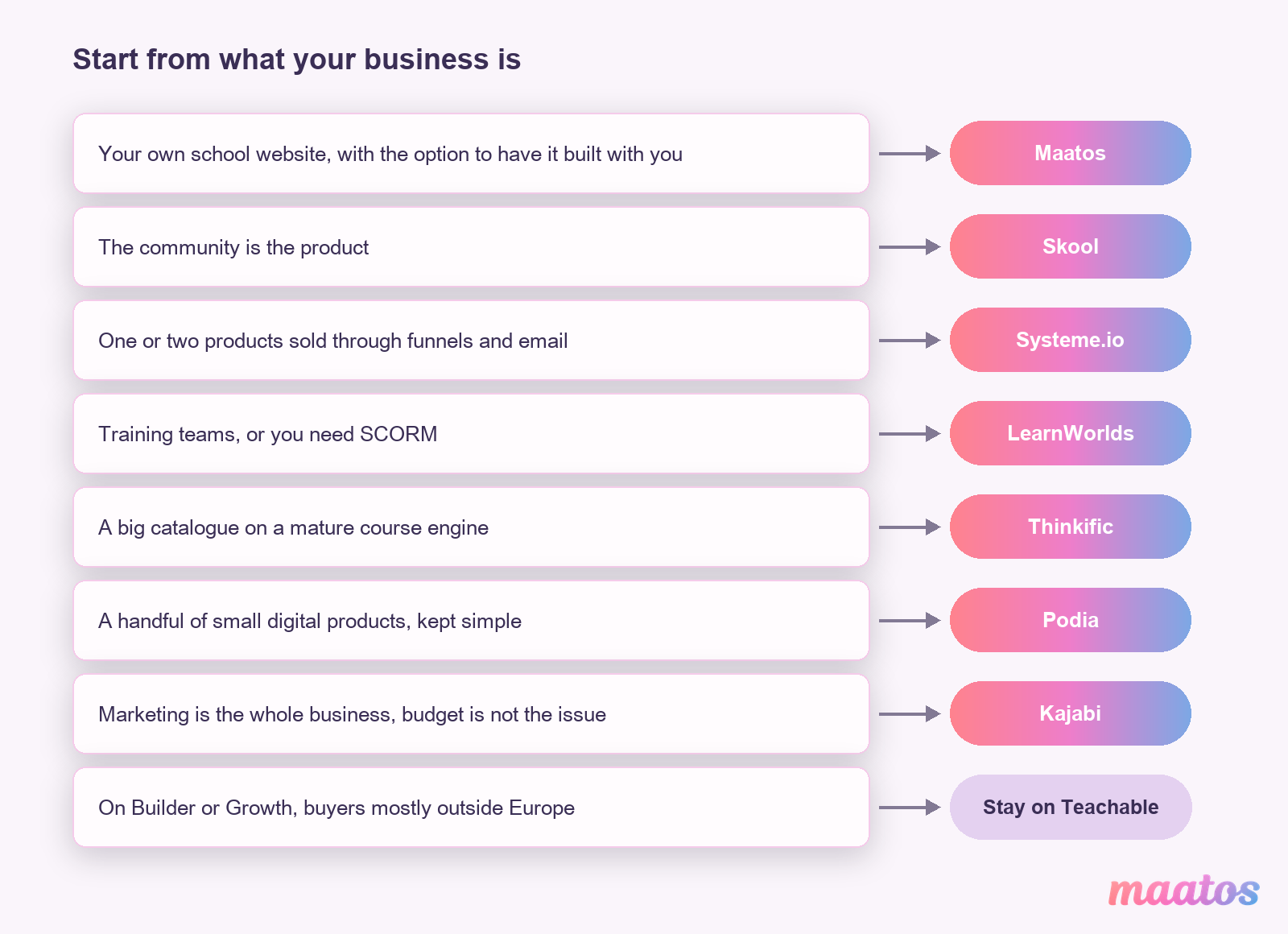
Start from what your business is, not from the price list. Here is how we would route it.
If you are building your first real course business and want a website that looks like your own school, on your own domain, with the option of having it built with you, choose Maatos. If the community is the product, the place people come back to every day, choose Skool, which handles VAT on your members’ payments. If you sell one or two products through funnels and email and want it all cheap, choose Systeme.io. If you train teams or need SCORM, choose LearnWorlds. If you have a big catalogue and want a mature course engine, Thinkific. If you sell a handful of small digital products and like simple, Podia. If marketing is your whole business and budget is not the issue, Kajabi.
And if you are on Teachable’s Builder or Growth plan, mostly sell to buyers outside Europe and like having VAT handled for you, staying put is a perfectly good answer. A move costs time, so weigh it against the fees you would actually save.
How hard is it to move off Teachable?
Moving the content is work, moving the students is a list, and moving subscriptions is the tricky part, so plan for each of the three separately.
Teachable lets you export your student list and your sales as CSV files, but its help centre says there is no native way to export a course as a single unit, and course files come out one at a time. So set aside time to download your videos and documents and upload them again on the new platform. Students import as a list on most platforms, but their passwords usually do not move: they set a new one on the new site, so tell them in advance. Running subscriptions and payment plans sit in the payment provider’s account and usually do not move by themselves. Many creators let them run out on the old platform and start new ones on the new site.
We wrote a step-by-step guide to moving your online course to your own platform, including the order to do it in so nobody loses access in the middle. The rest of our thinking on running a course site of your own lives in the Build Course Website section.
Frequently asked questions
What is the best Teachable alternative if I sell from Europe?
It depends on what you sell. For your own branded course website on your own domain, Maatos (our product). For a community where VAT is fully handled, Skool. For funnels on a budget, Systeme.io. For corporate training and SCORM, LearnWorlds. Check who remits VAT before you choose: of the seven, only Skool says it does.
Does Teachable charge transaction fees?
On its cheapest plan, yes. On 10 November 2026, Teachable’s Starter plan ($39 a month, or $29 billed yearly) charged a 7.5% transaction fee. Builder and Growth have 0% transaction fees when you use Teachable Payments. Card processing fees apply on every plan, and on the default Standard payments bundle Teachable also charges extra fees for tax handling and recurring payments; its optional Go Global bundle replaces them with 2.8% per sale.
Does Teachable handle EU VAT?
Yes, on Teachable Payments. Teachable’s help centre says it automatically calculates, collects and remits VAT based on the student’s location. With your own payment gateway, Teachable calculates VAT at checkout, but you remit it yourself.
Which Teachable alternatives charge no platform fee on sales?
Maatos, Systeme.io, Thinkific on Thinkific Payments, Kajabi on Kajabi Payments or PayPal, and Podia on its Shaker and Earthquaker plans. Skool, Podia’s Mover plan and LearnWorlds’ Starter plan do take a fee per sale. Your payment provider’s own fee applies everywhere.
Can I move my courses off Teachable?
Yes, with some manual work. You can export your student list and sales as CSV files, but Teachable has no native export of a whole course, so course files are downloaded one at a time and uploaded to the new platform. Students set a new password on the new site.
Want to see what your own school could look like?
If the first entry on this list sounded like you, a website with your own design on your own domain and no cut of your sales, the quickest way to find out is to build a bit of it. You get 30 days free with no credit card, which is enough time to set up your first course and see it on your own domain. Start your free 30 days with Maatos.